hermes update quietly changed its default: no more tracking every commit
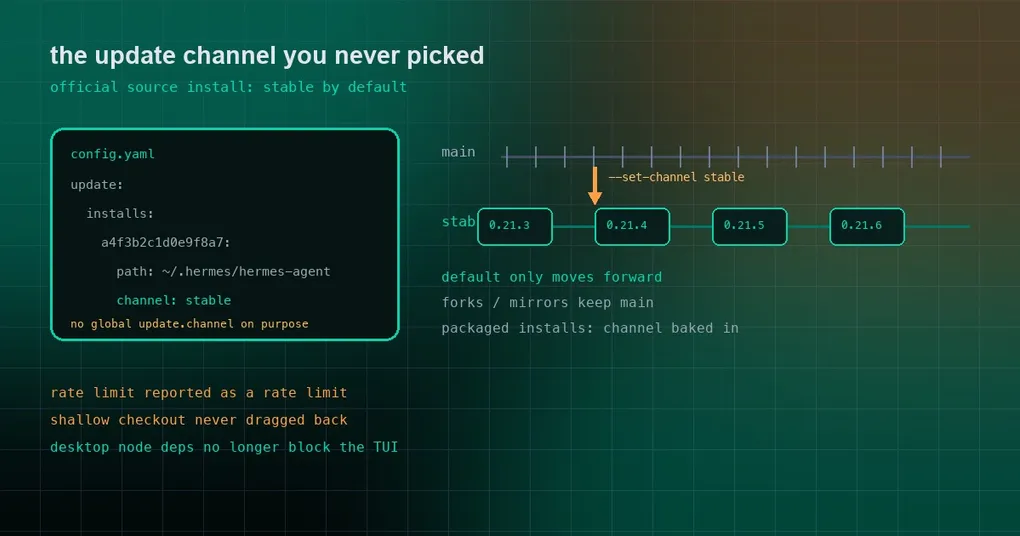
You run hermes update on Wednesday morning the way you always do, expecting it to pull the few dozen commits that landed on main. Instead it prints a single line: ✓ No newer release: stable v0.21.6; this checkout is newer and waits for the next release… — and mentions that you are a couple of hundred commits behind main. You have not touched a single setting.
Nothing is broken. The default changed: on an official source install, hermes update now follows the stable channel — the latest published release on GitHub — instead of every commit on main. This is what the new rules are, including the one that catches people off guard: the default only ever moves forward.
What “stable” actually points at
Stable is the newest published GitHub Release in the official repository, and it has to satisfy three things at once:
- it is not a draft and not a prerelease;
- its tag is a strict semantic version,
vX.Y.Z— three numbers, no suffix.
When it matches, the update target is the exact commit that tag points at, not the current tip of whatever branch the tag happens to sit on. So you never drift sideways into half-finished code between two updates.
One piece of history is worth knowing here: the project used to publish date-based tags (v2026.9.24 and friends). Only semantic versions are eligible for the stable feed, which means a CalVer tag can never be mistaken for a release.
Where the channel lives: per install, not global
The channel record is written into config.yaml, but deliberately not as a global update.channel:
update:
  installs:
    a4f3b2c1d0e9f8a7:                      # install id (sha16 of the install root path)
      path: /home/u/.hermes/hermes-agent
      channel: stable
Why the extra hop? Because one ~/.hermes is routinely shared by several installs — Hermes on the host, a gateway in Docker, and the desktop app can all bind-mount the same config. With a single global switch, flipping your development checkout to canary would also flip the desktop app’s update feed.
To see this installation’s identity and path:
hermes update --install-idThree commands, don’t mix them up
| Command | What it does |
|---|---|
hermes update |
Applies an update on this install’s channel |
hermes update --check |
Compares with the target without pulling, installing or restarting |
hermes update --plan |
Prints the plan: install kind (git/Docker/Nix/apt) and every running service with its supervisor |
hermes update --set-channel stable |
Persists the channel for this install; does not update anything itself |
hermes update --channel main |
Affects this run only; nothing is saved |
hermes update --install-id |
Prints this installation’s identity and path |
The pair that gets confused is --set-channel versus --channel: the first writes config, the second evaporates when the command ends. If you just want to peek at what main has, --channel main is enough and it will not change future behaviour.
The rule that surprises people: the default only moves forward
Switching the default was done conservatively, and the rule is that an install that never chose a channel only moves forward:
- if your checkout already contains the latest release — say you tracked main and were running ahead — it stays where it is until a newer release ships;
- only an explicit
--set-channel stablecounts as consent to land on the exact release commit, even when that means moving backwards.
That rule covers --check, the apply path, and the passive check the desktop app and the update banner use. You will not be silently downgraded by a stray update, and you will not be pinned to old code forever either.
Two kinds of install are untouched:
- forks and mirrors keep main. They have no official releases, so there is no stable to follow;
- packaged installs (MSIX, Store, bundled, electron-updater, externally owned) have their channel baked in at build time and cannot change it.
Desktop: a new switch under Settings → About
On a source install, the desktop app now shows an Update channel row under Settings → About → Updates, letting you flip between Stable releases and Every commit. It only appears for source installs (posix-handoff / windows-handoff); packaged installs never see it, because their channel is fixed.
The interaction detail is well thought out:
- main → stable asks first, because that step can move you to older code;
- stable → main switches immediately, because it can never move you backwards.
The GUI and the CLI write the same record, so a change made in the app is visible to hermes update --check right away.
Three fixes that came with it
A few companion fixes landed alongside, and all three are worth knowing:
1. The stable lookup used to go out unauthenticated and hit the anonymous rate limit. The old code read releases/latest with a bare HTTP call carrying no credential, spending GitHub’s 60-requests-per-hour anonymous budget even when GH_TOKEN was set or gh was logged in. Behind a shared office, CI or Docker exit IP that budget runs out quickly, and the resulting 403 was rendered as ✗ Could not resolve the stable source channel: No published stable release could be verified — which reads as “there is no release at all”. The lookup now walks the token ladder (environment, then gh auth token, then anonymous) and reports a rate limit as a rate limit, with its reset time and, for anonymous callers, a hint to set GITHUB_TOKEN. A failed lookup still stops where it is and never touches the checkout.
2. Shallow or offline checkouts are never dragged back. If a shallow clone or an offline copy is already newer than the latest release, an update no longer “corrects” it onto that release.
3. A desktop-only Node dependency failure no longer takes the TUI and web UI down with it. This one matters on headless hosts. npm ci installs ui-tui, web and apps/desktop as one union, and only the desktop app pulls native addons (node-pty, electron) that need a compiler. So an Ubuntu server with g++ 9 — which rejects -std=gnu++20 — failed the whole dependency install, the TUI and web UI were never built, and every launch printed a source update could not be finished automatically (6 attempts). Now the install retries once without the desktop app, builds the TUI and web UI as usual, and records the desktop build as owed: Desktop app build owed: desktop dependencies failed. It also prints a genuinely useful exit: if this host never runs the desktop app, hermes uninstall --gui removes it from the checkout so future updates stop building its native dependencies at all.
Which one should you pick?
- Want stability (the default, and what most people want): do nothing, keep running
hermes update. - Want the bleeding edge:
hermes update --set-channel mainrestores the old commit-by-commit behaviour. - Just want to look:
hermes update --channel main --checkchanges nothing long-term. - Not sure which channel you are on: the first line of
hermes update --checktells you.
One caveat if you develop on your own fork: official releases are not yours, so your default stays main. That is the correct call — a fork’s update source should be its own decision.
The short version
This change turns updating from a continuous stream into a staircase with version boundaries: move only between published releases, do not roll back by default, keep the choice per install, and authenticate the lookup as you. If you run hermes update daily, there are only three things to remember — stable is the default, only --set-channel persists, and main has to be asked for.
For the wider picture, start with our hermes update command reference, the older piece on graceful upgrades, and what to do when an update blows up your disk. The current release is v0.21.6; if you have not installed Hermes yet, the install guide is the place to start.