v0.21.6 changed how releases are cut — confirm what you actually got
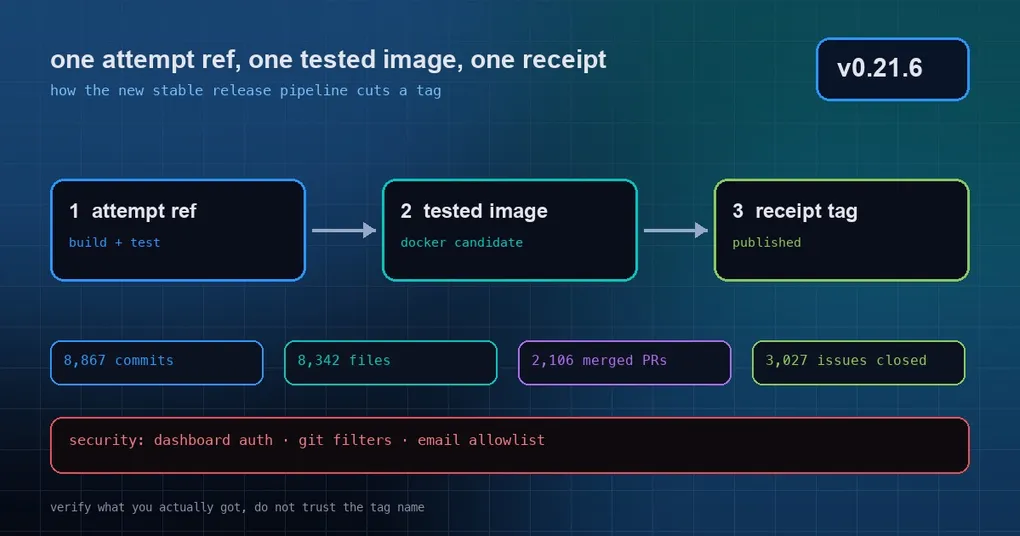
You see that Hermes Agent shipped again — v0.21.6. You open the release page and the first paragraph says it: this is a patch release that rolls the window up into a stable tag, and the full curated notes ship with v0.22.0. You run hermes update, the terminal says it worked, and you are left with a question you cannot really answer: what did I actually install, and should I be in a hurry? This time the nagging feeling is worse than usual, because it is not just the content that is new — the way the release was produced also changed. This post does two things: it explains what changed in the release process, and it gives you three commands to confirm your version yourself.
What is new: the first tag from the new stable release pipeline
The official body is blunt about it: v0.21.6 is the first release cut by the new stable release pipeline, and its shape is “one attempt ref, a tested Docker image, and a receipt tag at publish.”
That sounds abstract, so here it is in plain words. Before, a tag was the starting gun: the image, the hosted deployments and the Nix packages each went and built themselves from it afterwards. Now it is inverted — there is a release attempt first, the attempt itself carries the build and the tests, the Docker image is published only once it passes, and the receipt for what was published is recorded on the tag. For you as a user the practical difference is this: the tag is backed by an image that was tested, instead of a tag you build from afterwards.
The body also draws the boundary: this release ships the tag, the GitHub release and the Docker image. The desktop app, the Termux packages and the Microsoft Store stay on their current build and move with the next bundled release.
How much actually went into the window
Size first. These figures are the official ones, measured at commit 818c13be1dc4fd28987e1e881a9408224afd4535:
| Metric | Value |
|---|---|
| Non-merge commits | 8,867 |
| Changed files | 8,342 (+772,490 / −225,600) |
| Merged PRs | 2,106 |
| Closed issues | 3,027 |
If you want to check the file count yourself, one command does it (you need the full git history locally):
cd ~/.hermes/hermes-agent
git fetch origin main --tags
git diff --shortstat v2026.9.24 818c13be1dc4fd28987e1e881a9408224afd4535
# 8342 files changed, 772490 insertions(+), 225600 deletions(-)
v2026.9.24 is the previous tag — that is semantic version v0.21.5. “A patch release with no notes” does not mean “nothing in it”; it means those 2,106 PRs were never individually named and sorted. They will be documented with v0.22.0, and the body promises nothing in the window is skipped.
Three commands to confirm which version you are on
Do not go by feel, and do not go by the word “success” in the update output. Go by install type:
# 1. version number (git installs also show distance from the tag + short commit)
hermes version

# 2. what your last upgrade actually did
hermes update

# 3. Docker / hosted: look at the image tag itself
docker pull nousresearch/hermes-agent:stable
The third case deserves a warning. Docker and Hermes Cloud users do not get a git working tree, they get an image. The keyword for downstream consumers in this release is nousresearch/hermes-agent:stable (or :latest). For image users there is exactly one trustworthy answer to “did I upgrade?” — the image digest, not the pull time you remember.
There is one more easily missed clue. Git installs record how they were updated in an install stamp (install-stamp.json, read by hermes version). So if two machines report the same version but behave differently, compare that stamp before you suspect the code — you are probably looking at the difference between a “light” install and a full git one.
The security fixes in this window, in one place
This release deliberately does not document its features, but the security fixes are called out separately — three groups, and each one is worth checking which side of it you are on.
1. Dashboard authentication hardening (PRs #133367, #133369, #133370, plus session takeover #130685). A single report from Tenable Research (TRA-725 … TRA-728) covers four issues: a spoofed X-Forwarded-For could reset the password-login rate limit and get around the per-IP cap; unauthenticated login requests could write unbounded values into the audit log; the public /auth/ routes had no request-body size limit; and native sign-in could send login codes to a non-loopback redirect, which allowed session takeover. We already broke the first three down in detail in the dashboard login hardening post — that piece has the cause of each one and whether your deployment needs a config change. The fourth (the redirect) is only named explicitly in this release body, so read the two together for the full round.
2. Repository git filter hardening (#130661). Automatic git calls — session workspace snapshots, subagent worktrees, kanban, worktree cleanup, hermes -w — could be hijacked by clean / smudge / process filter programs defined in an untrusted repository’s own config, and it happened before you typed your first prompt. We covered this one on its own too: when git config becomes an RCE entry point. If you routinely clone unfamiliar repos and open a session inside them, this is your reason to upgrade.
3. Email gateway sender hardening (#125212, #124322). A quoted display name in the From header could be crafted to look like an allowlisted sender, letting an attacker’s message pass the email allowlist. We analysed that one as well in the sender identity spoofing post.
In one line, all three groups are the same class of mistake: input with no ceiling, trusted because it arrived. None of them is a feature.
Should you upgrade now?
This is not hard to decide:
- You expose a dashboard, or you run the gateway on several machines or profiles → upgrade. Two of the three security groups land directly on your attack surface.
- You clone other people’s repositories and let the agent work inside them (especially team-owned ones) → upgrade. The git filter issue fires before you say anything.
- You are a single local machine with no exposed ports → nothing breaks either way, but since the new pipeline ships a tested image as the artifact, moving early is cheaper than moving later.
The upgrade is still the same one-liner: hermes update; Docker users pull :stable; the desktop app needs nothing this time and follows the next bundled release.
Wrapping up
- The biggest change in v0.21.6 is not a feature — it is how the release is produced: attempt ref → tested Docker image → receipt recorded at publish.
- Window size: 8,342 changed files, 2,106 merged PRs. The full curated notes ship with v0.22.0.
- Do not trust the word “success” from the updater. Confirm with
hermes versionand the image digest. - Three security groups: dashboard auth, git filters, email sender. The first two are worth acting on today.
For the changes from the previous window that “already work but nobody has written up”, see our patch-window self-check guide. And if you want to know exactly what survives a restart when you turn YOLO on, read /yolo persistence next.