You thought YOLO was still on. The restart turned it off.
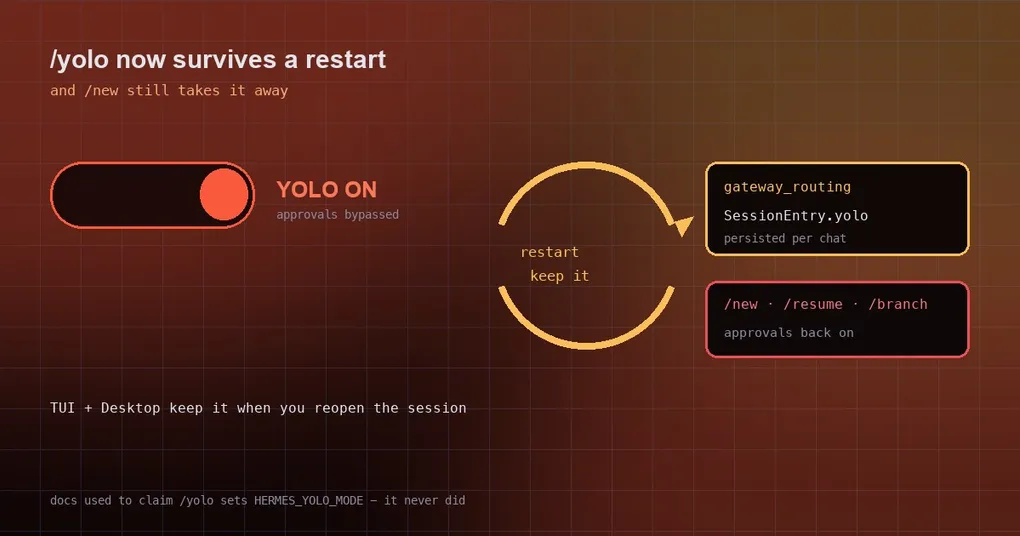
You type /yolo into Hermes on Telegram and it answers that YOLO mode is on and every command will be auto-approved. You hand it a chain of automation steps on the assumption that it will just get on with it instead of asking. Overnight you upgrade Hermes, the gateway restarts, and the next morning you send another instruction — and now it starts asking, one command at a time, whether it may proceed. You go digging through config: was YOLO not on? The answer stings a little: it was turned off while you were not looking, and nothing said so. The fix also creates risk in the opposite direction, so both are worth spelling out.
The problem: the switch only existed in memory
On a messaging platform, /yolo used to flip nothing more than an in-memory set inside tools.approval. Which meant:
- restart the gateway (
hermes update, a crash, systemd bringing it back, a Desktop reopen) → memory clears → that chat silently returns to manual approvals; - nothing in the UI says “your YOLO is gone”, so you keep believing it is bypassing prompts.
Two things then happen at once. You think it is executing on its own while it waits for you to approve each step, and if your automation depends on “no human confirmation”, it stalls there until it times out. The official wording for the report is blunt: the user still believed YOLO was on.
Now: saved with the session — and only with the session
The new implementation puts the flag on the chat’s own routing entry (SessionEntry.yolo, persisted in gateway_routing next to the /model override). The rules are worth reading one by one, because they decide which situation surprises you:
/yolowrites the persisted copy before flipping the live flag, and materialises the entry when you toggle on a first message.- Every turn re-arms the live flag from the entry it already resolved — so the very first turn after a restart restores the state, instead of waiting for you to type
/yoloagain. - The flag is carried across compression-tip and binding repoints (
switch_session). - The conversation-boundary security funnel clears the persisted copy along with the in-memory one:
/new,/resume,/branchand auto-reset. The intent is explicit — a restart must never revive a bypass you already dropped.
The docs now state the scope plainly: /yolo applies only to the session it was typed in; it is saved with the session, so it survives a restart — a messaging chat keeps it across gateway restarts, and the TUI and the Desktop app keep it when you reopen or resume the session. On a messaging platform, /new and /resume start the next conversation with approvals back on.
Checking your session state is straightforward:
# current session's YOLO state (and whether it was persisted)
hermes status

# turn it off AND drop the persisted copy: start a fresh conversation
/new
While we are here, one widely repeated claim needs correcting: the docs used to say “/yolo sets the HERMES_YOLO_MODE environment variable”. It never did. Those are three independent activation paths: the CLI flag hermes --yolo (or hermes chat --yolo), the in-session /yolo toggle, and the environment variable HERMES_YOLO_MODE=1. The first two are session-scoped, the third is process-scoped — do not reason about them as if they were the same thing.
Both directions can bite
Direction one: you think it is on and it is off. That is the opening scenario, and it is fixed.
Direction two: you think it is off and it is on. This is the new risk the fix introduces — a bypass that now outlives a restart. Two existing defences matter here, so use them:
- The visual reminders do not go away. While YOLO is active Hermes shows two persistent cues: a red banner line at session start,
⚠ YOLO mode — all approval prompts bypassed(hidden when YOLO is off so the default banner stays clean), and a⚠ YOLOfragment in the status bar across all width tiers, updated live as you toggle. - Two boundary actions always clear it:
/new(and its alias/reset) and/resume. The first is the right move when you no longer need it, the second when you want to get back to a clean session.
One more thing so you do not treat YOLO as a master key: YOLO only bypasses the dangerous-command approval step. It does not bypass the hardline blocklist, and it does not bypass the supervised-gateway lifecycle guard — restarting or killing the gateway from inside its own process is still refused, and user approval, YOLO and force=True are all no help. The reason is practical: doing so would kill the very tool executing the command, which kicks off a supervisor/auto-resume loop.
When to use it, and when to drop it
- Good fit: one-off, containerised, scripted automation where you really do want it to act without asking, and you already know what it will generate.
- Bad fit: interactive exploration, destructive commands you are unsure about, and any chat more than one person uses.
- General advice:
/newwhen you are done. Since a restart no longer closes it for you, closing it yourself is the only backstop — and/newis the least forgettable way to do it.
Wrapping up
/yoloused to change an in-memory set only, so a gateway restart silently dropped it while you still believed it was on.- It now lives on the session’s routing entry (
SessionEntry.yolo) and survives restarts, compression and session repoints, including TUI/Desktop resumes. /new,/resume,/branchand auto-reset clear both the persisted and in-memory copies — a restart cannot revive a bypass you dropped.- YOLO suspends approval prompts only; the hardline blocklist and the supervised-gateway lifecycle guard are unaffected.
- The old doc line that
/yolosetsHERMES_YOLO_MODEwas simply wrong — that environment variable is a separate activation path.
We have written about approvals several times, and these pair well: what the seven YOLO modes actually differ on, approval configuration for unattended runs, and dry-running your approval rules — that last one is the one to read when you have changed approval rules and are unsure whether they will block something you need.