Desktop plugins can finally press the app's own buttons: ctx.runAction and ctx.pet.say
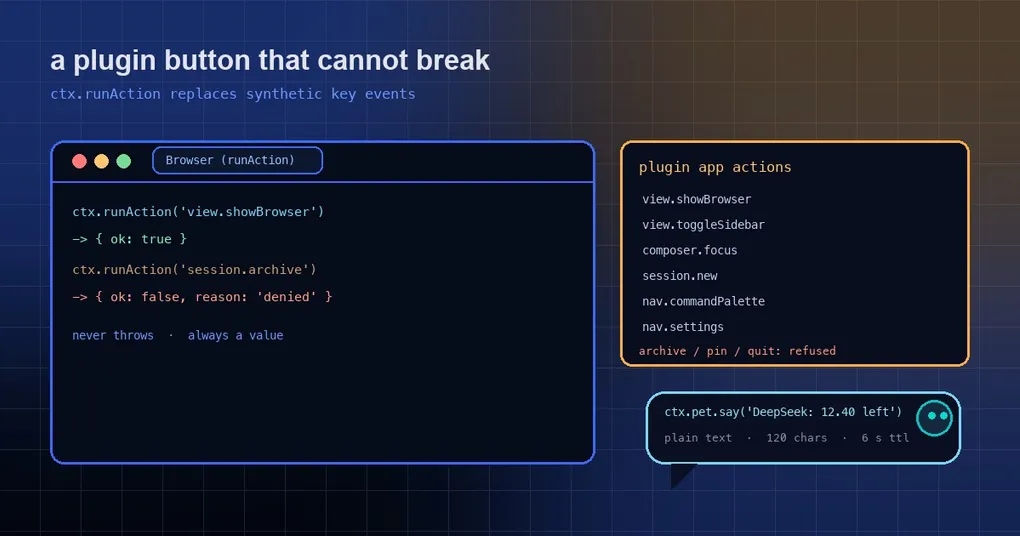
You wrote a desktop plugin that adds a titlebar button which opens the built-in browser panel. The implementation was one line: dispatch a synthetic Ctrl+Shift+L keyboard event on document.body. Two weeks later a user reports the button does nothing — they rebound that shortcut, or unbound it entirely. Your button is still there, the world has moved, and it reports no error at all.
That is a very typical kind of fragility in a plugin ecosystem: to call the host’s own features you had to pretend the user pressed a key. The same window produced a sibling example: a plugin showing quota balances painted bubbles over the core pet by finding it with document.querySelector('canvas[aria-label$=" pet"]'), adding a fixed-position layer and following the pet every frame. One markup change in core and it breaks.
Two changes merged in this window turn both of those into supported APIs.
ctx.runAction: the front door for app actions
const result = ctx.runAction('view.showBrowser')
// → { ok: true }
The important part is which handler runs. useKeybinds already holds the single handler table that shortcuts dispatch through. That table is now also registered with the built-in action runner (lib/keybinds/plugin-actions.ts), and ctx.runAction looks the handler up there when called — so a plugin call and a key press share one code path, and the key binding is never consulted. Rebind anything you like; the button keeps working.
A call returns one of two shapes and never throws:
ctx.runAction('view.showBrowser')   // → { ok: true }
ctx.runAction('session.archive')    // → { ok: false, reason: 'denied',   error: "'session.archive' is not available to plugins. …" }
ctx.runAction('app.quit')           // → { ok: false, reason: 'unknown',  error: "'app.quit' is not a Hermes app action. …" }
ctx.runAction('view.showBrowser')   // → { ok: false, reason: 'unavailable' }  // app shell not mounted yet
reason has three values: unknown (not a valid action id), denied (valid, but not available to plugins), unavailable (too early in startup — the shell is not mounted). Every refusal also logs a [plugin:<id>] runAction: … warning, so you can see exactly which plugin was turned down.
The API lives on the per-plugin ctx (like ctx.pet and ctx.os) rather than the global host, because a refusal has to be attributed to a plugin. Feature-detecting an older host is one check:
if (ctx.runAction) { /* newer host */ }The SDK types come with it: @hermes/plugin-sdk exports PluginAppActionId (a union of the allowed ids), PluginAppActionInfo, PluginRunActionResult, and the runtime list PLUGIN_APP_ACTIONS. For an enumerable list at runtime, ask the host:
ctx.listActions()
// → [{ id: 'view.showBrowser', label: 'Toggle browser', category: 'view' }, …]
The allowlist is views and navigation only
The permitted actions are deliberately narrow — “look at things and go places”:
view.showBrowser, view.showFiles, view.toggleSidebar, view.toggleRightSidebar, view.toggleReview, view.toggleStatusbar, view.findInPage, composer.focus, session.new, session.focusSearch, conversation.scrollPageUp, conversation.scrollPageDown, nav.commandPalette, nav.settings, nav.profiles, nav.capabilities, nav.messaging, nav.artifacts, nav.cron, nav.agents, keybinds.openPanel.
Refused: archiving a session, pinning, profile switching, the model picker, reasoning level, voice and dictation, terminals, new window, open folder, worktree, the HUD, closing or reopening a tab. Destructive and privileged operations are not exposed at all: deleting a session, signing out, approvals, model or provider changes, updating, quitting.
The reasoning is simple: a plugin may move the interface to where you like it, but it does not get to make irreversible decisions for you. A third-party plugin mis-clicking a session deletion is not a thing you can explain to a user.
ctx.pet.say: let the core pet bubble speak for the plugin
const dispose = ctx.pet.say('DeepSeek ¥12.40 left', { id: 'balance', tone: 'info', ttlMs: 8000 })
ctx.pet.say('DeepSeek ¥11.90 left', { id: 'balance' })  // same id replaces the line in place
ctx.pet.clear('balance')   // remove one line; ctx.pet.clear() removes all of yours
ctx.pet.visible            // ReadableAtom<boolean>: is a pet on screen?
The host draws the bubble, and the plugin never touches the app DOM — which is precisely the advantage over “find the pet and paint your own layer”: lines still work when the pet is popped out into its own window.
The host enforces boundaries so this corner of the screen cannot be abused:
- Plain text only. Control characters and bidi overrides are stripped, the text is collapsed to one line and capped at 120 characters, and it renders as a React text node.
- Labelled. The plugin’s name from the Plugins inventory appears as a small label above the line.
- Short-lived and bounded. Lines expire after 6 seconds by default (clamped to 1–30 s). Each plugin may have up to 3 live lines and 10
saycalls per 10 seconds; extra calls are dropped with a console warning. - Core status wins. When the agent has an error or is waiting on you, the core bubble takes over; the plugin line comes back afterwards if it has not expired.
- Follows the user’s pet setting. No pet, or the pet turned off, and nothing shows.
- Cleaned up. Disabling, unloading or hot-reloading a plugin removes all of its lines.
- No new permission model.
ctx.petis scoped and attributed per plugin, the same wayctx.osis.
What a complete button plugin looks like
// desktop/plugin.js
export default {
  id: 'browser-toggle',
  titlebarButtons: [
    {
      label: 'Browser',
      onClick(ctx) {
        const r = ctx.runAction('view.showBrowser')
        if (!r.ok) {
          ctx.pet.say(`browser: ${r.reason}`, { id: 'btn', tone: 'warn', ttlMs: 4000 })
        }
      },
    },
  ],
}
The old implementation was one synthetic key event. This one reports why it failed — and can tell the user without a modal.
When you can use it
Both changes landed recently, and the v0.21.7 release body lists them among the changes in this window (it does not detail them there, and defers the curated notes to v0.22.0). The desktop app ships on its own packaging cadence, so:
- Source installs and main-tracking desktop dev setups: available now.
- Store / MSIX / bundled desktop: wait for that build’s next update. Garden for it with
ctx.runAction?.(…)so one plugin works on both hosts.
Docs were updated too: website/docs/developer-guide/desktop-plugin-sdk.md gained a Run app actions — ctx.runAction section with the API, an example and the allowlist table, and the bundled hermes-agent skill’s desktop-plugins.md reference carries the same note.
Caveats
- Stop dispatching synthetic key events to trigger app features. That is exactly the pattern being retired: it dies when a user rebinds, and it fails silently.
- Handle refusals.
ok: falseis not an exception — ignoring it just hands the bug to your users. - The pet bubble is not a log panel. 120 characters, at most 3 lines, 6 seconds by default: it is an at-a-glance status, not an output channel.
- The allowlist changes between versions. Read it at runtime with
ctx.listActions()instead of hardcoding it in docs or type assertions.
To build a desktop plugin from scratch, see the desktop plugin SDK guide; for where plugins come from and how they are reviewed, see the plugin catalog guide; the safety model is in plugin isolation and the host boundary.