One File, One Panel: A Practical Guide to the Hermes Desktop Plugin SDK
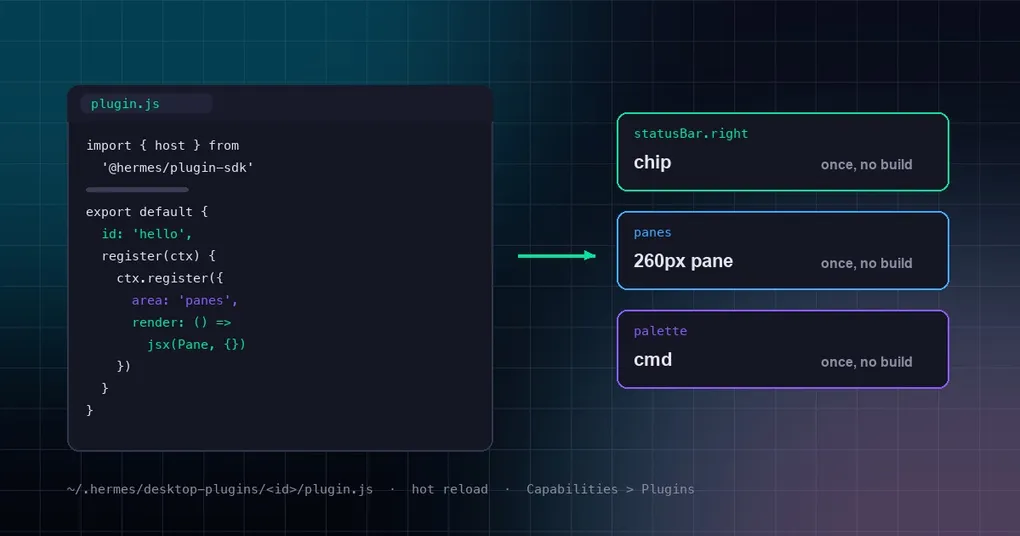
You spend your day in the Hermes Desktop window, and sooner or later a small wish shows up: a little pane showing whether today’s cron jobs actually ran, or a button in the status bar that tails the logs when you click it. Until recently that wish had two answers — live without it, or go read the app’s source, which is a large third-party-unfriendly codebase.
There is now a third option: write one file, drop it in a directory, and it’s live a few seconds later. Every surface in the Hermes Desktop window — layout panes, sidebar nav, the status bar, title-bar tools, ⌘K palette entries, keybinds, themes — registers into a single registry, and the core app registers its own chrome exactly the way a plugin does. Plugins aren’t a bolt-on: they’re how the app is built.
Three minutes to your first plugin
Here’s the shortest complete example. Create one file:
// $HERMES_HOME/desktop-plugins/hello/plugin.js  (that's ~/.hermes/desktop-plugins/hello/plugin.js by default)
import { host, haptic, useValue } from '@hermes/plugin-sdk'
import { jsx, jsxs } from 'react/jsx-runtime'

function HelloPane() {
  const gateway = useValue(host.state.gateway)

  return jsxs('div', {
    className: 'flex h-full flex-col gap-2 p-3 text-sm',
    children: [
      jsx('div', { className: 'font-medium', children: 'Hello, Hermes' }),
      jsx('div', {
        className: 'text-(--ui-text-tertiary)',
        children: `gateway: ${gateway}`
      })
    ]
  })
}

export default {
  id: 'hello', // must match the folder name
  name: 'Hello',
  register(ctx) {
    // a 260px pane docked to the right
    ctx.register({
      id: 'pane',
      area: 'panes',
      title: 'hello',
      data: { placement: 'right', width: '260px' },
      render: () => jsx(HelloPane, {})
    })
    // a small button in the right side of the status bar
    ctx.register({
      id: 'chip',
      area: 'statusBar.right',
      order: 130,
      render: () =>
        jsx('button', {
          type: 'button',
          className: 'px-1.5 text-[0.6875rem] text-(--ui-text-tertiary)',
          onClick: () => {
            haptic('tap')
            host.notify({ kind: 'info', message: 'Hello from my plugin!' })
          },
          children: 'hello'
        })
    })
  }
}
Save it. The app watches desktop-plugins/, loads the file within a few seconds, and hot-reloads every later save in place. If nothing appears, hit ⌘K and pick Reload desktop plugins. If loading fails you get a toast naming the error — fix it and save again. A broken plugin can throw, but it can’t take the app down.
The contract: two interfaces, that’s it
A plugin default-exports one object:
interface HermesPlugin {
  id: string            // stable slug — the `plugin:<id>` source tag and the id namespace
  name?: string         // shown in Settings; defaults to id
  defaultEnabled?: boolean  // defaults to true; false ships it opt-in (inventoried, switched off)
  register: (ctx: PluginContext) => void
}
register receives a scoped context. It never touches the registry directly — the context stamps provenance (source: 'plugin:<id>') and namespaces every contribution id (<id>:<localId>), so two plugins can never collide.
interface PluginContext {
  readonly source: string                                    // e.g. 'plugin:hello'
  register: (c: PluginContribution) => () => void            // register one, returns a disposer
  registerMany: (cs: PluginContribution[]) => () => void      // register many at once
  rest: <T>(path, opts?) => Promise<T>                       // REST to your own /api/plugins/<id>
  socket: (path, onMessage) => () => void                    // live WebSocket in the same namespace
  os: PluginOs                                                // native notification, open-external, reveal, clipboard
  storage: PluginStorage                                      // plugin-scoped persistence (hermes.plugin.<id>.*)
}
A contribution is the one primitive every surface shares:
interface Contribution {
  id: string            // your local id; the host namespaces it
  area: string          // WHERE it goes (see the area table below)
  title?: string
  order?: number         // sort within the area, lower = earlier
  when?: () => boolean   // dynamic visibility, re-evaluated by the area
  enabled?: boolean
  render?: () => ReactNode  // the component to mount
  data?: unknown            // area-specific payload
}
You provide render, data, or both, depending on the area.
Where things can go
| Surface | area |
What you provide |
|---|---|---|
| Layout pane (dockable, draggable) | PANES_AREA ('panes') |
title + render + data (placement, dock, width, height) |
| Full page route | ROUTES_AREA |
data (path) + render |
| Sidebar nav item | SIDEBAR_NAV_AREA |
data (path, label, codicon) |
| Status bar | STATUSBAR_AREAS.left / .right |
render, or data as a StatusbarItem |
| Title bar | TITLEBAR_AREAS.left / .center / .right |
data as a TitlebarTool, or a scoped <Contribute> |
| ⌘K palette | PALETTE_AREA |
data as a PaletteContribution |
| Keybind | KEYBINDS_AREA |
data as a KeybindContribution |
| Theme | THEMES_AREA |
data as a DesktopTheme |
| Composer | COMPOSER_AREAS.* |
render slots, or middleware / attachment providers |
A pane’s placement is its semantic role (main, left, right, top, bottom): it stacks as tabs with existing panes of that role, and the user can drag it anywhere afterwards. To land on a specific edge instead of stacking, add a dock gesture — the same thing as dragging a pane onto a drop chip by hand.
Three things to know before you write more
One: don’t write JSX syntax. The disk file is loaded uncompiled, so <div> never reaches a parser. Write UI with jsx() / jsxs() calls from react/jsx-runtime (or React.createElement), as in the example above. It’s more verbose, and it’s what buys you “no build step”.
Two: exactly three importable specifiers. @hermes/plugin-sdk, react, and react/jsx-runtime — everything else fails to resolve, on purpose. A lint fence enforces it: importing app internals (@/…) from a plugin is an error, and the correct fix is to add the capability to the SDK.
Three: desktop plugins are app-level, not profile-scoped. There is one root directory, and it applies to every profile, gateway, and remote machine the window connects to. If a plugin needs to behave differently per profile, it reads the active profile itself.
Use the app’s own design language
The SDK’s ui.* hands you the app’s real components, theme variables, icons, and formatters. That matters more than it sounds: hand-roll your own styling and the plugin looks foreign in a window where everything else matches pixel-for-pixel. Use ui and the colors and spacing follow the active theme — text-(--ui-text-tertiary) in the example is a theme variable that shifts when the user switches themes.
Want a backend? You get a namespace
A plugin’s rest and socket calls go to its own namespace, /api/plugins/<id>. Drop a plugin_api.py into the plugin package and that namespace comes alive. (Only this backend layer is shared between the desktop and web-dashboard SDKs — their front-end APIs are entirely separate, so don’t mix them up.) That gives a plugin its own in-process state, files, and long-lived gateway connections without stuffing logic into render. React Query comes along too, so fetching, caching, and invalidation don’t need to be rebuilt.
Three delivery modes
| Mode | Where | Who | Build step |
|---|---|---|---|
| Disk (recommended) | $HERMES_HOME/desktop-plugins/<id>/plugin.js |
users, agents | none — plain ESM, loaded uncompiled |
| Unified package | $HERMES_HOME/plugins/<id>/desktop/plugin.js |
plugins that also ship agent-side code | none — same disk pipeline |
| Bundled | apps/desktop/src/plugins/<id>/plugin.tsx |
in-tree, shipped with the app | yes — the app’s own Vite build |
All three take the same HermesPlugin contract, all appear in Capabilities → Plugins, and all enable/disable live. For reference implementations, the official companion repo is hermes-example-plugins. The app’s own Radio (live streams, station search, status-bar playback controls, an audio-reactive waveform) ships as a bundled SDK-only plugin, off by default — flip it on in Capabilities → Plugins to see how far a plugin can go.
The security boundary: this is not a sandbox
The docs are unusually blunt about this, and it’s worth passing along verbatim: a loaded plugin is evaluated as ESM in the renderer realm with full app authority — the React singleton, the whole SDK (host.request gateway JSON-RPC, ctx.rest, storage, navigate). The isolation here is error isolation (contrib boundaries, isolated listeners), which means a plugin can’t crash the app — but it can do anything the app can.
For local sources that’s acceptable, because a file on your disk can already run code. But it’s exactly why a remote source (https + allowlist) must not reuse this pipeline as-is: it needs a real boundary (iframe/worker plus CSP and capability gating) before it can ship. The { integrity } option is the transport seam, not the trust seam.
So: install only plugins you’re willing to run on your machine. If you want to know what the project is doing about plugin provenance and review, read the plugin catalog post alongside this one — the catalog answers “where did this come from, was it reviewed, are these the original bytes”.
Where to go next
- For agent-side plugins (Python CLI / gateway), that’s a different SDK: see terminal backend plugins and shipping a model provider as a pip plugin.
- To see what a finished desktop plugin experience looks like, the Desktop Skills Hub post covers browsing and installing skills in-app.
- Not set up yet? Start with the install guide — the desktop app is the easiest surface to write plugins against.
One honest note on timing: this SDK is young. Radio shipping as a bundled SDK plugin and the Plugins page rework both landed within days of this post, which means the surface can still move — and also that a small plugin working today is likely one nobody else has thought to write yet.