Hermes v0.20.5: Group Chats Finally Accept Files, Worktree Spring-Cleaning, and Receipts for Updates
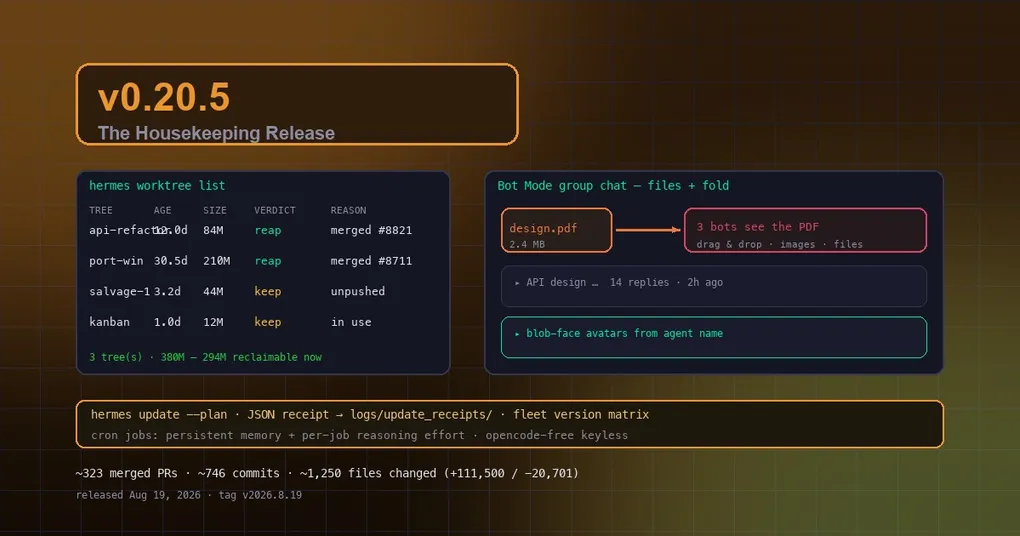
You run a machine with several parallel Hermes workflows, and one day you decide to tidy up: ls .worktrees/ shows two dozen trees, and the branch list scrolls for three screens — but you don’t dare delete anything, because you can’t tell which tree still holds unpushed work. Meanwhile, you set up a Bot Mode group chat with three bots tracking a project, and when you try to share a PDF design doc, you find the room simply can’t accept files. These are the chores nobody explicitly asked for but everyone has bumped into — and that’s exactly what v0.20.5 (tag v2026.8.19, released August 19, 2026) is about.
The window merged roughly 323 PRs and ~746 commits across ~1,250 files since v0.20.4. There’s no single headline feature: the story is that Bot Mode group chats finally accept files, worktrees finally get a safe spring-cleaning command, updates finally produce receipts you can audit, and cron jobs finally have memory. Let’s go through them.
Group chats accept files — and old messages auto-fold
Bot Mode group chats used to be text-only: to show a PDF to the bots in a room, you had to place the file somewhere and reference the path in your prompt. Now files are first-class — rooms accept PDFs, arbitrary files, and drag & drop, and every bot responding to the turn sees the attachments (PRs #97b41f8cf, #b359db72e). The multi-bot project-tracking scenario finally works without detours.
Long rooms have an answer too: older conversations auto-fold into one-line summaries (“▸ API design … 14 replies · 2h ago”) while the latest conversation stays fully open (#8505559fa) — rooms stop growing without bound, and history stays scannable. Avatars get a new look as well: they default to blob faces deterministically drawn from the agent’s name (same name, same face, every time), with four new silhouettes from blobatar 2.0.0 (#a77ee88ce, #cb0fd836a). For a systematic tour of group-chat features, see our Bot Mode group chat guide.
hermes worktree list/prune: safe spring-cleaning for worktrees
Back to the opening scene. Multi-agent workflows (hermes -w or /worktree new) accumulate dozens of trees and hundreds of merged branches under .worktrees/. The silent startup pruner only touches trees that are clean and fully merged; everything else lingers forever — conservative by design, but it means you’re left auditing by hand.
v0.20.5 adds an explicit, dry-run-first reclaim command (#f309f92d3):
hermes worktree list              # audit: one row per tree — age, size, verdict, reason
hermes worktree prune --dry-run   # show the plan, change nothing
hermes worktree prune             # reclaim safe trees + merged branches
list prints a table: tree name, age, size, verdict (reap/keep), and reason, with a footer summarizing “N trees, X total, Y reclaimable right now”. Safety invariants are identical to the startup pruner: tracked modifications are never deleted at any age, unique unpushed commits are never deleted (git cherry decides “unique”; shallow repos are deepened bloblessly first), live-locked trees are untouched, a branch is deleted only after its worktree removal succeeded, and untracked-only scratch is archived to ~/.hermes/archive/worktree-prune/ before its tree is reaped — trash goes, living work stays.
Updates now come with receipts: hermes update --plan
“What actually happened during the update” used to be a black box: print ✓ Code updated! and call it done — helper dies after printing, restart silently skipped, desktop shows failure for a successful update — the silent-failure classes (#88848, #74973, #85753, #81193) were all guesswork after the fact. v0.20.5 makes the updater prove its outcome (#0aecadc17, #1d74833d8):
hermes update --plan: read-only. Lists what the update will touch — install kind (git/docker/nix), every running Hermes service across all profiles with its supervisor and running code version, and how each will be restarted. Safe to run on a live fleet.- Structured receipts: every
hermes updatewrites a machine-readable JSON record — what it discovered, did, skipped (and why) — to<HERMES_HOME>/logs/update_receipts/. After the restart phase it reads every profile’sgateway_state.json, compares each live gateway’scode_shaagainst the freshly-updated checkout HEAD, and prints a fleet version matrix — mixed-version fleets become a loud, actionable report instead of a latent state.
Run hermes update --plan before upgrading to see what will change, then check the receipt after — who’s on what version is visible at a glance. This continues the arc from the honest hermes update in v0.20.4: updating is moving from “trust me” to “verifiable”.
Cron jobs have memory — and per-job reasoning effort
Cron jobs used to be treated differently: skip_memory=True, MEMORY.md/USER.md never loaded, and the memory tool was hard-stripped — even if you named it in a job’s enabled_toolsets. Users resorted to hacky workarounds. Cron agents now run with persistent memory enabled like every other agent (#ef04d846e): jobs can read — and update — your persistent memory.
Each job can also pin its own reasoning effort, independent of the global agent.reasoning_effort and per-model reasoning_overrides (#4e1dd1a74):
# heavy scheduled analysis at high, cheap recurring job at minimal — global default untouched
hermes cron create "0 7 * * *" --reasoning-effort high --prompt "Deep weekly repo-trend analysis"
hermes cron create "every 5m"  --reasoning-effort minimal --prompt "Health check and report"
Levels: none/minimal/low/medium/high/xhigh/max/ultra; levels a model doesn’t support are clamped by the provider at request time (pinning xhigh on a model that caps at high runs at high). Pass an empty string on edit to clear the pin. For more cron patterns, see our complete cron automation guide.
opencode-free: a genuinely keyless free model
opencode-free is now fully keyless — no env var, no account, anonymous wire (#ca06b8768) — and the catalog-drift sync pulls live OpenRouter free models into the list while delisting dead free slugs (#624723130). Keyless providers count as authenticated everywhere: opencode-free appears directly in /model and the desktop pickers with zero setup (#2a2307e68):
hermes model # pick opencode-free — no key requiredIf you haven’t configured a free model yet, this gives you a working option out of the box. Combined with our five free search channels, a fresh Hermes install can run completely keyless.
Other “nobody’s doing it but everyone needs it” improvements
- Execution discipline and stall guards (from the Composio eval findings): background-review cancellation synchronized with correct foreground priority (#37da0d4d5, #b883756b7), Ox Alpha reasoning effort reliably clamped across zen and free providers (#d4d04098a), prompt-caching cache-control decoration idempotent (#0fc52b055) — long-running tasks stall less and spend tokens more predictably.
- Desktop performance: paint-first Bot Mode hydration, compositor spinners, React Compiler in both renderers.
- Editing messages in old sessions no longer fails (#02e270a47); Telegram DM drafts keep rich formatting after streaming (#790c85014); Docker stage2
API_SERVER_KEYbootstrap no longer depends on.envexisting (#7a17a1b8a).
For the complete highlight-by-highlight breakdown (including the Improvements and Fixes lists), see our v0.20.5 release notes. Upgrading is straightforward:
hermes updateAfter upgrading, run hermes doctor to verify the install and restart the gateway (hermes gateway) so platform changes take effect. To see what the next update will touch before running it, start with hermes update --plan. This release has no flashy headline — but it clears a stack of chores everyone has bumped into, and a good spring-cleaning feels great once it’s done.