Your skill library lost seven sources: vendor repos are now trusted taps
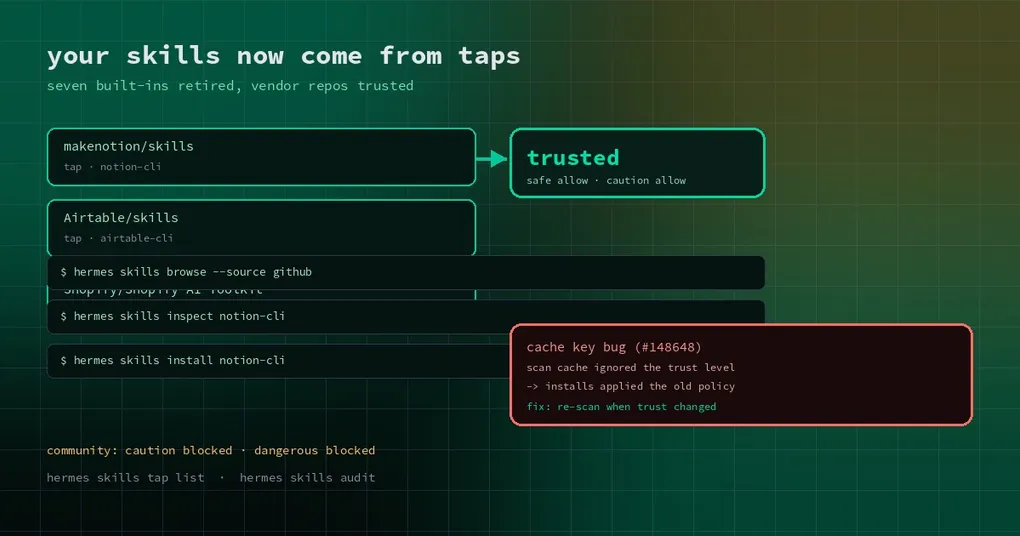
You follow a tutorial from a few months ago to teach your agent Notion: hermes skills search notion, and the built-in entries are gone — only repository sources remain. You start wondering whether you broke your install. You did not. Hermes retired seven built-in optional skills because the problems they solved now have better owners.
This is not a feature being cut; it is a re-division of where skills come from. Understanding it saves you two kinds of pain: installing something that is no longer there, and installing something that then runs under an outdated policy.
The seven retired skills and who took over
These built-in optional skills were removed because official vendor MCPs, catalog plugins, bundled search backends or the vendors’ own skill repositories cover them better:
| Retired built-in skill | Covered now by |
|---|---|
notion |
Official Notion MCP in the MCP catalog (OAuth, no Portal needed) + hosted connector + makenotion/skills |
airtable |
Official Airtable MCP + hosted connector + Airtable/skills |
shopify |
Hosted connector + the vendor-maintained skill in Shopify/Shopify-AI-Toolkit |
duckduckgo-search |
Bundled ddgs web search backend (web_search works with no key) |
searxng-search |
Bundled searxng backend via SEARXNG_URL |
honcho |
The honcho catalog plugin, which owns the hermes honcho commands that skill documented |
mpp-agent |
The verified pay / pay-cli catalog plugins (HTTP 402 / x402 / MPP) |
One side effect is worth knowing: AIRTABLE_API_KEY left the optional environment variable list, because that skill was its only consumer. NOTION_API_KEY stays, since the Teams meeting pipeline’s Notion sink still reads it.
So if you used the built-in skill for Airtable, the path forward is the official MCP or the vendor’s skill repo. The capability did not disappear; it moved to the party that tracks API changes.
Taps: where skills are actually discovered
Skill search does not only scan your local directory. It looks across a set of sources called taps. The default taps are a hardcoded set of repositories — openai/skills, anthropics/skills, huggingface/skills, NVIDIA/skills and others — and this change added three vendor repos:
makenotion/skills(pathskills/)Airtable/skills(pathplugins/airtable/skills/)Shopify/Shopify-AI-Toolkit(pathskills/)
The difference between a vendor repo and a general community repo is not quality; it is clear ownership. The repository belongs to the vendor, the licence is explicit, so it can join the default trusted list instead of being treated as community content on every install.
You can add taps yourself, which is the cheapest way to distribute skills inside a team:
hermes skills tap list            # configured sources
hermes skills tap add <owner>/<repo>
hermes skills browse --source github
hermes skills inspect notion-cli  # read before you install
hermes skills install notion-cli
Do not confuse hermes skills tap with hermes skills trust. The first manages where skills are found; the second decides whether repo-local skills such as ./.hermes/skills are allowed to load at all. Similar names, unrelated jobs.
Trust levels: the table that decides what installs
After scanning, a skill gets a trust level, and the install policy is a lookup on that level crossed with the scan verdict (safe / caution / dangerous):
| Trust level | safe | caution | dangerous |
|---|---|---|---|
| builtin | allow | allow | allow |
| trusted (vendor / official repos) | allow | allow | block |
| community | allow | block | block |
| agent-created | allow | allow | handed to the agent |
This table explains two things people trip over. First, why the same skill installs from one repo and not another: the source sets the level, and the level decides whether caution findings are blocked. Second, why vendor repos are worth listing explicitly — trusted allows caution through, community does not. That one cell is the whole difference.
trusted does not mean risk-free. Dangerous findings are blocked from every non-builtin source, with no exception.
The one-line cache bug that kept an old policy
Skill scans are cached so installs do not rescan everything. The cache key used content hash, source and scanner version — and pointedly not the trust level.
The consequence is concrete. You scan a skill, then upgrade Hermes after its repository was added to (or removed from) the trusted list, and installs keep applying the trust level recorded during that earlier scan, until the skill’s content changes. In other words, edits to the trusted-repos list bypassed the cache key entirely.
The fix puts the current trust level into the cache key: a cached scan is reused only when the source’s current trust level still matches, otherwise the skill is re-scanned. One line, with tests in both directions — a newly trusted repo re-scans as trusted, a removed repo re-scans as community, and an unchanged source stays a cache hit.
That fix is merged on main but is not in the v0.22.7 tag, so it arrives with the next release. Until then, if you recently changed trust and the policy looks wrong, hermes skills audit to re-scan installed skills is the direct workaround.
Three things to do now
- Inventory: run
hermes skills listand find anything still pointing at a retired skill, especially names hardcoded in team scripts. - Re-route: move Notion, Airtable and Shopify automation to the official MCPs or vendor skill repos; for search, use the bundled
ddgs/searxngbackends instead of installing a skill. - Audit: after upgrading, run
hermes skills auditonce so nothing keeps running under an old trust level.
Fewer built-in skills is usually good news. Seven less implementations to maintain, vendor repos that track their own APIs, and official MCPs that ship OAuth instead of asking you to copy an API key — the maintenance burden landed where it belongs.
Further reading: project-local skills and the trust gate, the three optional skills added earlier, a guided upgrade, what else is in the v0.22.7 window.