How Much AI Quota Is Left? Resetwatch Shows 14 Platforms in One Screen
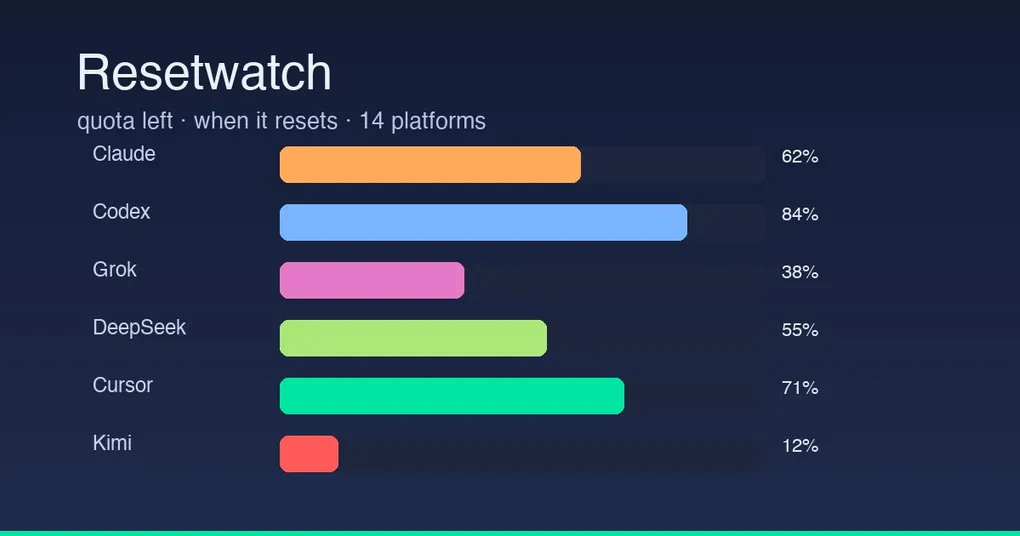
You know the moment: Claude is halfway through a big batch of code, and the screen pops “quota exhausted, try again tomorrow” — the third time this month you’ve hit a cap. What makes it worse is you had no idea how much was left or when it resets; you’d have to dig through each vendor’s website. Resetwatch, a new Hermes Desktop plugin (released August 20, already 47★), fixes exactly that: one screen showing how much quota you have left and when it comes back, across 14 platforms.
What It Is
Resetwatch is a Hermes Desktop plugin (MIT, by Adolanium). It renders live quota cards for the accounts you’re already signed into: a bar showing what’s left, plus the time until it fills back up. 14 platforms have live data today:
Nous Portal, Claude, Codex, OpenRouter, Cursor, Kimi, Grok, GLM, DeepSeek, OpenCode Go, Ollama Cloud, MiniMax, Novita, DeepInfra, AI Gateway
For platforms without a public quota endpoint (Gemini, Perplexity, anything else), you add a manual clock: paste the percent left and the reset time, and it becomes a card.
Three Things to Like
1. It names your plan. Not a generic “Claude 40% left” — it shows the actual tier: Claude displays Pro / Max / Max 5x / Max 20x, Codex shows Plus, Cursor shows Ultra, Kimi shows Advanced, GLM shows Lite / Pro / Max. Multiple OAuth accounts for the same vendor each get their own labelled card.
2. It does not scrape the web. Live rows come from logins already on your machine: the Hermes OAuth credential pool, Claude Code / Codex CLI local logins, each app’s own CLI (Kimi, Grok, GLM…), and API keys in Hermes env (DeepSeek, MiniMax, Novita…). No browser cookies, nothing leaves this machine — the only traffic is the same usage calls those apps already make for you.
3. It stays a page. No HUD, no chip, no side pane. Open it from the sidebar’s watch icon or press Ctrl/Cmd+Alt+R; click a section header to fold it, and folded state is remembered. It polls every 5 minutes while the page is open.
Install: Two Files
# Drop the plugin into Hermes Desktop's plugin directory
# macOS/Linux: ~/.hermes/desktop-plugins/resetwatch/
# Windows: %LOCALAPPDATA%\hermes\desktop-plugins\resetwatch\
# Copy two files: plugin.js and probe.py
The desktop picks it up within seconds (hot-reload); if it doesn’t appear, run “Reload desktop plugins” from the palette. For more desktop plugin patterns, see Hermes Desktop Skills Hub.
Where the Numbers Come From
- Nous dollars and renewal time come from the gateway (
usage.bars, thensubscription.stateif needed); - If the gateway exposes
account.usage, that RPC fills Claude, Codex, OpenRouter, and anything it already knows; - On stock Hermes,
probe.pyreads viashell.exec: everyanthropic/openai-codexrow inauth.json, plus local logins at~/.claude,~/.codex,~/.kimi-code,~/.grok,~/.zcode; - Env keys as fallback:
DEEPSEEK_API_KEY,OPENCODE_GO_API_KEY,OLLAMA_API_KEY,MINIMAX_API_KEY,NOVITA_API_KEY,DEEPINFRA_API_KEY,AI_GATEWAY_API_KEY.
In short: every AI credential already on your machine, read-only, summarized on one screen.
Who It’s For
- Anyone juggling two or three platforms (Claude + Codex + Grok) who is tired of tracking “when does which one reset”;
- Heavy users on multiple Max / Ultra / Advanced tiers who want to watch burn rate;
- Team budget-keepers: one screen showing every account’s remaining balance.
Release Status
Resetwatch is an independent community plugin (not built-in), released August 20 under MIT and actively maintained (updated Aug 21). It coexists fine with desktop plugins like Bot Mode — everything drops into desktop-plugins/ and works. For more desktop capabilities, see the v0.20.5 release notes.
Wrap-up
Quota anxiety is a daily reality for heavy AI users: you don’t know what’s left, so you only find out when you hit the wall. Resetwatch turns that into one screen you can glance at — live cards for 14 platforms, plan-aware, with nothing leaving your machine. Install it, and at least the next “quota exhausted” won’t be a surprise.