A plugin that could never finish signing in to Linear
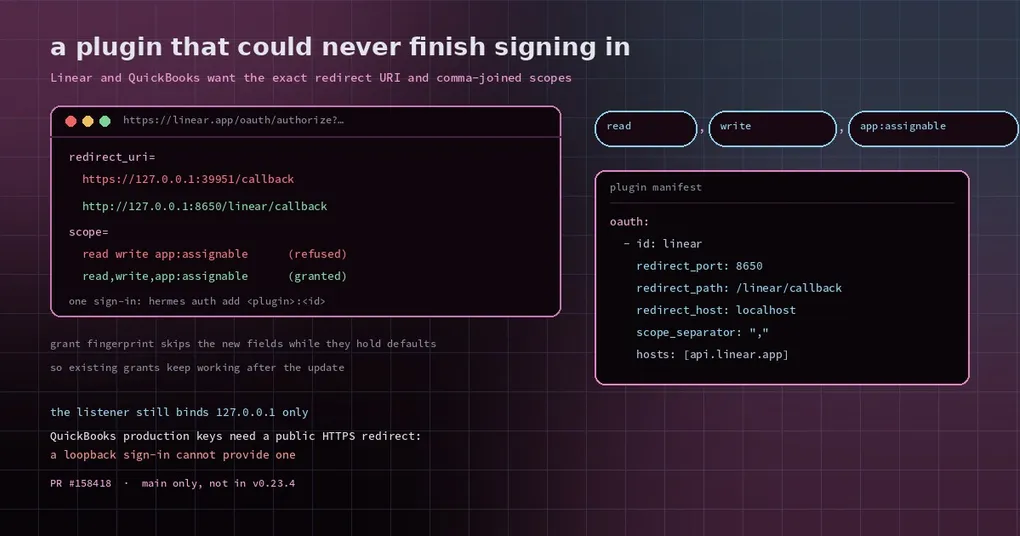
You spent a weekend building a Linear plugin for Hermes: read issues, post comments, create tasks from a status. The oauth: block is filled in from the docs, the tests pass, and there is one last step — letting a user sign in. You run hermes auth add my-linear:linear, the browser opens, you approve, and it comes back with a flat refusal: not every permission was granted, missing read, write, app:assignable.
You check three times. The scope names are right. The client id is right. The token URL is right. The problem is not in your manifest; it is in the request Hermes sent. The redirect address was a random port on 127.0.0.1, and the permission list was space-separated. Linear only accepts a redirect URI that matches its registered value character for character, and it wants its scopes comma-joined. Neither side is wrong. They just did not line up.
Why sign-in always stops one step short
OAuth’s authorization-code flow has a detail that is easy to skip: the redirect URI is normally fixed when the app is registered, and the authorization server compares it against the request literally. For local apps the usual answer is a loopback address on a random free port, because a fixed port gets taken. Services like Google are relaxed about loopback ports, so this works.
Not every service is relaxed. Linear and QuickBooks both want an exact redirect address registered in their dashboard first, and Linear also wants scopes joined by commas — while Hermes’ PKCE helper joined them with spaces in all three places it builds a scope string: the authorize URL, the stored grant metadata, and the refresh request.
So the manifest is fine and the generic flow is fine, and their defaults still never meet. Worse, the failure lands after the token exchange, so the user sees “permissions were not granted” and assumes they missed a checkbox.
Four fields for two kinds of strict server
PR #158418, merged November 27, adds four optional fields to a plugin’s oauth: entry. All are validated at plugin admission, like the rest of the manifest:
| Field | What it does | Default |
|---|---|---|
redirect_port |
Pins the loopback listener port (1024–65535), so the redirect URI is identical every time | unset: the OS picks a free port |
redirect_path |
The callback path | /callback |
redirect_host |
Host written into the redirect URI: 127.0.0.1 or localhost |
127.0.0.1 |
scope_separator |
How scopes are joined: space or comma | space |
A real Linear entry looks like this:
oauth:
  - id: linear
    authorize_url: https://linear.app/oauth/authorize
    token_url: https://api.linear.app/oauth/token
    scopes: [read, write, app:assignable, app:mentionable]
    client_id_env: LINEAR_CLIENT_ID
    client_secret_env: LINEAR_CLIENT_SECRET
    hosts: [api.linear.app]
    authorize_params: {actor: app}
    scope_separator: ","
    redirect_port: 8650
With no redirect_path, the callback is http://127.0.0.1:8650/callback — paste that into Linear’s app settings and the sign-in completes.
redirect_host exists for QuickBooks (Intuit), which refuses IP addresses in redirect URIs, so the entry writes http://localhost:<port><path> instead. The listener still binds 127.0.0.1 only; localhost is just what the URL says.
A real before-and-after: random port versus pinned port
The PR’s repro is convincing: the same plugin manifest against the same local HTTPS identity provider, driven through a real hermes auth add on both trees.
| Before | After | |
|---|---|---|
Authorize scope |
read write app:assignable |
read,write,app:assignable |
Authorize redirect_uri |
http://127.0.0.1:39951/callback (random) |
http://127.0.0.1:18650/linear/callback |
Token exchange redirect_uri |
same random port | same pinned port |
| Result | exit 1, “not every permission was granted” | exit 0, “Signed in to linear”, grant stored |
A related check came along: the granted-scope response is now read back whether the identity provider answers with commas or whitespace. And scope_separator is not plugin-only — model-provider plugins use the same OAuthPKCEConfig, so they get it too.
Your existing grants do not break
This is where updates usually go wrong. Hermes fingerprints every grant, and a field change means signing in again. If the four new fields joined the fingerprint, every existing grant would go stale the moment you upgraded — users would open a plugin next morning and be asked to sign in, assuming something broke.
So the fingerprint skips the new fields while they hold their defaults. Leave them alone and old grants keep working; change any of them (port, path, host, separator) and the entry asks for a fresh sign-in, exactly like any other oauth: change. That is correct: a different redirect address means the value registered with the provider must change too.
Using it
For a user it is one command:
hermes auth add my-linear:linearThe plugin’s key, a colon, the entry’s id. It is the standard PKCE login — a loopback callback, with an SSH tunnel hint when Hermes runs on a remote host (the OAuth over SSH guide covers that case). The grant lives in the active profile’s auth.json; check it with hermes auth status my-linear:linear, refresh with hermes auth refresh, remove it with hermes auth logout.
Three behaviours worth knowing: Hermes refreshes on use once less than two minutes remain; it never starts a sign-in under the gateway or cron, because a sign-in needs a person present; and if the provider grants fewer scopes than declared, nothing is saved — which is why the failure above ends with no grant at all.
For plugin authors there is no token file to maintain. Calls go through credentialed_provider_request, and Hermes injects and refreshes the credential. The catalog, admission checks and SHA pinning are in the plugin catalog guide; the full token lifecycle, MCP servers included, is in MCP OAuth token lifecycle.
Where it does not help
QuickBooks production keys require a public HTTPS redirect. A loopback sign-in cannot provide one, so only development (sandbox) keys work this way. That is Intuit’s policy, not a Hermes limitation — and the developer docs state it instead of letting you find out at the last step.
A pinned port also means the sign-in fails if something else holds it. Hermes says so directly — the port is in use, or pick a free oauth.redirect_port and retry — rather than reporting a vague timeout.
Status
The change is on main; it is not in the v0.23.4 stable package (its release page does not mention it). On a stable install, a plugin written this way still stops at the same place. Full flag lists live in the hermes auth reference, and the rest of the manifest in hermes plugins.
Update (2026-11-28): these changes shipped in v0.23.5 (November 28) —
hermes updatebrings them in. The “not in v0.23.4 / onmainonly” wording above is a snapshot from publication time.