Why Your MCP Tools Keep Logging You Out: Inside the OAuth Token Lifecycle
You wired Linear, Figma, and Notion into Hermes last month. hermes mcp list showed three healthy servers and every tool call just worked. This morning every MCP tool answers with an authorization error — Desktop flashed one toast last night, you were in a meeting, and you dismissed it. You re-authenticate Linear, and by the afternoon Figma has dropped out too. The pattern repeats almost weekly whenever Hermes is running on both your laptop and the office machine, and you start to wonder what you configured wrong. Probably nothing: the fault is in the long token lifecycle behind those connections, and Hermes just shipped four fixes aimed squarely at it.
The handshake behind those tools: access tokens, refresh tokens, and “use once”
MCP (Model Context Protocol) is the protocol that lets Hermes call tools an external service exposes; Linear, Figma, and Notion do not accept a static API key, they hand out credentials through OAuth. When you finish an OAuth login you get two things:
- An access token — short-lived, usually thirty to sixty minutes. It travels with every tool call.
- A refresh token — long-lived. Its only job is to buy you a new access token.
So that a stolen refresh token stops being useful quickly, modern authorization servers enable rotation: each time you exchange your refresh token for a new access token, the old refresh token is invalidated on the spot and a fresh one is issued. Sensible design — and it comes with a safety net called reuse detection: if the same refresh token shows up a second time, the server cannot tell a flaky network retry from a stolen credential, so it takes the safe route and revokes the entire grant (every token for that client and that user), then asks you to sign in again.
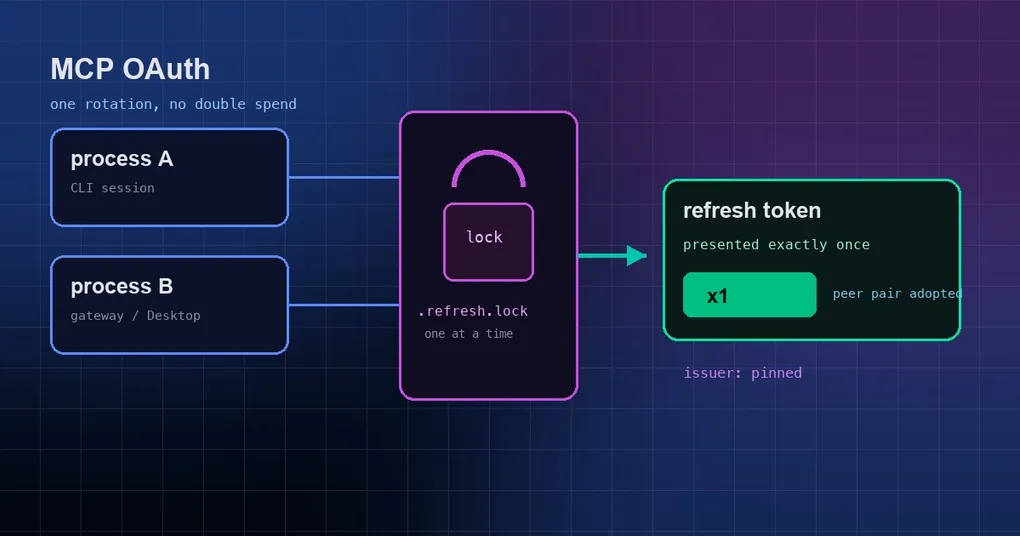
That is where a normal install runs into trouble. Desktop, the dashboard, and a background gateway can all be running on one machine, or you have two profiles, and they share the same token file at ~/.hermes/mcp-tokens/linear.json. When the access token expires, two processes notice at roughly the same moment and each presents the same refresh token:
- Process A gets there first, receives a fresh pair, and the old refresh token is voided.
- Process B is a few hundred milliseconds behind and presents that now-voided refresh token.
- The server calls it a replay and revokes the whole grant — including the healthy, brand-new tokens process A just received.
Both processes go dark, for a reason that looks like nonsense from the outside: it worked a second ago. Closing that window is what PR #111186 is about.
Fix one: a cross-process fence so a rotated refresh token is presented exactly once
Hermes now puts a cross-process lock next to the token file — a fence. The lock comes from the kernel (flock on Linux and macOS, msvcrt.locking on Windows) and it locks a file handle, not a file’s existence, so a crashed process leaving a stray lock file behind cannot fool it. The lock lives in a sibling file named like linear.json.refresh.lock.
The whole sequence — read the refresh token, POST to the authorization server, write the result back to disk — now happens inside that lock, which changes the behaviour to:
- Re-read the disk once the lock is held. If a peer process completed a rotation while we waited, and the pair it wrote back is still live, this process simply adopts the peer’s fresh tokens and skips the POST instead of presenting a token that has already been spent.
- If the peer’s pair has expired, this process POSTs the peer’s refresh token — that is the only currently valid one — rather than the stale copy in its own memory.
- A missing expiry counts as live. When the server does not state a lifetime, Hermes does not assume the token is dead.
- No lock, no refresh. On fence timeout the refresh fails closed instead of gambling on a replay. Only contention error codes mean “a peer holds the fence”; anything else fails fast rather than waiting.
What it means for you: running Desktop, the dashboard, and a gateway at once is safe, and so is having Linear connected in two profiles. Drop-outs stop being random and unexplainable — a refresh either works, or it fails with a clear error.
Fix two: refresh tokens are pinned to the issuer that granted them
The next hazard is quieter. An OAuth authorization server advertises its own identity address in its metadata; that value is the issuer. Hermes discovers that metadata from the URL the MCP server publishes — and if what sits behind that URL changes character (a service migration, someone editing the metadata, or worse, a hijacked domain), Hermes would hand a long-lived refresh token to a server that never issued it. A refresh token is worth far more than an access token; that handoff is a long-term credential given to a stranger.
The fix: Hermes records a hermes_issuer field alongside the cached tokens, noting who originally granted them. That field is Hermes bookkeeping only — it is stripped before the SDK validates the token and never goes out on the wire. Every time it initializes a connection, Hermes compares the stored issuer with the currently discovered one:
- Mismatch → the refresh token is dropped, in memory and on disk, while the still-valid access token is kept, because it remains valid for the server that issued it. It keeps working until it expires, and then a normal re-authorization runs against the new issuer.
- Match → nothing happens, the stored tokens keep working.
- Legacy token files with no recorded issuer (any install that predates the field) → the current discovered issuer is adopted once and recorded, instead of bouncing you into a forced re-login. That is a deliberate choice: Hermes has a lot of existing installs whose token files predate the field, and forcing them all to re-authenticate would be pure annoyance.
Worth noting: this diverges on purpose from a sibling change in codex (openai/codex), which hard-fails on a missing issuer because its credential store shipped the field from day one.
Fix three: RFC 9207, and the one Figma exception
RFC 9207 is an OAuth extension: the authorization server appends an iss parameter when it redirects the browser back to the client, declaring “I am who I say I am”. With it, the client can confirm the callback really came from the authorization server it trusts, rather than an authorization code injected by a different one — it is a defence against authorization-server mix-up attacks.
There were two opposite failure modes here, and Hermes fixed one of each:
The relays dropped iss. When a server advertises support for that parameter in its metadata and then omits it, the underlying SDK rejects the callback with OAuthFlowError: Authorization response missing iss parameter. The CLI path always passed it through, but the dashboard, Desktop, and TUI callback relays did not carry iss all the way to the MCP client — so against a properly RFC 9207 compliant server like Cloudflare or Resend, logging in from the graphical interfaces was a dead end. Every relay now passes the parameter along.
Figma advertises what it does not send. Figma’s authorization server (https://api.figma.com) claims support for iss and never includes it, so every valid authorization code was being discarded by the SDK and hermes mcp login figma could never complete. Hermes opens a hole for exactly that one issuer: a callback carrying a code but no iss gets the missing value filled in from the discovered metadata issuer, with a warning logged. An iss that is present but different is still rejected, and every other server keeps the strict rule. There is no toggle and no new environment variable.
Fix four: a once-a-day re-auth nudge in Desktop
Once a token dies, the server gets parked and no longer tries to open a browser tab — nobody is sitting there to click Allow. That is a good thing, except it made a dead token invisible: the health check raised one warning toast at the moment the state flipped, then stayed quiet for the rest of the app session. Dismiss that toast on Monday and the server sits parked until you happen to open the Capabilities page.
Desktop now nudges once a day instead: on the transition into a bad state, and again once the 24-hour snooze has lapsed if the server is still broken. It never nudges while tokens are healthy. The toast carries two buttons:
- Sign in — routes to the MCP page’s existing authenticate button. Nothing launches an OAuth flow in the background on its own.
- Disable — calls the existing endpoint to set
enabled: falsefor that server. The gateway’s config reconcile chore tears it down within about 60 seconds, and ahermes servebackend drops it on the next/reload-mcp.
The snooze is recorded per profile and per server, so one broken server cannot nag you a dozen times a day, and a server you already acknowledged does not go silent forever.
Which PR fixed what
| PR | Label | Behaviour change |
|---|---|---|
| #95246 | type/security (2026-09-14) | Stored refresh tokens can no longer be sent to a different issuer: on mismatch the refresh token is dropped and the unexpired access token kept; legacy token files adopt the discovered issuer once |
| #111186 | type/bug, P1 (2026-09-15) | Refresh is fenced across processes: a rotated refresh token is presented exactly once, a peer’s fresh pair is adopted with the POST skipped, and a fence timeout fails closed |
| #111628 | type/bug, P2 (2026-09-15) | OAuth login completes against RFC 9207 servers from the dashboard, Desktop, and TUI (Cloudflare, Resend) |
| #112059 | type/bug, P2 (2026-09-15) | Figma login completes despite the omitted iss parameter; the strict rule is relaxed for that one issuer only |
| #110078 | type/feature (2026-09-13) | Desktop nudges once a day for MCP servers needing re-auth, with Sign in and Disable |
| #111481 | fix (2026-09-15) | Dashboard-served profiles keep their own MCP connections and credentials instead of borrowing another profile’s session |
What to do when an MCP server asks you to sign in again
Work through these in order; most cases resolve in one or two steps.
- Read the message before rebuilding anything. “Refresh failed” and “the issuer changed” are different classes of problem — the first is an expired or revoked token, the second means the authorization server on that side moved.
- Find the affected server.
hermes mcp listshows which servers are parked, andhermes mcp test linearprobes a single connection. - Re-authorize once.
hermes mcp login linearfor one server,hermes mcp reauth --allto redo every OAuth server. In Desktop, just click Sign in on the toast. - Let the session see the new tokens. A session’s tool set is frozen when it starts, so use
/reload-mcpafter re-authorizing, or open a fresh session. - Upgrade both machines. The fence is cooperative — it needs every process participating. Upgrade one host and the other keeps replaying tokens the old way, so make sure both include PR #111186.
- Remember that a gateway never opens a browser. If you run a gateway on a server, a dead token only leaves a warning in the log; complete the flow somewhere else and it reconnects on the next probe.
- If in doubt, reset. Token files live under
~/.hermes/mcp-tokens/, one per server name. Deleting the right one and runninghermes mcp loginagain is the cleanest reset available. - Disable what you no longer use. Nobody needs a daily reminder about an integration you abandoned last quarter.
If Hermes lives on a remote host with no browser, the flow is different — SSH port forwarding, pasting the callback URL back, and device codes are covered in completing OAuth on a remote server. For the exact subcommand flags, see the hermes mcp command reference, and if you are curating which servers to connect in the first place, the official remote MCP catalog is the better starting point than random search results.
The short version
Two of the four fixes are the same principle seen from different angles: a credential only goes to the server that issued it (issuer binding), and a rotated refresh token is consumed exactly once (the cross-process fence). The third enforces caller identity on every path that a callback can travel (RFC 9207, with Figma’s single exception), and the fourth is a human patch — when something needs your attention, say so, once a day, with a button that does it.
In practice that means MCP drop-outs stop feeling like bad luck. Run Desktop, the dashboard, and a gateway at the same time; when a server genuinely does need you, you will hear about it the same day rather than discovering that every tool has been broken since Tuesday. hermes update picks all of it up — the fixes are in the 0.21.x line, and everything after the v0.21.2 stability patch already includes them.