Hermes Mobile Beta Is Out: What the iOS and Android Apps Really Do (and Where They Still Break)
You hand the research task to Hermes on your desk, grab your phone, and head for the elevator. Somewhere around the third floor it hits you: you scoped it too wide. Papers only. Skip the blog posts.
A year ago that meant either carrying the thought around until you got back to your desk, or pulling out Telegram and typing a paragraph of context into a chat window. As of this week there is an official answer — a Hermes app for your phone. This post is not another “the app is finally here” announcement. It covers the three things that actually matter: what shipped, whether you can install it today, and which parts of it hold up once you do.
The phone is a remote control. The agent does not move.
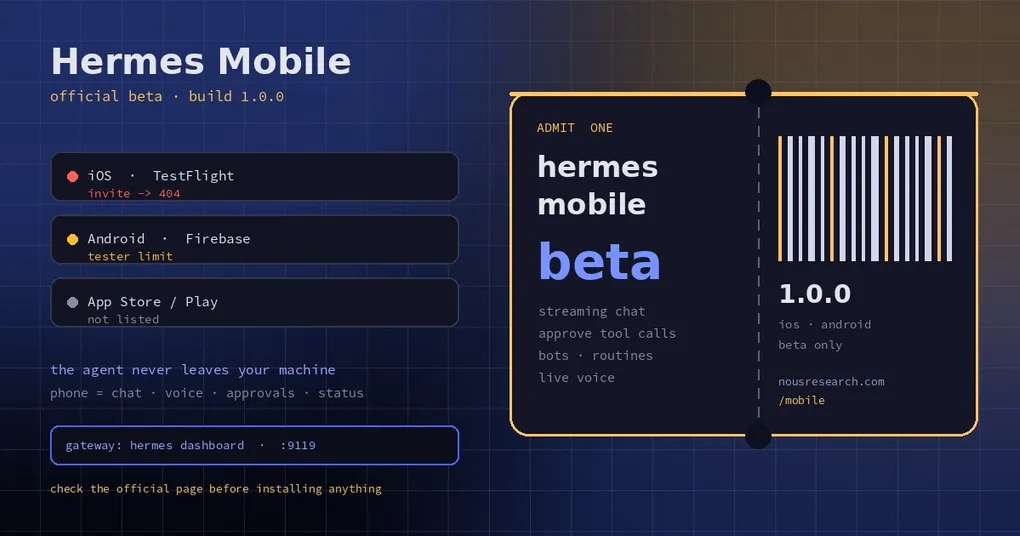
This is the single most misunderstood thing about Hermes Mobile, and the official announcement is explicit about it: the app connects to your own Hermes gateway. The model, the tools, the memory, the project files — all of it stays on the machine it was already running on. The phone handles three jobs: talk, watch progress, tap approve.
  Phone app (chat / voice / approvals / status)
        |  authenticated connection (direct address, SSH tunnel, or Tailscale)
        v
  Your gateway (hermes dashboard or hermes serve, default port 9119)
        |
        v
  Models | tools | skills | project files | cron
Once that split is clear, most of the beta’s behaviour makes sense. A tester’s report from October 31 nails it: after about 55 minutes the Android app froze and then died, while the same turn kept running on the server and finished normally — the only trace on the backend was a WebSocket closing with code 1006 (issue #147323). The UI fell over; the work did not.
The reverse is also true. When the phone says it cannot connect, the app is rarely the broken part. Either the path from phone to gateway is wrong, or the gateway’s own auth did not pass.
What actually shipped
On October 30, 2026, at NousCon in New York, Nous Research opened an official mobile beta and pointed everyone at hermes-agent.nousresearch.com/mobile. That page does exactly one thing: you pick a platform, it hands you an invite.
| Item | Reality |
|---|---|
| iOS | Apple TestFlight public invite |
| Android | Firebase App Distribution — not Google Play |
| Package name | ai.nousresearch.hermes.mobile |
| Version | 1.0.0; builds seen in tester reports are versionCode 21 |
| Store status | Neither platform is in an app store; no general-availability date announced |
Per the official announcement, the pitch is three things: streaming chat, approving tool calls from your phone, and managing bots and routines on the go.
One detail deserves its own paragraph. Five days before the beta, Nous publicly warned that there were no official Hermes apps in the app stores yet, and that third-party apps borrowing the name and the look were likely scams rather than community projects. So do not search the stores for it. Start from the official page.
There is also a naming collision worth knowing about: the Hermes Mobile entry in our ecosystem directory is a community-built Android client, unrelated to this release. Same name, different project.
Can you install it today? Check both doors first
The beta being open does not mean the invite works when you click it. I checked both links today, November 2, and this is the part most coverage skips.
The iOS invite is currently dead. The official page hands out testflight.apple.com/join/U8e1zmbc, which returns 404 — Apple’s bare 896-byte “Not Found” page, not a “this beta is full” screen. The distinction matters: a full beta still renders the app page and tells you it is full; a 404 means the public link itself is no longer live (revoked, expired, or replaced). Meanwhile /mobile still answers 200 and still serves that same old link. Multiple users reproduced the 404 with desktop, iPhone, and TestFlight user agents, plus cache-busting parameters (issue #147556, and the comment thread on issue #147269).
The Android invite is at capacity. Open the Firebase link, sign in with Google, and you get a blunt message: This app is at the tester limit, along with advice to ask the developer to free up slots. Several people on different machines and accounts confirmed the same result (see the comments on issue #147269).
So the real state of play: some people are already running the app and filing bugs; everyone else is stuck at the door waiting for slots or a fixed link. It is not your network, and it is not a regional block.
What your backend needs to look like
An install by itself gets you an empty shell. The app needs something to talk to. From the configuration that shows up across tester reports, the checklist looks like this:
- Run the gateway. Usually
hermes dashboard(port 9119 by default, with dashboard auth) orhermes servefor the web surface. See the hermes dashboard command reference for the flags. - Make it routable from the phone. Same Wi-Fi is the easy path. Off-network, Tailscale is what testers use most; the app also has an SSH tunnel mode.
- Do not expose port 9119 to the open internet. Behind that port is an agent that can run commands and read files. Reach it over a Tailscale range, or put Tailscale Serve in front for HTTPS and point
webapp.public_urlat that origin. - Pick an auth method. The app supports two routes: browser sign-in with a Nous account (callback lands on
/auth/callback), or Direct mode with an address plus a password using the dashboard’sbasic_auth. - Install the push plugin if you want notifications. The gateway needs
hermes-mobile-push, and it is not discoverable in the catalog today —hermes plugins search hermes-mobile-pushreturnsNo catalog entries matched, so it has to be dropped into the user plugin directory by hand (issue #147651). Without it, do not expect a “reply finished” push. - Keep the backend reasonably current. Backends in the reports are mostly v0.22.5 (2026.9.24).
One more thing before you start: “connect” is not a single mode. There is Direct (address plus browser sign-in or password), an SSH & Mosh tunnel, and a direct dial against the dashboard address. They fail in different ways, which is exactly what the next section shows.
What already works in 1.0.0
There is no official feature list, and the docs site has no mobile setup guide yet. So this table is assembled from real tester reports, each with an issue number you can check yourself.
| Capability | Status | Notes |
|---|---|---|
| Streaming chat | Works | Long replies and Markdown render; sessions, Projects and Artifacts screens exist |
| Model picker | Works, with display bugs | Reads /api/model/options from the gateway; one backend returned 69 ids under the nous group and 407 under custom:openrouter |
| Live Voice | Works, handles interruptions | Not reachable from an empty chat by default — see the workaround below |
| Tool-call approvals | Listed in the announcement | Approving from a phone is convenient and, in equal measure, a risk surface |
| Bots and routines | Listed in the announcement | Cron deliveries land in Bot Chat but render wrong in the app — see below |
| System page | Works | Shows host address, Hermes version, release date, health, auth mode |
| Push notifications | Incomplete | A “thinking” notification arrives, a completion one does not; confirm the push plugin first |
| Inline HTML reports | Missing | Generated dashboards arrive as downloadable files, not rendered in chat |
Live Voice has a genuinely useful workaround, documented in issue #147322: by default a brand new chat has no way to start live voice until you send a text message first. Change Settings → Chat → Collapsed Voice Button from voice message to live voice, and both new chats and the quick-settings tile drop straight into a live voice session; regular voice messages can still be recorded from the composer. The reporter’s words: one-tap start matters a lot when driving. Voice itself, interruptions included, works well.
Six rough edges to know before you install
This is a beta, and these are filed issues, not rumours.
1. Long sessions eat memory. The same tester’s timeline is precise: around 55 minutes of switching between live voice and long streamed replies, then an ANR (the main thread waiting for garbage collection), then thirteen seconds later java.lang.OutOfMemoryError with the full 256 MB heap, on a Galaxy S25 running Android 17 (#147323). It happened once, and it is exactly the kind of scenario worth watching.
2. Long replies do not scroll. The same reporter also filed stuttering scrolling and streamed replies that cannot be scrolled into view (#147321).
3. Chat bubbles clip their text. On first paint the bottom of a bubble is cut off mid-line, on both the user and agent side; scroll away and back and it renders fully — the content is intact, the measured height is wrong (#147723).
4. Model names truncate into each other. deepseek/deepseek-v4.1-flash and deepseek/deepseek-v4.1-flash-1017 both display as deepseek/deepseek-v4.1-fl… on a phone, so the only characters that distinguish them are the ones being cut (#147319).
5. Sign-in can open the callback twice. On Android, intermittently: the browser lands on an invalid_grant error page while the app actually signs in fine. The gateway log shows two /auth/callback hits 697 ms apart, the second redeeming an already-consumed code — a losing duplicate tab rendered on screen (#147738). “It worked but told me it failed” is the fastest way to make someone retry a flow that was already fine.
6. Chat WebSockets get a 403 on remote gateways. Auth passes, then the WebSocket is refused and the app says “Hermes signed you in, but turned down the chat connection.” The upgrade carries a ticket in a subprotocol and no Origin header from a non-loopback peer, so it is treated as a native local Desktop dial and closed before the ticket gate ever runs (#147361). Switching to SSH & Mosh is not automatically a fix either: on iOS, SSH and dashboard auth both succeeded server-side while the app reported a credential error (#147726).
Two more operational ones worth bookmarking. First, the hermes-session-reset-policy plugin never fires for source=gui sessions — the dashboard / Desktop / mobile path — so those sessions never idle-reset; one user logged 47 context compactions in six hours and then stopped getting answers on the phone (#147660). Second, cron deliveries with deliver: bot-chat render in the app as messages the user typed, while the same delivery is correctly styled as an outbound bot message on Telegram (#147573).
As for the “no notification when the reply completes” report (#147345), the reporter closed it himself, suspecting a missing component. Given that the push plugin is not in the catalog, that explanation lines up: it is probably not a broken notification system, it is a missing link in the chain. If you want the full picture on notifications in Hermes generally, our notification and attention guide covers the config side.
A ten-minute acceptance test once you get in
Do not start by installing a pile of plugins. Run one low-risk task through the whole path first. This sequence hits every failure mode listed above:
- New chat, ask something answerable in one line. Confirm streaming works.
- Ask for a long answer — a thousand words or more — and watch whether scrolling keeps up.
- Background the app, come back, check the session and its full content survive.
- Start a live voice session, interrupt it mid-sentence, see whether it picks the thread back up.
- Trigger a tool call that needs approval. Approve or deny it from the phone.
- Open the System page and compare the backend version and health with what the host reports.
- Write down three things: app build number, phone OS version, and the backend’s
hermes --version. Those three turn “it does not work” into a bug report someone can act on.
If you are still on the backend step, start with the install guide, then read how the web app and the desktop app divide the work — the mobile app talks to the same webapp endpoints, and sign-in rides the same handoff (Nous sign-in and app handoff goes deeper).
What this release actually changes
Put all the rough edges together and the positioning is still clear: Hermes Mobile is not “the agent, crammed into a phone.” It is “you, let out of the office.”
The old way to judge an agent was counting tools and models. There is now a second question: when I am nowhere near my desk, can I reach it, add one sentence, approve one command, and keep the work moving? That question matters more than a feature list, because it decides whether you will ever hand a long-running server task to an agent at all.
Today’s honest answer: yes, but do not bet everything on the phone. Starting short tasks, checking progress, adding a requirement, approving a command, dictating an idea — all of that works. Expecting the phone to carry a multi-hour task on its own, with every notification landing on time, overestimates it.
When the iOS invite is replaced and Firebase frees up slots, check the same official page again. And skip the APK links in random threads — the agent on your machine deserves a better provenance than that.