Your Memory Provider Moved Out of Core — the Upgrade Puts It Back
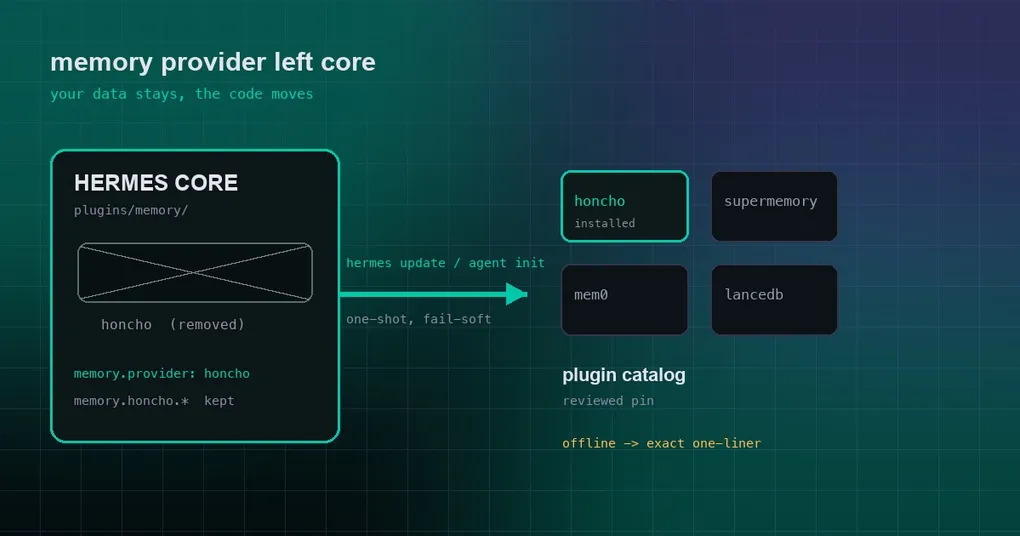
You run hermes update, restart the agent, and ask it what happened with yesterday’s refactor. It pauses, then answers that it has no record of anything. You open config.yaml: memory.provider: honcho is still right there, and the whole memory.honcho block is intact. The only thing missing is the code — the provider has moved out of the core repository, and your upgrade replaced only the core half.
Nothing was lost. What you are looking at is the nastiest kind of failure: a config that points at an implementation that no longer exists. PR #114569, merged into main on 18 September 2026, is built for exactly that state: when Hermes notices that your configured memory provider is absent, it installs it back from the plugin catalog at the reviewed pin. Here is how it decides, what path the install takes, what happens when it cannot install, and whether you need to do anything.
What stays the same: name, config, data
The reassuring part of this migration is that only the code moves. When a bundled plugins/memory/<name> becomes a standalone catalog plugin:
- the provider name stays (
memory.provider: honchokeeps working); - the config section stays (every key under
memory.<name>is untouched); - the data directory stays (everything your agent remembered is where it was);
- the tool names stay (the instructions in its memory about how to use memory do not need re-learning).
The single change is that the code now lives under HERMES_HOME/plugins/<name>. In theory the user-visible effect should have been a quiet reinstall. This PR is what makes that theory true.
Two hooks: hermes update and agent init
The new module hermes_cli/memory_provider_migration.py exposes one entry point, migrate_home(). It does three things: read memory.provider for that home, check whether the name still resolves anywhere Hermes looks (the bundled directory, that home’s user plugins, an entry point), and — only when it resolves nowhere — look for a catalog entry of the same name. All three have to line up before anything is installed.
Two different call sites cover two different upgrade habits:
hermes updateruns it for every profile home sharing the virtualenv. That is the natural place: the update is already rebuilding dependencies, and plugin dependencies get re-applied under the core pins.- Agent init runs it when
load_memory_providerreturns None — that is, when the provider cannot be loaded at all — once per process, per name. This hook exists for desktop users, who update through the app and never runhermes updateby hand.
The install itself goes through the normal plugin install path: the catalog entry’s reviewed pin, the kill list, dependency constraints, and enable-on-install. Nothing gets a shortcut for being automatic, and a custom source is never substituted.
One switch matters here. Because this step installs code, it honours security.allow_lazy_installs (on by default). If you turned that off for security reasons, the automatic migration will not happen — and the log says so, rather than leaving memory quietly dead.
When it cannot install: a real command, not silent amnesia
The best engineering habit in this change is that failure is visible and immediately actionable. Three paths, three outputs:
| Situation | Behaviour |
|---|---|
| The catalog has no entry for that provider | One warning naming the exact hermes plugins install <source> to run, or suggesting a different memory.provider |
| The catalog has it, but the install fails (network, uv, kill list) | The installer’s own error text, plus the same one-liner |
security.allow_lazy_installs is off |
A log line stating the config prevented the automatic install |
Before this, the report was a DEBUG-level line and nothing else, which is why the user-visible symptom was simply “the agent suddenly remembers nothing”. There is also a deliberately restrained rule inside the function: it never raises. The comment says it plainly — memory being down must not take the update or the agent down with it.
A small install-syntax fix that migration depends on
The same PR makes hermes plugins install owner/repo#subdir parse correctly. Before, the # was glued into the clone URL, so any plugin that ships in a subdirectory of its main repo could not be installed this way.
That syntax is not academic. Honcho ships its plugin inside its main repository, so its post-migration source is plastic-labs/honcho#hermes-plugin-honcho; supermemory’s is supermemoryai/hermes-supermemory. The PR verified the whole path on a real install: with the bundled honcho and supermemory deleted from a probe checkout, memory.provider: honcho set, and a real AIAgent(), agent init installed plugins/honcho from the maintainer’s repo with its dependencies (honcho-ai, httpx) resolved inside the core pins and loaded it. The desktop config panel for honcho still rendered its 33 fields, the hermes honcho CLI was still discovered, and a second start was a no-op.
What to do now: a five-minute check
This PR is groundwork — it removes nothing from core by itself. But the direction is public: the built-in memory providers are heading to their maintainers’ repos and the catalog (the PR notes the discussion with the Hindsight, Honcho and Supermemory maintainers). So it is worth knowing where you stand:
- See which provider you run:
hermes config get memory.provider. If it is one of the bundled ones (honcho, supermemory, mem0 and friends), note the name. - Check whether it is currently bundled or a standalone plugin:
hermes plugins list. After a future upgrade, seeing it installed from the maintainer’s repo is expected, not a problem. - If some upgrade ever leaves the agent amnesiac, run the
hermes plugins installline from the log first. Once memory is back, checkhermes doctorfor the health of the state database and WAL — the large-WAL diagnosis we covered in the live-writer guide is the place to start.
If you want the broader picture first, the plugin catalog guide and the hermes plugins reference explain how catalog entries are reviewed and installed. And if you use Honcho for session and workspace routing, the settings in that routing guide keep working unchanged after the migration.
Release status
These commits merged into main on 18 September 2026, and the newest tag is v0.21.3 (tag name v2026.9.14, released 14 September), so the migration hooks are not in a tagged release yet. Git installs that run hermes update already have them; Docker image and cloud users get them with the next tag. Check where you are:
hermes --version
hermes update
For context, the v0.21.3 release page notes that the full curated notes for everything since v0.21.0 ship with v0.22.0 — expect the memory-provider move to be one of the sections worth reading there.
The lesson
The interesting part is not the auto-install. It is the failure class this exposes: when a config references an implementation that moved elsewhere, the user does not see an error — they see a capability quietly disappear. Three habits are worth stealing from the fix: treat “the implementation is missing” as a first-class state worth detecting, route the automatic repair through the already-reviewed path instead of a shortcut, and when repair is impossible, print a command someone can actually run — from code that is guaranteed never to take the upgrade or the agent down with it.