Why Hermes Honcho Memory Lands in the Wrong Project
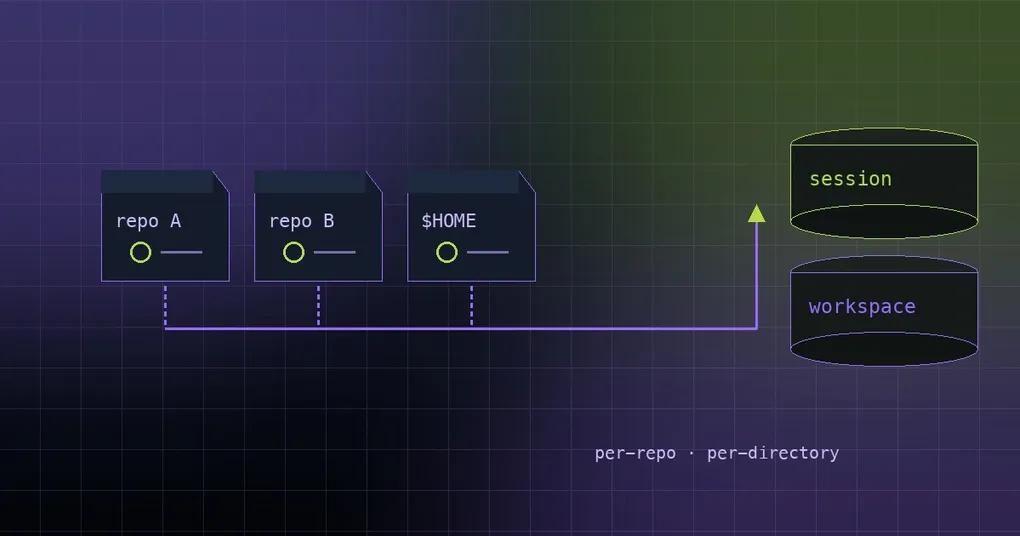
You keep three repos: a backend monorepo, a frontend, and an ops-scripts folder you have not touched in two years. Last week you rewrote the refund flow in the monorepo. Today you open Hermes inside the ops folder and ask what happened with that refund refactor — and it answers confidently, in detail, about a project you have never discussed in this directory. The reverse is worse: you clone a repo, have not written a line, and the first conversation already “remembers” your whole home directory. You run Hermes per project precisely so each repo gets its own memory. Honcho was filing it somewhere else.
The prompts were fine. The filing destination was not. PR #112602 (merged 2026-09-16) fixes the two code paths that routed sessions to the wrong place. Here is what broke, how to configure sessionStrategy so it sticks, and how to tell which session your memory actually landed in.
Two terms, one sentence each
Honcho is one of Hermes’ memory providers: it models you as a user profile that persists across sessions — user representation, peer card — instead of treating each conversation as an island.
sessionStrategy decides how Honcho sessions (think: memory buckets) map onto your work. The default is per-directory, and there are four settings:
| sessionStrategy | What it does |
|---|---|
per-session |
Each hermes run gets a fresh session; memory comes back through tools. The docs recommend this for new users |
per-directory |
One session per working directory; context accumulates across runs (default) |
per-repo |
One session per git repository |
global |
A single session across every directory |
One related detail worth separating from all of this: in hybrid / context mode Honcho injects two layers of context into the system prompt every turn — a base layer (session summary, user representation, peer card, AI self-representation) and a dialectic supplement built by an LLM. contextCadence defaults to 1, dialecticCadence to 2 (docs suggest 1–5), and the concatenated result is truncated to the contextTokens budget. Session memory and user-level profile are two different things; blurring them makes routing bugs much harder to diagnose.
If you would rather keep memory on your own disk, the LanceDB route is covered in how Hermes does semantic memory — same problem, different storage.
The symptom: three repos, one memory
Three flavours of the same complaint, all under one configuration:
- You ask about repo B from repo A, and Honcho pulls up B’s details.
- A brand-new repository arrives pre-loaded with preferences and conclusions from old projects.
- Your config says
per-repo, but the agent behaves likeglobal.
All three mean one thing: every project is landing in the same session — and that session is not named after any of your repos.
Cause one: an auto-generated title silently renames the session
Hermes writes chat titles for you. Their provenance is derived or llm (the same is true of lineage titles on Desktop branches). They exist to help you recognise conversations in a list — display metadata.
The old code disagreed. If a session had a title at all, that title took part in deriving the session name. So an auto-title like “Refactor the billing module” pulled the conversation off the repo’s session and renamed it to Refactor-the-billing-module. Your sessionStrategy was still configured; it just was not being consulted.
Cause two: resolution used the launch directory, not the workspace
This one is quieter. Session-key resolution ran against os.getcwd() — the backend process’s launch directory. Under Desktop or a messaging gateway, that process typically starts in $HOME, so no matter which repo you were chatting from, the workspace Honcho saw was your home directory. Every project collapsed into a single bucket named home.
That is why so many setups looked “global” while the config file said otherwise.
What PR #112602 changed
The fix is deliberately narrow — one change per bug, both on the resolution path:
plugins/memory/honcho/client.py::_resolve_session_name_base— a title whose provenance isderivedorllmis display metadata and skips the title branch entirely. An explicit/title(provenanceuser) still overrides. A title with no recorded source keeps the old behaviour.plugins/memory/honcho/__init__.py::_resolve_session_key— resolves againstkwargs["cwd"]orresolve_agent_cwd()(pinned session cwd →TERMINAL_CWD→ launch directory): the same contract system-prompt and context-file discovery already use, instead ofos.getcwd().hermes_state_common.py— theTITLE_SOURCE_*constants live in the cycle-safe sibling module, soSessionDBand the plugin read the same vocabulary.agent/agent_init.py—AIAgent(cwd=...)stampsagent.session_cwd, and_memory_provider_init_kwargspasses bothsession_title_sourceandcwdto the provider.tui_gateway/*— the eager-resume, branch, compute-host and deferred-build paths passcwd_override(their session record is not yet in_sessions, so_set_session_contextwould otherwise clear the cwd). A workspace moving during a deferred build also reaches the built agent.
Precedence is worth memorising, because it explains what happens when several rules could apply. Messaging gateways keep their stable per-chat session key regardless of strategy or title. For other sessions: per-session identity → manual directory mapping → explicit title → the configured strategy, first match wins.
The merge was validated end to end with real imports (real SessionDB, real HonchoMemoryProvider, process cwd set to a fake $HOME, session cwd bound to a git repo named myapp, strategy per-repo):
| Case | Before | After |
|---|---|---|
| no title | home |
myapp |
| LLM title “Refactor the billing module” | Refactor-the-billing-module |
myapp |
explicit /title My Explicit Name |
My-Explicit-Name |
My-Explicit-Name |
That third row is intentional: a title you typed is still an override.
Configuring sessionStrategy properly
The wizard is still the least error-prone install path — it asks about your gateway setup and writes the keys for you:
hermes memory setup # select "honcho" from the provider listConfigured by hand, config.yaml needs at least this much:
# ~/.hermes/config.yaml
memory:
  provider: honcho
echo 'HONCHO_API_KEY=***' >> ~/.hermes/.envGrab a key at honcho.dev. Settings like sessionStrategy live in the Honcho provider’s settings block — the one hermes memory setup writes. If you would rather not hand-edit, pick [e] at the wizard prompt and set the keys in its editor.
How to pick your strategy:
per-repo— a monorepo plus several standalone repos, each needing its own memory. This is the scenario above.per-directory— you work in one directory long-term and do not need isolation between subfolders. It is the default for a reason.per-session— every run starts clean and memory is fetched through tools. This is also the best debugging setting, because it separates session-level memory from user-level profile most sharply.global— only when you genuinely want one shared profile across all projects.
The rest of the settings (mostly gateway-related, listed together for reference):
| Setting | Default | What it does |
|---|---|---|
sessionStrategy |
per-directory |
The four levels above; directory-based strategies and manual sessions mappings use the logical session working directory, not the backend’s launch directory |
a2aSessions |
true |
DMs from other bots are written into their own session per sender bot, never the human’s; false skips bot-authored turns entirely |
pinUserPeer |
false |
Gateway only. When true, every platform user collapses to peerName |
userPeerAliases |
{} |
Gateway only. Map of runtime IDs to peers ({"7654321": "alice"}), many-to-one |
runtimePeerPrefix |
"" |
Gateway only. Namespaces unknown runtime IDs (telegram_7654321) when no alias matches |
Gateway peer resolution tries these top-down, first match wins: pinUserPeer → userPeerAliases[id] → runtimePeerPrefix + id → raw runtime ID → peerName → session-key fallback. If someone else’s facts are sticking to you in Telegram or Discord, that is the table to read. One warning from the docs: flipping pinUserPeer from true to false does not migrate data — history under peerName stays put. Command-level details are in the hermes memory reference.
How to tell which session your memory landed in
After the fix the session name is derivable, which means you can reason backwards from it:
- Look at the shape of the name. Under directory- or repo-based strategies it is the directory or repo name (in the validation run,
myapp); with no workspace information it is the launch directory (home); an explicit title becomes a hyphenated form of that title (My-Explicit-Name). A title-shaped session name is the signature of the old bug — if you seeRefactor-the-billing-module, the title took over the session. - Run a cross-repo test. In repo A, have the agent record a conclusion that only belongs to A (a conclusion written by
honcho_conclude, or the user card behindhoncho_profile). Then switch to repo B and ask about it. Underper-repo, B should draw a blank. If it answers, both repos are talking to one session. - Confirm the working directory itself. Ask the agent to report the working directory for the current run and compare it against the repo you think you are in. The chain is session context → scoped
terminal.cwd→ launch directory; if any link hands back$HOME, your memory goes to thehomebucket. - Use
per-sessionas a control. Switch to it temporarily: every new session should start empty. If facts still show up, they come from the user-level profile (user representation / peer card), not session memory — that is by design, not cross-contamination.
Sessions created before the fix
The docs are blunt about this one: sessions created before title provenance was recorded retain legacy behaviour. An old automatic title cannot be distinguished from an old user title, so a title with no source is treated as an explicit override. Upgrading does not walk those sessions back onto the repo’s session.
There is a second limit: this change does not migrate messages already written to misrouted sessions. History that landed in the wrong bucket stays where it is. The practical move is to start a fresh session in the correct directory — it resolves to the right session name — and to keep using explicit /title where you want a deliberate override, since that behaviour is untouched.
If you like turning conclusions into durable notes, having the agent write into your Obsidian vault while sitting in the right project directory sidesteps the whole problem: the filesystem is already partitioned per project. And if you schedule work, the same memory chain shows up in cron jobs and memory continuity.
Takeaways
- Honcho memory has a definite destination, and that destination is decided by
sessionStrategyplus the session’s working directory. - Two bugs broke one half each: auto-titles (
derived/llm) no longer override the strategy, and resolution now follows the conversation’s workspace instead of the process launch directory. An explicit/titleis still your manual override. - Use
per-repoacross multiple repositories,per-directoryfor long-term single-directory work, andper-sessionfor clean starts or when hunting a routing bug. - To diagnose, read the shape of the session name first, then run one cross-repo question.
- Legacy sessions and already-misrouted history do not move themselves — start new sessions from the right directory.