Give Hermes Agent a Semantic Memory with LanceDB: Install, Configure, Benchmark
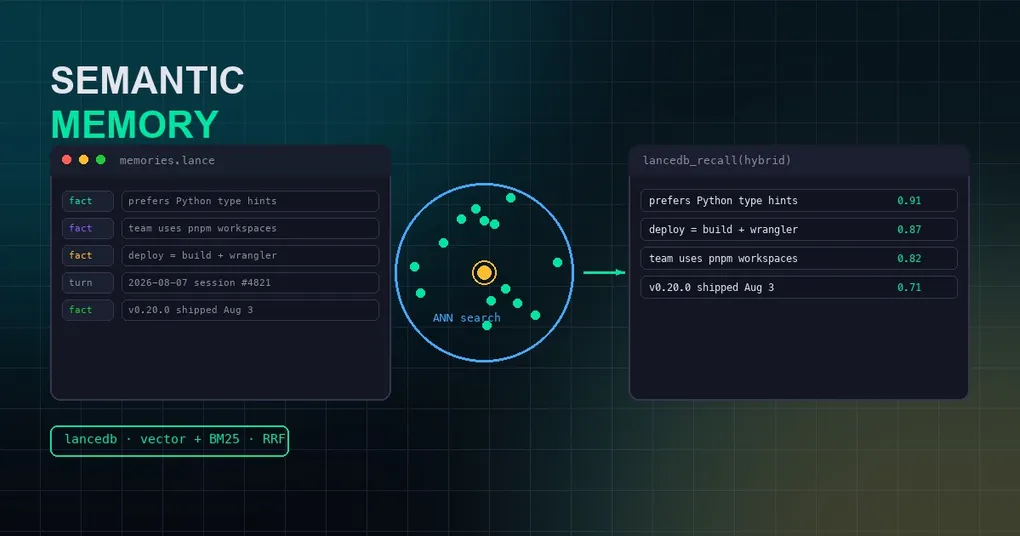
One of the most frustrating experiences with an AI agent is that it forgets. You tell it on Monday, “I use pnpm workspaces and deploy via wrangler.” By Friday, in a fresh session, it has no idea what you’re talking about. Hermes Agent does have built-in memory (MEMORY.md / USER.md under ~/.hermes/memories/) and cross-session recall — but at its core it’s lexical matching. Say “deploy” as “ship it”, or “pnpm” as “the package manager”, and the memory simply isn’t found.
In August 2026, LanceDB released an official semantic memory plugin for Hermes Agent — hermes-agent-memory — which turns this into a pure engineering problem: facts are stored as vectors in a local LanceDB table, and recall matches on semantic similarity instead of keywords. In the plugin’s LongMemEval benchmark, pure vector recall scores 0.661 accuracy / 0.795 Recall@5, clearly ahead of Hermes’ built-in FTS5 session search at 0.533 / 0.659.
This post walks you through the full install, explains how the four memory tools work, how to pick between the hybrid retrieval modes, and reads the benchmark numbers carefully.
1. Understand Hermes’ memory architecture first
Before installing anything, spend two minutes on how Hermes’ memory layer is designed — otherwise you may install everything and wonder why nothing works.
Hermes memory is a provider architecture. agent/memory_provider.py defines an abstract MemoryProvider interface, and agent/memory_manager.py orchestrates it (prefetch, sync, shutdown). Two hooks matter most:
on_pre_compress(messages)— extract what’s worth keeping before context compression runs;on_session_end(messages)— one final extraction pass at the end of a session.
The interactive hermes memory setup command scans installed providers under plugins/memory/, lets you pick one, and writes memory.provider: <name> into ~/.hermes/config.yaml (line 277 of hermes_cli/memory_setup.py is exactly that write). In other words: the memory backend is a pluggable registry. Out of the box Hermes ships with eight providers: mem0, hindsight, honcho, supermemory, byterover, retaindb, holographic, and openviking.
The LanceDB plugin uses the same channel: it registers itself as a memory provider, gets installed into ~/.hermes/plugins/lancedb/ via hermes plugins install, and is then selected in hermes memory setup.
Want to try it without touching your existing setup?
hermes profile create lancedb-democreates an isolated profile; add-p lancedb-demoto every command below, andrm -rf ~/.hermes/profiles/lancedb-demowhen you’re done.
2. Installation: four steps, about five minutes
Step 1: Install the plugin
hermes plugins install lancedb/hermes-agent-memoryThis shallow-clones https://github.com/lancedb/hermes-agent-memory.git into ~/.hermes/plugins/lancedb/. Re-run the same command later to pull updates.
Step 2: Install runtime dependencies into Hermes’ own Python
Hermes loads plugins inside its own interpreter, so dependencies must go into Hermes’ venv — not a separate virtualenv:
# If you used the one-line installer:
uv pip install --python ~/.hermes/hermes-agent/venv/bin/python3 lancedb openai pyyaml
Note: Hermes’ interpreter is shared across all profiles, so this step has no
-pflag and only needs to run once. The default configuration needs no local ML stack — embeddings go through the OpenAI API. Only if you enable the cross-encoder reranker do you needsentence-transformers(which drags in ~2GB of torch).
Step 3: Activate the provider
hermes memory setup
# pick "lancedb" in the interactive menu
Expect output like this, and memory.provider: lancedb written into ~/.hermes/config.yaml:
# ✓ LanceDB memory configured (embedding dim: 1536)
#  Start a new session to activate.
Embeddings default to OpenAI text-embedding-3-small (1536-dim), so an OPENAI_API_KEY must be available.
Step 4: Verify (don’t skip this)
The most common “memory isn’t working” report is simply the provider not being active — if memory.provider isn’t set, Hermes silently falls back to its built-in notes and you’ll never see the lancedb_* tools. Confirm it’s on:
hermes memory status          # look for: Provider: lancedb, installed ✓, available ✓
hermes plugins list           # should list "lancedb"
hermes chat -q "Hello"        # agent.log should contain "lancedb provider initialized"
If memory status shows nothing (or the wrong provider), re-run hermes memory setup and pick lancedb again.
3. The four memory tools
Once active, the agent gains four new tools:
| Tool | Purpose |
|---|---|
lancedb_recall |
Vector (default) or hybrid recall over workspace memory; returns IDs, snippets, scores, provenance turn IDs |
lancedb_remember |
Store a durable fact, typed preference / entity / event / case / pattern / general; deduplicated by content hash |
lancedb_read |
Fetch one memory by ID, optionally with the provenance turns it was extracted from |
lancedb_forget |
Two-step delete: action: preview lists candidates by description, then action: delete with the exact ID |
The provider’s system-prompt block tells the model when to use each tool: lancedb_remember only when the user explicitly asks to remember, and always preview before any delete — so the agent can’t wipe an important memory by accident.
Beyond explicit calls, there’s an automatic extraction pipeline: once a session accumulates enough turns (default min_turns: 3), durable facts are pulled out of the conversation by an auxiliary LLM both before context compression and at session end. Even if you never say “remember this”, long-term-useful information still gets persisted — that’s the “agent gets smarter the more you use it” mechanism.
4. Retrieval modes: vector vs hybrid
Recall is the heart of semantic memory, and the plugin gives you two layers of control:
1. Search mode (per call): vector (default) or hybrid (vector + BM25 full-text), overridden per call via the mode parameter of lancedb_recall.
2. Hybrid fusion (global config): in hybrid mode, how the vector and full-text legs merge is set by plugins.lancedb.retrieval.reranker.type:
rrf(default) — Reciprocal Rank Fusion, rank-based equal-weight fusion;linear— weighted linear combination;reranker.weight(default 0.7) biases toward the vector leg;cross-encoder— reranks an oversampled pool with a local sentence-transformers model; highest quality, slowest.
Example config (~/.hermes/config.yaml — only write the keys you want to override):
plugins:
  lancedb:
    retrieval:
      mode: hybrid          # vector (default) | hybrid
      top_k: 10
      reranker:
        type: linear        # rrf | linear | cross-encoder
        weight: 0.7
A pure-lexical
ftsmode also exists, but the authors explicitly recommend against it: keyword-only matching tends to surface coincidental, irrelevant rows that pollute the agent’s context. Semantic recall lives invector/hybrid.
5. Embedding backends: not just OpenAI
In the default setup, the only remote call is the embedding API — everything else is local. Point the OpenAI-compatible client at any endpoint that speaks the same shape and you’re done, no code changes. A few practical examples:
# Non-OpenAI model via OpenRouter
plugins:
  lancedb:
    embedding:
      model: google/gemini-embedding-001
      base_url: https://openrouter.ai/api/v1
      api_key_env: OPENROUTER_API_KEY

# Fully local: Ollama
plugins:
  lancedb:
    embedding:
      model: nomic-embed-text
      base_url: http://localhost:11434/v1
      api_key_env: OLLAMA_API_KEY    # any value works for local Ollama
Switching embedding models needs care: if the new model’s dimension doesn’t match the existing table, the plugin fails loudly instead of silently returning nothing. The fix is to delete ~/.hermes/lancedb/memories.lance/ and let the next session recreate the table (fine if you don’t care about the old memories).
The auxiliary LLM used for fact extraction can also point at a cheaper model, through Hermes’ own auxiliary routing (provider routing, fallback, and credit exhaustion handled for you):
auxiliary:
  lancedb_extraction:
    provider: openrouter
    model: google/gemini-3-flash
6. Reading the benchmark: is semantic recall actually better?
The plugin repo ships a LongMemEval-S long-conversation QA harness (60 stratified cases, answered by gpt-5.4, judged by gpt-5.4-mini, top-k 5). It compares the recall options a Hermes user actually has:
| Variant | Accuracy | Recall@5 | MRR@5 | Query p50 |
|---|---|---|---|---|
| hermes-session-search (built-in FTS5/BM25 baseline) | 0.533 | 0.659 | 0.639 | 0.002s |
| lancedb-vector (default) | 0.661 | 0.795 | 0.682 | 0.207s |
| lancedb-hybrid-rrf | 0.610 | 0.650 | 0.635 | 0.235s |
| lancedb-hybrid-linear | 0.610 | 0.718 | 0.676 | 0.246s |
| lancedb-hybrid-cross-encoder | 0.678 | 0.754 | 0.689 | 0.702s |
Notable takeaways:
- Semantic recall clearly beats the lexical baseline: 0.661 vs 0.533 accuracy, 0.795 vs 0.659 Recall@5 — paraphrase (deploy vs ship) is exactly where BM25 goes blind, and vector retrieval is far more robust, at ~0.2s per query.
- Equal-weight RRF actually hurts (0.610 < 0.661): noisy lexical hits displace good vector results. That’s why the shipped default is
vector, nothybrid. - If you want lexical signal, use linear, not RRF: the weighted fusion recovers Recall@5 to 0.718 for a tiny latency cost.
- Cross-encoder tops quality (0.678 / 0.754) but p50 climbs to ~0.7s and it needs torch — for latency-tolerant, accuracy-sensitive setups.
The authors label these as illustrative: absolute accuracy tracks the answer model (here gpt-5.4), but the relative ordering of retrieval methods is stable. The harness also measures only the retrieval substrate (verbatim recall of original turns), not the full fact-extraction lifecycle — in real use, fact-first retrieval may do even better.
7. Storage layout and auto-compaction
Everything is local, no external service:
| Path | Contents |
|---|---|
~/.hermes/lancedb/memories.lance/ |
LanceDB dataset (fragments, manifest, indexes). Single memories table; kind column separates fact vs turn rows |
~/.hermes/lancedb/.last_optimize_version |
Sentinel file: table.version at the last successful optimize() |
~/.cache/huggingface/ |
Cross-encoder reranker cache; only present when reranker.type: cross-encoder is enabled |
Want to poke at the store directly, SQL-style:
uv run --project ~/.hermes/hermes-agent python -c "
import lancedb
db = lancedb.connect('~/.hermes/lancedb')
df = db.open_table('memories').to_pandas()
print(df[['kind', 'category', 'content']].head())
"
Agent workloads are dominated by single-row writes, and every Lance add/delete is a commit — without intervention, tiny fragments and version files accumulate forever. The plugin’s auto-compaction (on by default) tracks the version against the sentinel file and runs table.optimize(cleanup_older_than=timedelta(days=7)) in a daemon thread once the delta crosses optimize_every_commits (default 50). A non-blocking lock guarantees one optimize at a time and writers are never blocked. Disable it (maintenance.enabled: false) and the dataset grows without bound — generally not recommended.
8. Troubleshooting quick reference
hermes plugins listdoesn’t showlancedb: check the~/.hermes/plugins/lancedbsymlink resolves to the repo.- Agent only writes built-in memory, no
lancedb_*tools: the provider isn’t active. Runhermes memory status— you wantProvider: lancedbwithavailable ✓; if blank, re-runhermes memory setup. - Recall fails with an auth error: embeddings call the OpenAI API — make sure
OPENAI_API_KEYis set (environment or~/.hermes/.env). .lancedirectory keeps growing: confirmmaintenance.enabled: trueand~/.hermes/lancedb/.last_optimize_versionadvances across sessions;lancedb optimize startinginagent.logmeans compaction is running.- Changed
embedding.modeland recall returns nothing: dimension mismatch. Delete~/.hermes/lancedb/memories.lance/to recreate the table.
Wrap-up
The LanceDB plugin fills the most important gap in Hermes Agent’s long-term memory: recall by meaning, not by keyword. Five minutes to install, zero tuning on defaults, all data local — in exchange for ~24% better accuracy (0.661 vs 0.533) and a big Recall@5 jump on LongMemEval. For knowledge workers, it means “things you told it once come back even when you ask differently.”
Related reading:
- Want memories distilled into a human-readable knowledge base? See turning Hermes conversations into Obsidian notes.
- Memory stores grow too — managing sessions and disk space: Hermes storage optimization guide.
- More day-to-day tips for getting the most out of your agent: Hermes Agent productivity tips.
- Haven’t installed Hermes yet? Start with the installation guide.