Hey Hermes: turning a spare Echo Dot into a voice line to your own agent
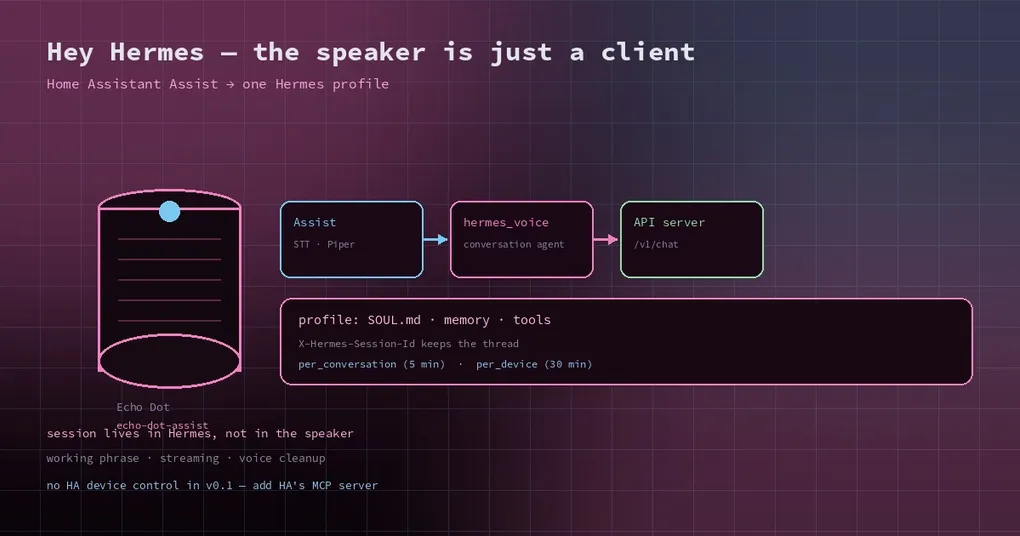
There is a two-year-old Echo Dot in a drawer, and a Hermes profile that already knows your projects, your preferences and your half-finished ideas. Putting those two together sounds like a weekend project that ends with a smart speaker reading a changelog out loud. On the weekend of November 5, someone actually shipped the missing pieces: an open-source project called Hermes Voice that makes an Echo a conversation client for one Hermes profile.
It is small, honest about its limits, and useful in a way that most voice-assistant hacks are not — because the intelligence is not in the speaker, it is in the profile you already maintain.
What the pieces are
Three parts, and only one of them is new:
- The device. An Echo Dot or Echo Show running echo-dot-assist, which replaces the Alexa client while keeping Fire OS and the hardware’s audio processing. That project does the wake word, the microphone and the speaker.
- Home Assistant. Its Assist pipeline does speech-to-text (Whisper, or HA Cloud) and text-to-speech (Piper), and routes the conversation to a conversation agent.
- Hermes Voice. A Home Assistant custom integration that is that conversation agent. It sends each turn to a Hermes profile’s API server and speaks the reply.
So the audio never leaves your network if you do not want it to, and the “brain” is the same agent you use at your desk — with its SOUL.md, its long-term memory and its tools.
Two ways to install it
The project ships a Hermes skill that does the whole setup, which is the shortest path:
hermes skills install majorminorlabs/hermes-voice/skill/hermes-voice-setupThen ask your agent to use it. It asks which profile to use, what the voice assistant is allowed to do, and whether you already run Home Assistant, shows a dry run of each step, and then configures a dedicated profile, a Dockerised Home Assistant, speech services and a verification pass.
If you prefer to keep your hands on it, the manual path is the normal Home Assistant routine: add the repository to HACS as a custom integration, install Hermes Voice, restart, then add the integration with three fields — your Hermes API server URL, the profile’s API_SERVER_KEY, and a display name. The URL is validated with a GET /v1/models call, which costs no tokens.
On the Hermes side you need the API server enabled, which is a platform in ~/.hermes/.env:
API_SERVER_ENABLED=true
API_SERVER_KEY=change-me-local-dev
The key is the same secret you paste into the integration. If one gateway serves several profiles, the URL uses the multiplexed route with the profile name in the path; a single-profile home can point at the plain /v1 endpoint.
How the conversation survives between questions
This is the part that decides whether the thing is a toy. A voice assistant that forgets every sentence is a novelty; one that remembers yesterday is a colleague.
Hermes Voice does not keep the history itself. It sends only the new user message plus a stable X-Hermes-Session-Id header, and Hermes keeps the conversation. Two session modes decide what that id is:
per_conversation(default) — one session per Home Assistant conversation, which the pipeline starts fresh after five minutes of silence. Good for “one question at a time” use.per_device— one session per voice device, continued until it has been idle foridle_reset_minutes(default 30), with the window surviving a restart. Better if you want a running thread with a particular room.
Because Hermes holds the state, the profile’s personality carries over: SOUL.md, long-term memory and tool access all apply as they do in the terminal. The integration adds exactly one system message — a short “answer briefly, for speech” instruction, which you can edit or turn off.
One detail I like: the integration can tell Hermes the local date and time on every turn. Hermes has no clock of its own, and “what’s on my calendar tomorrow” is the first thing anyone says to a speaker.
What it deliberately does not do
In v0.1 the integration gives Hermes no Home Assistant device control. It cannot dim your lights, and that is a design choice rather than an omission: the agent is a conversation client, not a smart-home bridge.
If you do want device control, the documented route is to give the voice profile Home Assistant’s MCP server as a tool. That keeps the decision in your config rather than in the integration, which is the right place for it — a voice profile with lights-plus-terminal access is a very different risk profile from one that can only answer questions.
The other documented recommendation is worth taking: turn on Prefer handling commands locally in the pipeline. Home Assistant then answers its own things instantly — the time, timers on the device, simple device commands — and sends everything else to Hermes. Those local answers are HA’s, not the agent’s, and Hermes never sees them.
Making it sound like a person
Three settings do most of the work:
- Working phrase — a short filler (“One moment.”) spoken when Hermes starts a tool call before it has any text. An empty value turns it off.
- Streaming — on by default; speech starts on the first complete sentence rather than after the whole reply.
- Voice cleanup — strips markdown, code fences and URLs so the speaker does not read asterisks aloud.
There is also a fallback message, so a failed request says something human instead of reading an error code.
The honest caveats
- Home Assistant 2026.10 or newer is the tested baseline.
- Flashing an Echo can brick it. The project’s own device guide documents a Dot 2 that needed a hardware short during a stalled unlock, and an Echo Show 5 whose first unlock reported success but left it locked. Read the recovery notes before you start, not after.
- Tested devices are narrow — Echo Dot 2nd gen and Echo Show 5 1st gen, end to end. Other Assist satellites should work because they only need a pipeline pointed at the integration, but “should” is doing real work in that sentence.
- The wake word is custom. The repo includes a reproducible pipeline and a trained microWakeWord model for “Hey Hermes”, so you are not stuck with the stock wake word.
If you want the inverse of this setup — controlling Hermes from a phone rather than talking to a speaker — the mobile beta guide covers the current iOS and Android apps, and the speech-to-text plugin guide is the place to start if you want to swap Whisper for something else in the pipeline. The v0.23.0 release page is worth a look too: the API server and gateway in this cycle are what make a long-lived voice profile practical.