v0.23.1: a 2 MiB ceiling quietly froze your plugin catalog in the past
A colleague drops a plugin name into the team channel and says “install this, it is great.” You type the install command, and Hermes answers that it cannot find that plugin. You assume a typo, try another spelling, get the same answer. You open the catalog page: there it is, with a version, a repo and a description.
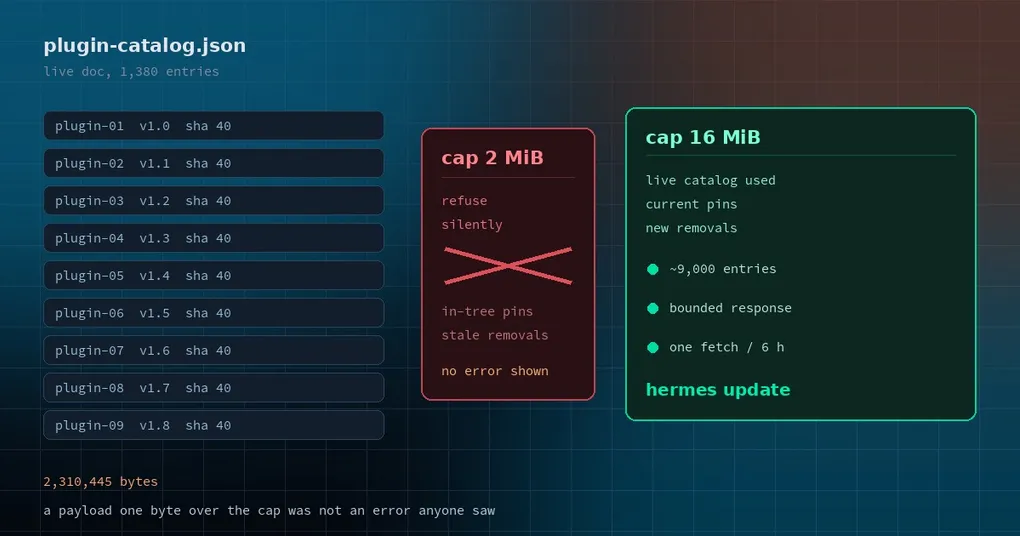
Nothing is wrong with your network or your spelling. Since November 9, the officially published plugin catalog file has been larger than the size clients accept — and when the client decides the file is too big, it does not complain. It quietly falls back to the copy shipped inside your release. What you can search is a snapshot from the day that release was cut. v0.23.1 raises the ceiling so the live catalog is used again.
Three things worth understanding: how the ceiling bit, why “silent” is the expensive part here, and how to check your own install. Plus the rest of the window.
The short version: update
hermes updateAfter that, the client accepts up to 16 MiB instead of 2 MiB. The live catalog loads, so hermes plugins install can see newly listed plugins, resolve current pins instead of the ones your release shipped with, and honor newer removed entries.
One caveat that matters: the fix is in the client. Installs that stay on v0.23.0 or older keep falling back until they update. So when a colleague swears a plugin does not exist, ask for hermes version before you debug anything else.
How a ceiling bites
The plugin catalog is a public JSON document fetched when you browse or install, then cached locally for six hours. Two sources, in strict priority order:
- The live catalog (
plugin-catalog.json), published by the docs site — newest entries, newest version pins, newest removals; - The in-tree catalog shipped with your installation — never updated, used only when the live one cannot be fetched.
The fetch path has a size check. Over the cap, the response is treated as broken: raise, log at debug level, return “no live catalog.” Every caller up the stack sees “nothing,” falls back to the in-tree copy, and says nothing to you.
On November 9 the published document measured 2,109,306 bytes across 1,268 entries — about 1.7 KB each — and crossed the 2 MiB line. From that moment:
- newly listed plugins did not exist on your machine;
- plugins that had been re-pinned to a newer commit installed at the pin your release shipped;
- newer “removed / unmaintained” entries were invisible.
That third one is the one to sit with. A plugin that has been formally pulled no longer looks pulled on your install — it still looks installable.
Measuring the live document just now: 1,380 entries, 2,310,445 bytes. It is already 10% past the old ceiling. Without the bump this would only get more common, not less.
Why “silent” was the expensive part
Looked at cold, the bug is a constant that was set too small. The hard part is the failure mode: every error was swallowed.
That design is correct on its own terms. A missing catalog should never block an install — if the network is down or the docs site is having a bad day, you should still be able to install from the copy you already have. Fall back on any failure is the right policy.
The problem is that “the document is too large” and “I have no network” were filed in the same bucket. The first means your catalog is stale and you should care; the second means wait a minute and retry. Both looked identical to the user, and the required actions were opposite. The bug survived on that ambiguity until someone noticed missing plugins and traced it back to the constant.
That is the shape of most infrastructure bugs, really: nothing crashes, nothing pages anyone, no log line turns red — the world just quietly gets older. You do everything right and get the wrong answer.
What changed
The fix is a one-constant change, but the comment that landed with it is worth reading, because it states the boundary:
- the cap moves from
2 * 1024 * 1024to16 * 1024 * 1024; - at current per-entry sizes, 16 MiB fits roughly 9,000 entries;
- the cap is not gone. It still bounds a hostile or corrupted response — it just stops punishing normal growth.
The same file carries the surrounding fallback rules, and knowing them tells you which catalog you are on:
| Rule | Value | What it means |
|---|---|---|
| Normal cache | 6 hours | repeat calls inside the window skip the download |
| Stale cache usable for | 24 hours | older caches drop entries and keep only the removals list |
| Failure memory | 60 seconds | after one failure, no retry for 60 s |
| Request timeout | 5 seconds | per-attempt network timeout |
Checking your own install
The honest test is behavioral: try to install a plugin listed recently and see whether it resolves. The hermes plugins reference page lists the full subcommand set.
Two habits are worth keeping:
- when a plugin “does not exist,” run
hermes versionfirst — then consider the catalog; - when a plugin behaves like a version you did not install, check the resolved pin before blaming the plugin.
If you read our earlier piece on how the plugin catalog works, this is a direct consequence of that design: the catalog is data, not code, and data growth eventually presses on client assumptions. The same reasoning shows up in the plugin public API surface — stable interfaces are what let data grow, and clients have to leave room for that growth.
What else is in the window
v0.23.1 is a patch tag: 618 merged PRs since v0.23.0, rolled into a stable release for the GitHub release (CLI and installers), the Microsoft Store app, Docker and Hermes Cloud. Measured at commit 3b421578588, the window holds 2,578 non-merge commits across 2,781 changed files (+151,690 / −62,595) and 409 closed issues.
The release notes say plainly that a set of features in this window is undocumented on purpose, with full curated notes shipping alongside v0.24.0. Named in that list:
- Esc backtrack in the TUI and the classic CLI, replacing the rewind list picker;
- group chats that run on a gateway without Desktop, and can seat bots from other computers;
- saved gateway connections shared between Desktop and the Webapp;
- the in-app browser signing in with your real browser profile and filling saved logins from its address bar;
hermes gateway attachfor local clients;hermes clipboard image --json;- new plugin API surface: session-scoped environment values, plugin JSON-RPC methods and events,
llm.oneshotauxiliary tasks, a compression-stableconversation_id, anon_session_openhook in the gateway, apost_curator_runhook; - faster transcript and handoff reads, plus a large batch of new catalog entries.
We have covered most of these separately: the Esc-backtrack workflow in rewinding a conversation without losing it, catalog housekeeping in how catalog entries get swept in batches, and the bigger picture in the v0.23.0 release page.
Upgrading
# CLI
hermes update

# or re-run the installer one-liner
# Docker / Hermes Cloud: nousresearch/hermes-agent:stable
The Microsoft Store app updates through the Store. A Desktop app installed from the .exe / .dmg installer does not change in this release; it picks the fix up with the next bundled release.
One thing worth doing after the update: install the plugin that “did not exist” and confirm it resolves. If it still does not, check hermes plugins list and your client version — at that point the problem is the plugin entry or the repo, not the catalog cache.
Full notes: the v0.23.1 release page.