hermes update hangs, lies about being up to date, or refuses your CA — four fixes landed
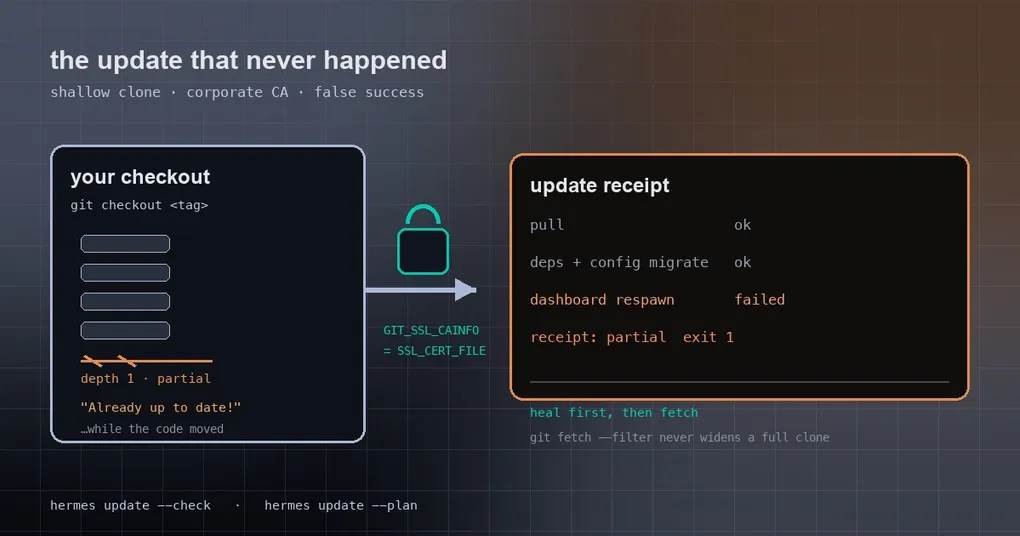
It’s Friday evening and you type hermes update before logging off. The screen parks on Fetching... and doesn’t move for ten minutes. You Ctrl+C, try another machine, and this time it answers instantly: Already up to date! — except after the restart hermes --version still shows the old release. The worst variant is the third one: it does move the code, reports nothing wrong, and you assume you’re current.
Those three experiences come from four separate bugs, all merged into main on 2026-09-28. None of them touches your daily conversations, but each one breaks exactly the operation you reach for when you need it most. Here is what triggers them, what the root cause was, and what the updater does now.
1. Shallow checkouts: the update hangs in fetch until it times out
The installer clones with --depth 1 to save time — only the most recent commit’s history. That’s fine right up until the checkout falls far enough behind.
From a depth-1 clone, a plain git fetch origin main makes the server send the full ancestry of every side branch merged past the shallow boundary. That download cannot finish inside the 300-second network cap. And the unshallow step that would have fixed it was scheduled after a successful update — so it never ran: timeout, failed update, no unshallow, same timeout next time.
Now it runs the other way around: before the bounded fetch, heal_shallow_history fills in the commit graph (commits only, a 900-second budget, and it pulls the target branch along), so the capped fetch that follows is actually small.
The same batch handles two subtler failures:
- git 2.53+
index-pack --promisorcrash. On certain local objects,pack-objectshits an internalBUG(). The damage is that the state persists in the repository, so every later fetch — the update check and the update itself — dies on it. The fix is deliberately narrow: on exactly that crash signature, retry once with-c remote.origin.promisor=, per invocation, leaving the repo config untouched. --filter=tree:0silently turned full clones into partial ones. The updater passed that filter on every tag fetch, andgit fetch --filterwritesremote.origin.promisorandpartialclonefilteras a side effect — so a healthy full clone got converted into a partial clone and every subsequent fetch picked up a promisor dependency. Tag fetches now reuse the clone’s own filter: a partial clone repeats its filter, a full clone fetches unfiltered.
Two commands tell you whether you’re on that kind of machine:
git rev-parse --is-shallow-repository      # true means shallow
git config --get remote.origin.partialclonefilter
2. It said “Already up to date!” while the code had just changed
This one is nastier: you think nothing happened, when in fact the pull happened and dependency sync, config migration and the gateway restart were all skipped.
The trigger is a detached checkout — for example because you rolled back earlier with git checkout <tag>. In that state the updater switched HEAD to main and then counted HEAD..origin/main. Your local main already pointed at origin/main, so the count was zero: it printed Already up to date! and exited, even though the code you were actually running had just been replaced. The count now starts from the commit that was really running.
The rollback path was wrong in the same way. If the update finished with a syntax error, it ran git reset --hard on the update branch: a detached user ended up parked on main, and a parked feature branch’s commits got written onto main. Now it splits into two cases:
- detached checkout:
git checkout --detach <sha>, back to the commit the update started from; - parked branch:
git checkout <branch>, leavingmainalone. If another worktree holds that branch, its commit is restored detached instead.
One rule covers both: a failed update never leaves your install sitting on broken code.
3. Behind a corporate network, SSL_CERT_FILE never reaches git
If your root CA is distributed through the SSL_CERT_FILE environment variable, you get a split personality: the version check (Python) succeeds, and git fetch fails TLS every time. The reason is boring — git’s libcurl doesn’t read SSL_CERT_FILE. It only honours GIT_SSL_CAINFO or a configured http.sslCAInfo.
The fix maps SSL_CERT_FILE onto GIT_SSL_CAINFO once per update or check, into the process environment rather than a single command’s arguments — so the lazy promisor fetches a partial clone performs also get the CA. If you set GIT_SSL_CAINFO explicitly, or have http.sslCAInfo in your git config, your setting wins.
The same batch lets hermes pm install work behind an internal npm mirror, which previously failed when it could not reach the public URL pinned in the lock file.
Your own two checks:
echo "$SSL_CERT_FILE"
git config --get http.sslCAInfo
4. Failures booked as successes
The first three are “the job didn’t get done”. This one is “it didn’t get done and you were told it did”, which is what actually wastes your evening.
A refused .env write printed ✓ Set anyway. When hermes config set saves provider credentials it goes through the .env write path, and that path, on detecting a lock conflict, used to print a line and return. The caller never checked the result: it went on to scrub the mirrored values out of config.yaml, printed ✓ Set, and exited 0 — you believed the credential was stored. Now all four multi-store writers call require_env_writable before any side effect: the CLI exits 1, PUT/DELETE /api/env answers 400 with the reason, and the TUI’s model.disconnect checks every variable up front.
A dashboard that failed to come back was recorded as restarted. During an update Hermes takes over and restarts a dashboard you had started by hand. It replayed the stopped process’s /proc argv verbatim — including a launcher path the takeover had already rewritten into a shell shim — so the child died immediately with SyntaxError. Popen itself succeeded, so the updater printed ✓ restarted anyway. The argv is now rebuilt on the installation-bound launcher every other Hermes spawn uses, a child that exits within one second counts as a failed restart, and a dashboard that never comes back turns the whole update receipt into partial with exit code 1.
Look before you leap: two read-only commands
hermes update --check    # is there a newer version? (changes nothing)
hermes update --plan     # read-only plan: install kind, every Hermes process across profiles, how each will restart
--plan is the natural companion to these fixes: it prints what the update will touch and changes nothing, so it is safe to run on a live multi-profile host. The other flags worth knowing are --no-gateway-restart (swap code without bouncing the gateway), --keep-stash, and --backup / --no-backup.
What you need to do
Nothing. All four patches are on main; your next hermes update picks them up. If your machine is a shallow clone or sits behind a corporate CA, resist the urge to Ctrl+C this once — give it the time to fill in history. Afterwards, hermes doctor is a good way to confirm dependencies, config version and running processes all line up.
If the upgrade flow itself is still fuzzy, start with our upgrade walkthrough, and with keeping your profile’s skills and config across an update. Worth knowing: this same update is what finally kills the plugin compatibility layer — if your plugin still imports an old path, you’ll find out right after. Setting up from scratch instead? The install guide covers every platform.