hermes profile update used to delete your skills and cron jobs
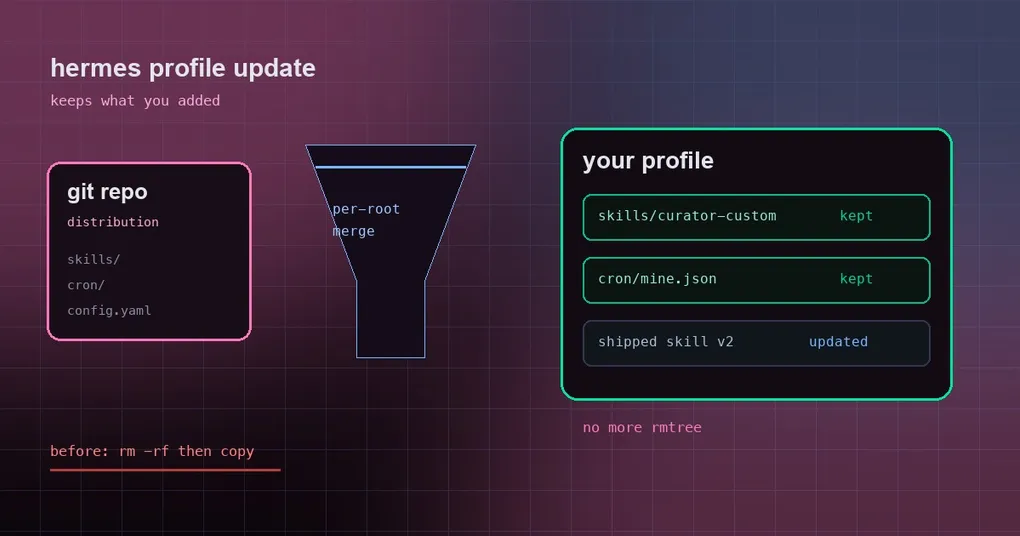
Your team packaged a Hermes agent as a git repository: anyone who needs it runs hermes profile install and gets the whole thing — personality, skills, cron jobs, config. You added two of your own touches to that profile: a skill that answers compliance questions, and a cron job that posts a status summary every morning. An upstream release lands, you follow the docs and run hermes profile update. The upgrade succeeds, and your skill and cron job are gone.
That was not user error. PR #111344 fixes a P1 data-loss bug: updating a distribution treated skills/ and cron/ as directories it could replace wholesale.
Two ways to share a profile, and only one of them bites
A Hermes profile is a self-contained agent: its own config, credentials, memory, skills and cron jobs. Sharing one with someone else has two paths, and they answer different questions:
- A distribution (git repository): the author writes a
distribution.yaml, others runhermes profile install <repo>and follow upstream withhermes profile update. Pick this when the agent is a product you will keep improving — a team’s internal compliance agent, a community release, the same agent on five machines. - An export file (
.tar.gzsnapshot):/exportand/import, orhermes profile export/import. Pick this when you just want someone to have your setup right now. There is no versioning.
The bug only hit the first path, because only a distribution does overwriting updates. Our multi-instance profile guide covers the boundaries between the two, and the hermes profile command reference has the command-level detail.
Why it deleted: replace the whole directory
The old update logic treated author-owned directories as replace-in-place units: delete the target skills/, copy the new payload’s skills/ over. From the author’s point of view that is correct — it guarantees that files the author retired actually disappear instead of lingering forever.
What it could not tell apart was which roots belong to the author and which ones the user added. skills/curator-custom/ is yours, but from the updater’s perspective it is indistinguishable from skills/shipped/, so a whole-directory replacement took it with the rest. Same for cron/mine.json. And hermes profile update means “upgrade”, not “reset” — nobody expects their own additions to vanish.
The new rule: treat a top-level directory as a set of roots, merge each one
The fix treats every top-level author-owned directory (skills/, cron/, and any directory the manifest declares) as a container of roots rather than a unit (_copy_dist_payload in hermes_cli/profile_distribution.py):
- a root the new payload does ship replaces its counterpart wholesale — files the author retired do disappear;
- a root the payload does not ship is left alone, because it was never part of that release;
- the same logic applies to
updateand toinstall --force, for the default owned set and for an explicitdistribution_owned: [skills].
The clearest evidence is the before/after table from the PR itself:
| Scenario | Before | After |
|---|---|---|
your skills/curator-custom/ |
deleted | preserved |
your cron/mine.json |
deleted | preserved |
| the author’s shipped skill updated to v2 | updated | updated |
| a file the author retired | gone | gone |
All four rows together are the actual behaviour: protecting your additions and following the author’s release now hold at the same time, instead of forcing a choice.
Three edge cases worth knowing
Nested allowlist entries still replace exactly that path. If the manifest lists skills/compliance/, only that path is replaced — sibling roots are untouched.
A symlinked container is refused instead of written through. If skills/ is a symlink to a shared directory, the update raises a DistributionError before the first write. That matters more than it sounds: writing through the link would overwrite the shared directory and could leave the profile half-updated, which is far harder to diagnose than a hard failure.
.env.template still lands as .env.EXAMPLE. It is unlinked first so it cannot be written through a symlink, and it never shadows your real .env.
What you should do
On a version that contains this fix, just run the update again — there is nothing to migrate:
hermes profile updateTo know what a given profile’s author-owned surface is, read distribution_owned in its manifest; nested paths there (like skills/compliance/) limit the replacement to exactly that path. The full flag list, including --force, is in:
hermes profile update --helpIf you already lost user-added skills or cron jobs to the old whole-directory replacement, they do not come back automatically — restore them from a backup or another machine. Our guide to where skills live covers rebuilding them by hand, and cron jobs that follow a profile explains where the scheduled jobs belong.
The short version
hermes profile update now replaces only what the author shipped; skills and cron jobs you added to the profile stay where they are. If you maintain a shared team agent, that means you can customise locally without wondering whether the next upstream release will clean house.