Your theme stopped at the desktop app: Hermes now stores UI settings per machine
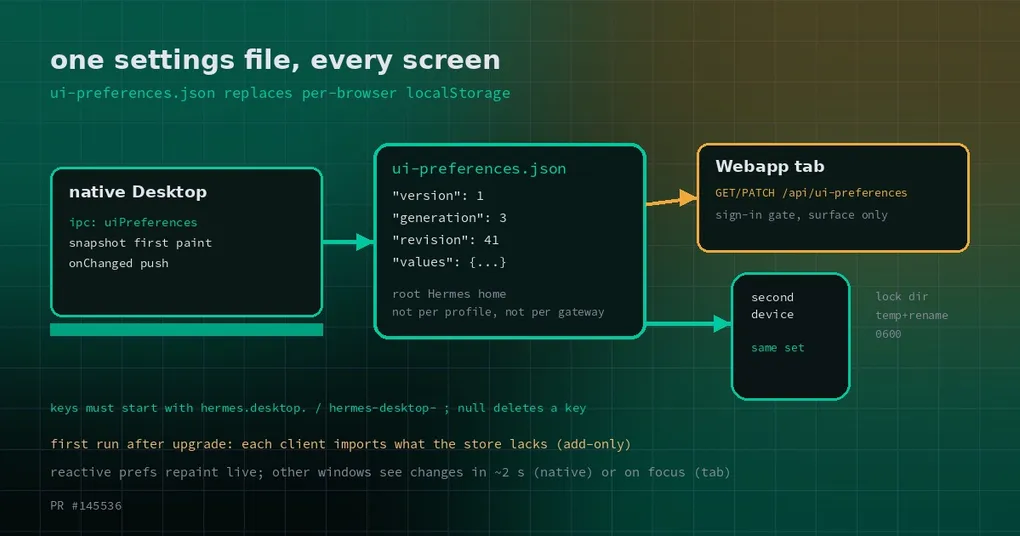
You set the theme to dark in the desktop app, switch the status bar to compact, tighten the sidebar a notch. Then you open the webapp in a browser on the same machine and get the default palette and the default layout back, as if that last minute never happened. Nothing was broken: same machine, same config.yaml, same sessions on the same gateway. Only the interface settings had gone their separate ways. That is what #145536 (merged October 27, 2026) fixes — preferences stop being the private property of one tab and become one file on the machine.
localStorage is a per-browser, per-origin cubby
The premise first, or the bug looks like magic.
localStorage is a small key-value cubby the browser hands out, but it is not one per site — it is one per origin. An origin is scheme plus host plus port. Change any of the three and the browser considers it a different site with a fresh, empty cubby. The same service opened at http://127.0.0.1:9120, at a LAN IP, and at public_url is three unrelated origins to the browser, and three sets of settings that cannot see each other. That is not a Hermes defect; it is the browser’s isolation model doing exactly what it says on the tin.
And one Hermes usually has more than one address. So before this change, a single set of interface preferences was diced into several: one per device, one per private window (a private window is a clean cubby), one per webapp address — plus one more for the desktop app, which is not a browser at all and keeps its own storage. You thought you were adjusting “my interface”. You were adjusting “the interface of this browser, at this address, in this window”.
If you have not run the webapp yet, putting the whole workspace in a browser tab covers where those addresses come from and what host and public_url each do.
One file now, and it belongs to the machine
There is one location left: ui-preferences.json in the root Hermes home of the machine running the app. The native Desktop on that machine and any browser pointed at its webapp read and write the same file.
The owner is the machine, and that is worth stating precisely: not one store per gateway connection, and not one per profile. A Desktop wired to a local gateway and a remote one at the same time still has a single set of preferences.
What about profiles? A Desktop can perfectly well launch from a profile home. The rule is that a passed path is walked up to its root home first, and the store lands under that root; Python’s store_path() and Electron’s uiPreferencesRoot(resolveDesktopHermesHome()) implement the same rule, and both resolve symlinks — so a profile home, or a symlinked profile directory, collapses back to the root and never becomes one store per profile. That is not a promise in a comment: a vitest contract test runs the real Python resolver and the real Electron resolver side by side over a profile home, a custom home and a symlinked profile directory, and fails when they disagree. If you are weighing when you actually want more than one profile, the trade-offs of one instance per profile goes deeper — interface settings just no longer travel with them.
One more thing people get backwards: a Desktop connected to a remote gateway still uses its own machine’s store. Settings follow the machine in front of you, not the gateway.
Before and after
| Before | Now | |
|---|---|---|
| Webapp in a second device or a private window | defaults | this machine’s settings |
The three addresses: 127.0.0.1, LAN IP, public URL |
three sets | one set |
| Native Desktop and webapp on the same machine | one each | shared, both directions |
| After a change in another window or tab | reload needed; across origins, never visible | native window within ~2s; webapp tab on focus or within 10s; reactive preferences repaint live |
| Desktop connected to a remote gateway | not applicable | still its own machine’s store |
| First run after upgrading | — | each app or browser imports its own values that the store lacks; adds only, overwrites nothing |
What is in the file, and why two writes do not clobber each other
The on-disk contract is one shape, shared by hermes_cli/ui_preferences.py on the Python side and apps/desktop/electron/ui-preferences.ts on the Electron side.
{
  "version": 1,
  "generation": 1,
  "revision": 12,
  "values": {}
}
values maps keys to strings. Keys must begin with hermes.desktop., hermes-desktop- or hermes-onboarding-, and their length is capped — this file is not a general-purpose dumping ground. A null value deletes that key.
A write is not “read the whole file, change one field, write the whole file back”. It is a per-key merge performed under a directory lock: the lock is the <store>.lock directory, taken with mkdir, which is atomic on Node and on Python and on every platform, with no per-OS branch. Waiting tops out at 3 seconds, polling every 0.02 seconds, and a lock older than 10 seconds is broken outright so a killed process cannot wedge the store forever. After the merge revision increments, and the file is replaced through a temp file plus rename at mode 0600. Two windows flipping two different switches at once therefore cannot erase each other.
The definition of “no store” is deliberately narrow: only a missing file counts. Any other read failure — permissions, disk, encoding — refuses the write (503 on the webapp, and the client retries) instead of pretending the store was empty and merging on top of nothing. That distinction matters more than it looks: treating “cannot read” as “nothing there” is the classic way to lose data.
A corrupt file is not silently discarded either: the write that replaces it first copies the original to ui-preferences.json.corrupt-<ms>, and that write starts a new generation.
Two seconds, ten seconds, or immediately
The difference is who is listening.
On the native side there is a typed preload capability, window.hermesDesktop.uiPreferences: a snapshot available synchronously on the first frame, read, a validated write, and onChanged. The main process pushes changes to every window, including those written by the webapp’s Python process — it notices via a cheap fs.watchFile stat, no JSON parsing in the polling loop. There is no generic filesystem door here; the exposed surface is narrow and typed. The handlers are registered in main.ts, right next to the local-skin first-frame read (which moved into local-skin.ts, leaving main.ts seven lines shorter).
The webapp side is plain HTTP: GET /api/ui-preferences and PATCH /api/ui-preferences. The route exists only on the webapp surface (SurfacePolicy.ui_preferences); on serve, dashboard and gateway it is a 404. It also sits behind the existing session-token and sign-in gate, so an unauthenticated request is a 401.
Which gives you the time scales: a native window within about 2 seconds; a webapp tab on focus, or within 10 seconds; and the reactive preferences — theme, mode, density, status bar — repaint live rather than waiting for a poll. The old “across origins it is never visible” problem is settled along with the rest.
The first launch after upgrading
Upgrading neither throws away your old settings nor overwrites what is already in the new file. Each app or browser imports the values it has that the store lacks: adds only, never rewrites an existing value, and does not delete its local copy before the import lands. So the upgrade is invisible — the desktop app looks the way you left it, and the webapp is no longer default-colored the first time you open it. For the launch flow itself, including what it does and does not ask you, see the desktop first-run guide.
What it does not do
It is not cloud sync. No account, no relay, no server in the middle — a different machine still has a different set of settings, because the file lives on that machine. The scope it solves is narrow and specific: on one machine, one person’s several windows, browsers and addresses should show one interface.
Worth knowing: this is still a plaintext JSON file on disk, mode 0600, governed by the same file permissions as everything else under the Hermes home. Anyone who can read that home can read your interface settings.
As for the locking and the merging — the best way to use them is to never think about them. Set your theme; the writes queue up behind the lock on their own.