Three Hermes tabs, one glance: which one is working and which one is waiting on you
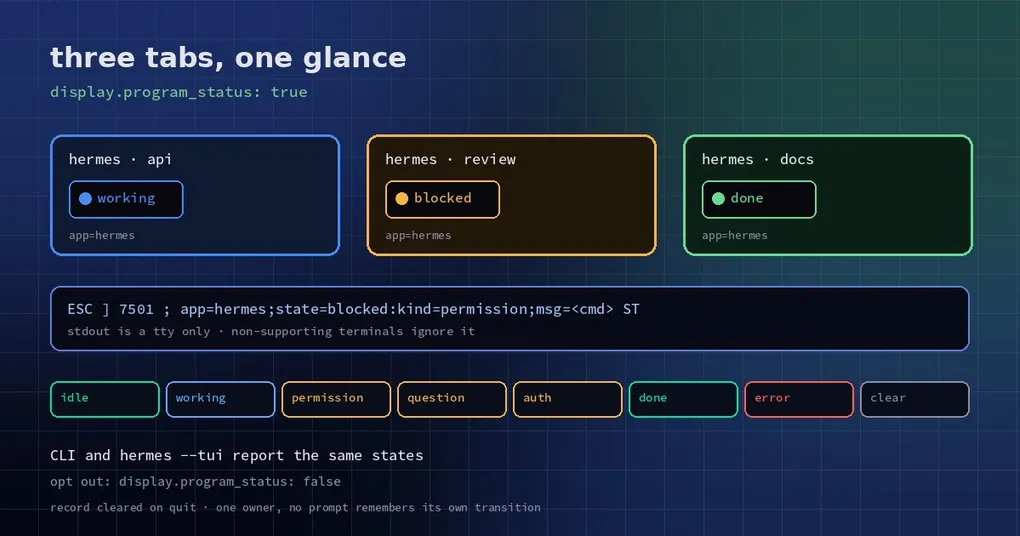
Three tabs open: one refactoring, one waiting for you to click allow, one writing docs. You get coffee, come back, and the second tab is still sitting on a permission card from twenty minutes ago — looking exactly like the third tab, which is making progress.
To the terminal, a program is a black box. It can see that python is running. It cannot tell whether you are thinking, waiting for a human, or finished. That is what a program-status protocol is for: let the program announce its own state instead of the terminal guessing.
Hermes now does. The classic CLI and hermes --tui both report over OSC 7501, so terminals that track agents — Herdr, Rex, anything implementing the protocol — can paint the state on the tab. Terminals that do not implement it discard the escape sequence, which is the whole reason this is safe to ship on by default.
The states
| Moment | Report |
|---|---|
| sitting at the prompt | idle |
| a turn is running | working |
| an approval card is waiting | blocked, kind permission, message is the command |
| a clarify question is waiting | blocked, kind question, message is the first unanswered question |
a billing wall, /reset or /new confirm |
blocked, kind question, message is its title |
| a sudo, secret, vault or connect card is waiting | blocked, kind auth |
| the turn finished normally | done |
| the turn failed with no answer | error, message is the error |
| you cancelled the turn | back to idle |
/quit, or a one-shot run exiting |
clear |
The three blocked kinds are worth keeping apart: a terminal can colour “waiting for you to approve a command” differently from “waiting for a token”, so you know which tab needs which kind of attention.
What goes over the wire
One OSC 7501 sequence, terminated with ST:
ESC ] 7501 ; app=hermes ; state=working STWhen there is a message, msg is base64-encoded and capped at 2048 bytes. That is what lets an arbitrary command line or error string travel safely: a stray semicolon or newline cannot truncate the sequence. Control characters inside the message collapse to spaces, so a coloured traceback does not scramble your terminal.
Two conditions gate every write: stdout must be an interactive terminal, and display.program_status must be true — which it is by default.
# ~/.hermes/config.yaml
display:
  program_status: true     # set false to opt out
Or from the CLI:
hermes config set display.program_status falseWhy it does not lie
The usual failure of multi-source status reporting is that everyone writes and nobody owns it. This implementation collapses ownership to one place:
- The classic CLI has a single method that reports what the screen currently shows — a blocking prompt if there is one, else a running turn, else the last outcome. It runs from the repaint path and from turn boundaries, so no individual prompt has to remember its own transition.
- The TUI derives state from stores the app already updates instead of adding a parallel state machine. A 150 ms settle window absorbs the flicker between submitting and
message.start, so the tab does not blink. - A finished turn reports
doneand never the reply text. A status channel should not leak content. - Quitting clears the record, including a one-shot run that exits.
The protocol itself comes from block/goose’s implementation of the same spec, so this is adopting an existing terminal convention rather than inventing one.
Two older switches next to it
If your terminal does not speak OSC 7501, the notification pair is the coarser fallback:
display:
  bell_on_complete: true    # bell when a turn finishes
  bell_on_prompt: true      # bell when a blocking prompt appears (clarify, approval, sudo, secret)
Both work over SSH, and both also emit an OSC 9 desktop notification — Ghostty, iTerm2, Kitty and WezTerm raise a system notification — plus, inside Warp, its warp://cli-agent event so Warp’s own tab status and notification mailbox track Hermes.
When it helps, when it does not
It helps when several sessions are open and you decide what to switch to by “which tab is moving”, or when a long task runs and you would rather not check every thirty seconds.
It does not help when the terminal does not implement the protocol. Whether it survives tmux depends on your terminal and configuration; screen and older terminals drop it. In that case the sequence is invisible output: no side effects, no benefit.
One expectation to set: this is state, not progress. It says “working”, never “37% done”. For numbers, the status bar and /status remain the place — we went through those metrics in the status bar guide and through fewer keystrokes in the command palette guide.
Still on main
The change merged into main on 22 November 2026, after v0.23.3 shipped, so no release contains it yet. Follow main or wait for the next tag.
Update (2026-11-25): these changes shipped in v0.23.4 (November 24) —
hermes updatebrings them in. The “not in v0.23.3 / onmainonly” wording above is a snapshot from publication time.
The fastest acceptance test once you have it: open two tabs, ask one for a command that needs approval, give the other a long task, then watch the two tabs report blocked and working. If both look unchanged, check your terminal’s OSC 7501 support first and display.program_status second — after those two, it is almost always a version mismatch.