Search Every Hermes Command and Skill in Telegram: The @botname Inline Picker Bypasses the 60-Slot Menu Cap
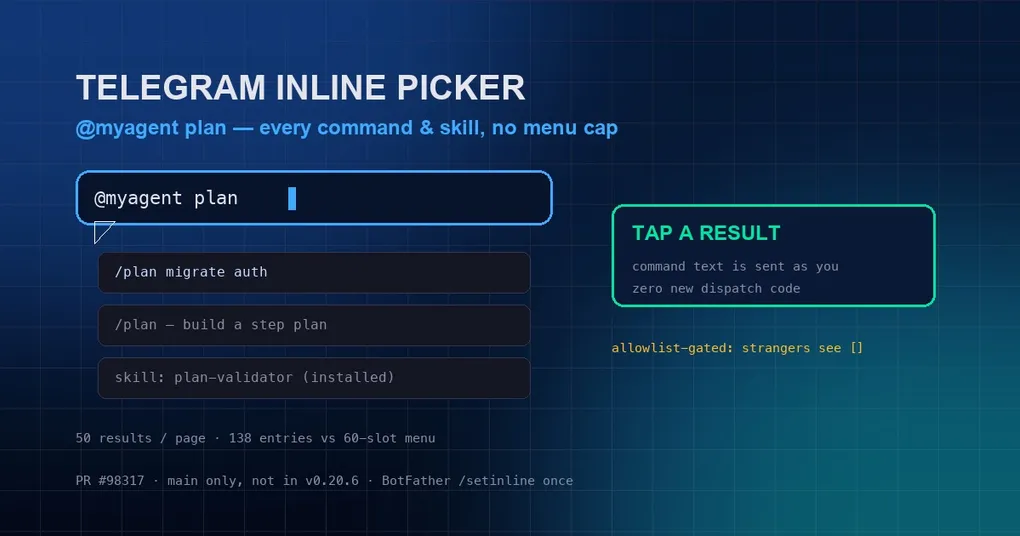
Ever had this moment: you use Hermes as your main assistant in Telegram, install skill after skill, and then one day you need a specific skill in a group chat — you type /, scroll, and it’s not there. It’s not missing; the menu simply ran out of room. Telegram hard-caps the BotCommand menu (100 commands per scope, ~4KB of payload; Hermes defaults to 60 slots), so once your skill count grows, most skill commands can never appear in the / menu. A feature merged on August 30 sidesteps the cap entirely: type @yourbotname + a keyword in any chat and a live, searchable picker opens over every command and installed skill — one tap sends the command into the chat. The change comes from PR #98317 and currently lives on main, not yet in a release.
Why the / menu “fills up”
Telegram’s command menu has a platform-level hard limit: 100 commands per scope, ~4KB of total payload. Hermes’ default strategy registers only 60 slots with the most-used commands. The catch: skills are also invoked as slash commands, so every installed skill adds another entry — install a few dozen skills and most of their commands will never fit in the / menu. It’s not Hermes being stingy; the Telegram box is just that small.
How the inline picker works
No configuration needed beyond the one-time setup below. In any Telegram chat, just type:
@yourbotname keywordIf your bot is called myagent and you’re looking for planning commands:
@myagent planThe bot responds with a live searchable picker listing every matching command and skill — computed per keystroke, paginated 50 at a time, with a complete catalog that never trims anything. In official testing, a session with 72 installed skills surfaced 138 entries (versus 60 slots in the / menu), including the least-used skill at the very end of the list.
Tap a result and the command text (e.g. /plan migrate auth) is sent into the chat as you. Because command-prefixed messages reach the bot even under default privacy mode, dispatch flows through the existing command path — zero new dispatch code was needed.
One-time setup: /setinline in BotFather
Inline mode is off by default for every Telegram bot. Enable it once:
- Open @BotFather;
- Send
/setinlineand pick your bot; - Set a placeholder text (e.g.
Search commands and skills...).
Until you do, Telegram never delivers inline queries and the picker stays inert — which is why the handler is registered unconditionally: harmless when off, instant when on.
Security boundary: strangers get an empty list
Inline queries can arrive from any chat, including ones your bot isn’t in, so auth is a hard gate: only users who pass your gateway allowlist / pairing / multiplex routing see results — unauthorized users get an empty list, so your installed-skill catalog is never leaked to strangers. Results are also marked is_personal=True, so Telegram won’t share cached pages across users.
The third leg of the menu-cap work
This is the last of three moves against the “menu too small” problem: PR #98272 made /plan a built-in command that survives Discord’s menu cap, PR #98280 made pinned skill commands take priority slots, and this inline picker bypasses the menu entirely instead of squeezing into it. For more on running Hermes across chat platforms, see our Bot Mode group-chat guide.
When you can use it
PR #98317 merged on August 30 and is not in v0.20.6 (tagged August 27). To try it today, pull latest main; otherwise it ships in the next release. See the install guide for upgrade paths. If you route multiple profiles on messaging platforms, the multi-profile routing guide has relevant background.
Bottom line: Telegram’s menu box only holds so much, but your skill library doesn’t have to shrink to fit. The @botname + keyword live search picker makes every command and skill discoverable — install 100 skills without losing any of them.