That "share anonymous metrics?" question — what actually leaves your machine
At the end of hermes setup, the terminal asks whether you want to share anonymous usage metrics. You probably hit “Share with Nous” and then felt slightly uneasy — not because you object, but because you are not sure what you agreed to. Ever since, the word “telemetry” in the docs has produced a small twinge: is it sending my conversations, or just counters?
You can answer that yourself: the metrics contract is public and enumerated field by field, and an exported copy of each package sits on your disk. Today’s snapshot gained five fields, which makes it a good moment to walk the whole thing.
The shape: one daily snapshot plus aggregate counters
Shared metrics are not a live event stream. There are two paths:
- Counters: activity, outcomes, error classes (with a fixed-list reason when a memory write, compression, update or install fails), model routes, token totals, feature use, coarse machine facts.
- The install snapshot
hermes.install.snapshot: once per rolling 24 hours, describing how the profile is configured.
The snapshot already carried: the memory provider (a bundled provider name, builtin, or plugin), bucketed counts of MCP servers, enabled plugins, installed skills, enabled cron jobs, profiles and connected messaging platforms, the main provider id, the terminal backend (local, docker, ssh, …), the display language, and install_age_bucket — how long ago the profile’s first-ever session started. That last one is what lets the backend tell a brand-new user from an existing user who just opted in.
Equally worth noting is what it explicitly does not read: the names of servers, plugins, skills, jobs and profiles. Not one of them enters the event.
The five new fields
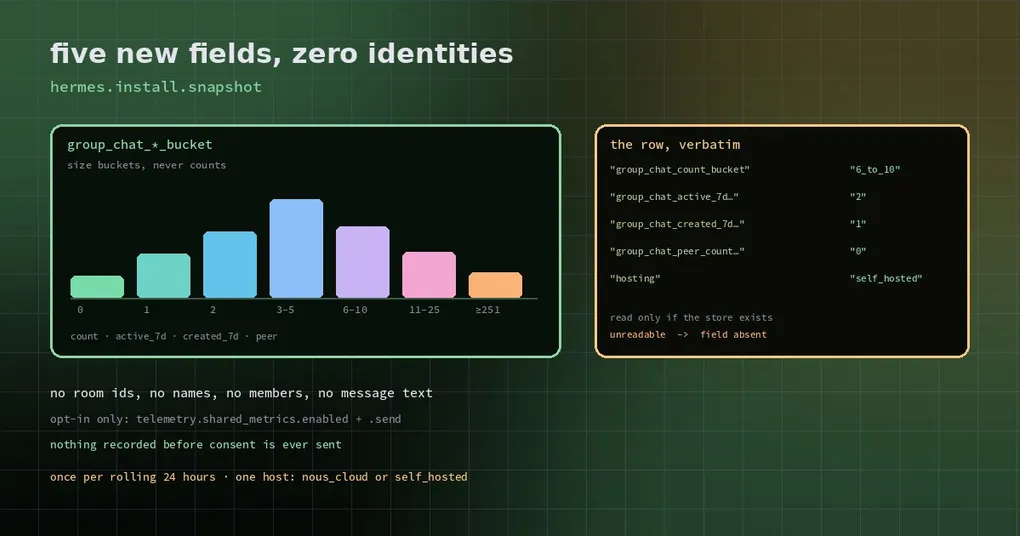
Four group-chat size buckets:
| Field | Meaning |
|---|---|
group_chat_count_bucket |
Group chats that exist (not disbanded) |
group_chat_active_7d_count_bucket |
Those with a message in the last 7 days |
group_chat_created_7d_count_bucket |
Those created in the last 7 days |
group_chat_peer_count_bucket |
Those with a member served by another gateway |
The buckets are shared across all four: 0, 1, 2, 3_to_5, 6_to_10, 11_to_25, and so on up to gte_251.
The fifth is hosting, with exactly two values: nous_cloud or self_hosted. It reads nous_cloud only when the HERMES_HOSTING environment variable says so (Hermes Cloud sets it on the agents it runs). The variable’s raw value is never recorded — only a boolean conclusion.
The questions behind these numbers are specific: designing a group-chat list and its navigation requires knowing what is typical, and what share of people have more than ten. Without those distributions, UI decisions are guesswork.
How the counting works (this is what makes the numbers trustworthy)
- A gateway hosts a profile’s group chats in that profile’s own
state.db, so each profile’s snapshot counts its own. - A standalone
hermes serve/hermes dashboardbackend keeps its group chats in the rootshared-state.dbuntil the root profile’s gateway takes them over (fencing the source rows). The root profile’s snapshot reads that store too and skips fenced rows — so each group chat is counted once. - “Active” is strict: a message posted in the last 7 days by a person or a scheduled post. Bot replies alone do not count.
- A group chat created and disbanded inside the window is not counted as created.
One detail says a lot about intent: these stores are only read, never created. No store reads 0; and a store that cannot be read leaves the four fields out entirely rather than reporting a false zero. Missing data beats invented data.
Why buckets instead of exact numbers
Two reasons — one privacy, one engineering.
Privacy: exact numbers combine into fingerprints. “17 group chats, 4 MCP servers, 3 profiles” narrows down an install far more than “6_to_10, 3_to_5, 2”. Bucketing keeps the shape of the distribution while lowering individual resolution.
Engineering: buckets do not lurch after a cleanup, so long-run trends stay comparable. Product decisions need distributions, not decimals.
What never enters the event
Worth listing on its own, because it is the boundary of the whole thing:
- Group chat room ids, names, members, link targets, message text — none of it is read.
- Account, agent or machine identifiers — not read (
hostingis justself_hostedornous_cloud). - The raw value of
HERMES_HOSTING— never recorded. - Prompts, files, paths, setting values, error text — out of scope by contract.
And one hard rule on top: data from before you opted in is never sent. Local counters accumulated before consent do not get flushed by a later opt-in.
You can verify it locally
No need to take the docs on faith:
$HERMES_HOME/telemetry/shared_metrics/metrics.sqlite3   # local database
$HERMES_HOME/telemetry/shared_metrics/outbox/*.json     # packages already written to disk
The JSON in outbox is the package body that is queued to send (or already sent). Open one: the field names match the list above, and there is nothing else in there.
One point the docs clarify because it has been misread before: the outbox is local history, not a send queue. exported_at means “written to disk”, not “sent”. Files are pruned by age alone (30 days) and are not deleted on successful upload — otherwise your promised 30-day local history would quietly become a transmission buffer. Send state lives in database columns; the files stay untouched.
Three ways to turn it down, at different granularities
Two keys, both in the profile’s own config.yaml:
telemetry:
  shared_metrics:
    enabled: true    # collect
    send: true       # upload daily
send: false— no further package leaves the machine, but collection and local history continue. Good for “I want to keep my own numbers, not ship them”.enabled: false— collection stops; existing local state remains.- Remove the
telemetry/shared_metricsdirectory — local identity, aggregates and files reset, and future sends use a newinstall_id.
One honest limitation: already-sent data has no self-service deletion path. The v1 contract does not have one and does not pretend to — deleting it means an operator acting on the storage bucket. Which is exactly why “nothing is sent before consent” matters: that is your one real stopping point.
Also worth knowing: a machine-managed configuration overlay cannot enable or disable shared metrics on the profile’s behalf. The choice is read from the profile’s own config.yaml.
Who asks you
- Terminal: at the end of every
hermes setupflow, and once before an interactivehermes/hermes --tuichat for a profile that never answered (which also covers the dashboard’s Chat tab, a PTY-hosted TUI). - Desktop: as a strip above the composer.
- The messaging gateway never asks — a chat participant is not the install owner.
Both answers set both keys at once: “Share with Nous” turns both on, “No thanks” turns both off. Writing either key explicitly counts as answering.
The point
The change itself is small: four buckets and one string. But it works as a mirror. Look at what it asks for — distributions, not identities; trends, not content; blanks when a store cannot be read, never a fabricated zero.
For the fuller picture of the consent machinery, read what shared metrics actually collect. If the reason you care about group-chat counts is that your own list got unwieldy, the other half of the story is how group chats work.