What Hermes telemetry actually records: two switches, both off by default, and nothing that looks like your content
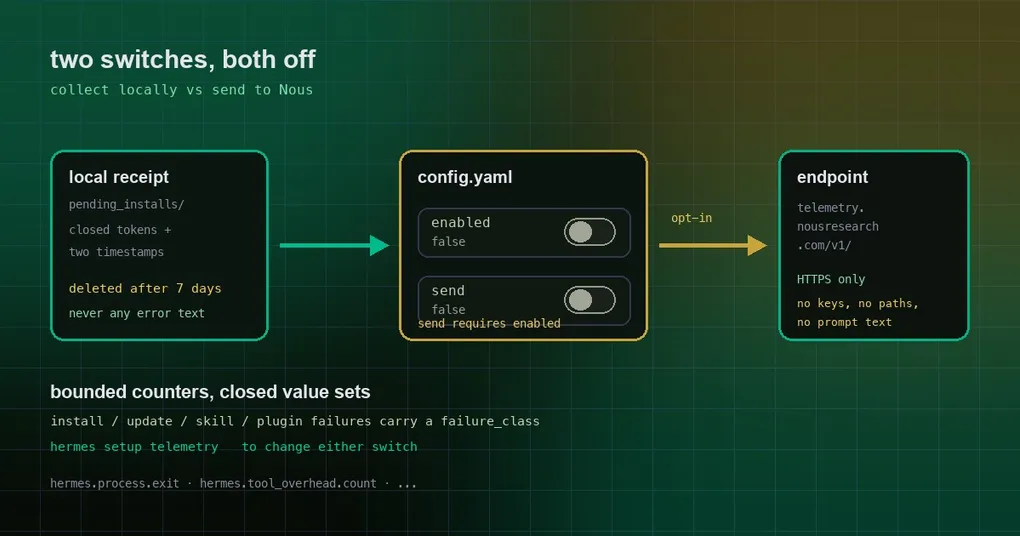
The first time you install Hermes it asks whether you want to enable local shared metrics. Most people reflexively answer no and never think about it again. Then one day you want to know what it would have sent, you open the docs, and you land in a wall of metric names and consent-window language. So you close the tab.
Here is the whole thing in one pass. The short version: everything is off by default; collection and transmission are two separate opt-ins; what gets recorded is bounded counters, never prompts, file contents, paths, setting values or error text. And a change merged on October 6 makes those counters genuinely useful to you for the first time.
Two switches, not a checkbox
The config lives under telemetry.shared_metrics in config.yaml:
telemetry:
  shared_metrics:
    enabled: false   # collect locally — off by default
    send: false      # transmit to Nous — off by default
    endpoint: "https://telemetry.nousresearch.com/v1/telemetry"
Three things worth knowing:
enabledcollects,sendtransmits. They are independent opt-ins. With onlyenabledon, everything stays on your machine and never leaves it.sendrequiresenabledand never implies it. Setsend: truewithenabled: falseand Hermes logs an error instead of quietly switching collection on for you — a transmission flag should not be able to start collecting.- Only packages whose whole period falls inside a recorded consent window are sent. Opt in today and nothing from before today is retroactively uploaded.
The endpoint is deliberately not overridable by an environment variable, and a non-HTTPS address is refused unless it points at localhost.
What actually gets recorded
The official list is long, but it all collapses into one principle: bounded counters, closed value sets. A few representative examples:
| Metric | What it records |
|---|---|
hermes.process.exit |
How a CLI / TUI / gateway / cron process ended: clean, crash (exception family only), killed, watchdog |
hermes.tool_overhead.count |
Bucketed count of enabled tools and the tokens their definitions add to each request |
hermes.tool_enabled_unused.count |
Which default toolsets you enabled and never used |
hermes.feature_disabled.count |
Which toolsets, skills, plugins or settings you switched off |
hermes.provider_setup.count |
Where provider setup broke down, and in which failure class |
hermes.desktop.onboarding |
Which first-run step people stop at |
Names appear verbatim only when they are shipped by Hermes — a custom toolset, skill or plugin is recorded as custom. Settings record the key path, never the value. The docs’ own summary is precise: never prompts, files, paths, setting values or error text.
New: failures now say why
Before PR #133809, telemetry knew a run had failed and which stage it died in — but not why. Three numbers made the blind spot obvious: 22–27% of CLI installs that attempted an update hit a failure that day (14–18% on desktop); about 35% of skill install events fail and about 33% of plugin installs; and 12% of failed git updates read failed_stage=other, meaning every stage mark passed and the run still failed.
The new failure_class is a closed set, derived at each raise site or from the exception type — the message text is never read. Examples:
- Skills:
ambiguous,auth_rejected,fetch_failed,invalid_bundle,not_found,rate_limited,scan_blocked,stale_index; - Plugins:
clone_failed,deps_declined,git_missing,incompatible,manifest_invalid,removed_from_catalog; - MCP:
auth_required,config_invalid,connect_failed,missing_credentials,server_start_failed; - Every kind:
none,exception,filesystem_error,network,other,permission.
The other mislabelling is fixed too: a partial update — post-restart verification found a gateway or desktop backend not back on the new code, with no stop reason — now reads failed_stage=verify with a real reason. Skill and plugin installs also carry a registry field, which finally separates “the official index served a broken entry” from “the URL you typed is dead”. Those two used to look identical.
Why a fresh install leaves a local receipt for 7 days
A brand-new install.sh / install.ps1 used to report nothing at all, because the consent question happens after the install. Now the installer writes one small file under $HERMES_HOME/telemetry/shared_metrics/pending_installs/ when it finishes — or when a stage fails. It contains only closed-set tokens and two timestamps.
Its lifecycle answers the two obvious worries:
- The installer never sends anything. It leaves a local note. Reporting happens later, on a Hermes start, and only while collection is on at that moment.
- The note lives at most 7 days. A receipt no start counted within 7 days is deleted unreported, so an old install is never counted under a later Hermes version. Any opt-out answer deletes unreported receipts immediately.
- A single
--stagecall writes nothing, and an install interrupted with Ctrl-C or SIGTERM is recorded asinterrupted.
So if you answered no during installation, the note is deleted; if you never started Hermes again, it expires on its own.
Turning it on or off
- Guided:
hermes setup telemetryasks the two questions separately. - Later:
hermes tools, or the toggle in the Desktop’s Settings. - Manual: edit the
config.yamlblock above.
Turning collection off withdraws send consent with it — transmission cannot outlive collection. The docs are explicit that disabling shared metrics stops new collection but does not silently delete previously collected local data; clearing that directory is your call.
What this means for you
If you were reading this as “yet another privacy switch”, the point is: off by default, two-stage consent, contents constrained to closed value sets, and even failure reasons are recorded as fixed categories rather than error text. If you were reading it as “what does this do for me”, the new failure_class is the answer — your install and plugin failures now land in a named bucket, and a dashboard can no longer confuse “a registry is returning 404s in bulk” with “you made a typo in a URL”.
The short version
Default off, collection and transmission separate, and what is recorded is categories and counts rather than your content. Turn on send if you want to contribute those counters to Nous; change nothing if you do not, and the note the installer left will quietly disappear within a week.
To see how Hermes handles your data locally first, read secret encryption and Keychain storage; to get started, see the install guide.