Ship It With One Command: the publish-site Skill for Versioned Website Deploys
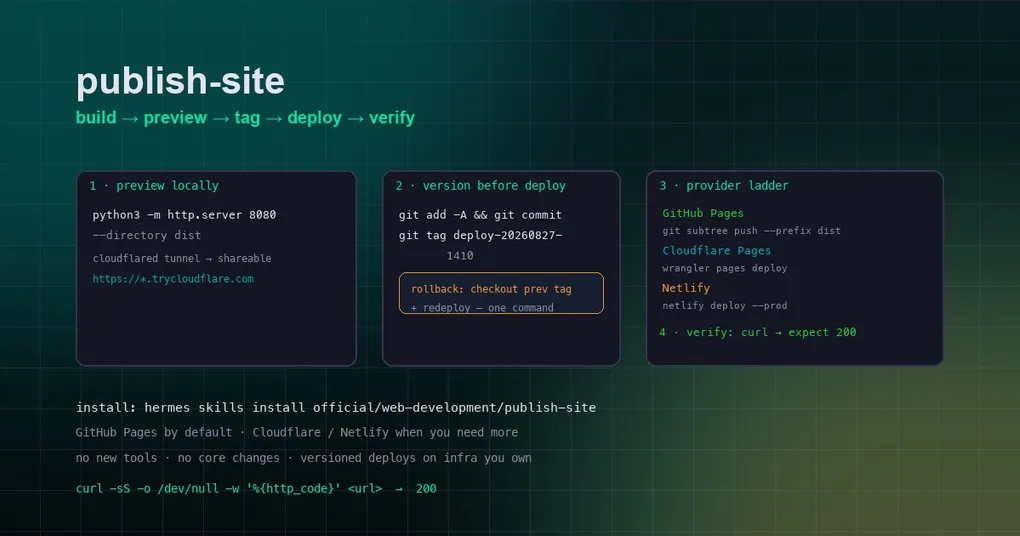
You just spent an afternoon building a dashboard, a portfolio, or a docs site — and now comes the part nobody enjoys: getting it online. You need a host, a deploy command, a way to preview before it goes public, and the confidence that you can roll back if something breaks. If you’ve ever deployed a site at 11pm only to find a broken asset path on the live URL, you know the pain. Hermes now ships an optional skill that turns this whole ritual into a five-step, one-command pipeline: publish-site.
Merged on August 27, 2026 (PR #72189), publish-site is a zero-core-footprint skill — no new tools, no changes to the Hermes core — that gives you the same outcome as ChatGPT Work’s “Sites”: save a version, deploy, and roll back if needed, on infrastructure you own. It’s a disciplined pipeline: local preview for sign-off, version-before-deploy, a provider ladder, mandatory HTTP-200 verification before reporting success, and rollback one command away.
What the skill does
The pipeline is always the same five moves, and the skill’s SKILL.md spells out each one with exact commands:
- Build — run your build step (
npm run build, etc.) and identify the output directory (dist/,build/). - Preview for sign-off — serve it locally, or open a shareable tunnel so someone else can approve before it goes live.
- Commit + tag — version every deploy with a git tag (version-before-deploy).
- Deploy via the provider ladder — GitHub Pages by default; Cloudflare Pages or Netlify when you need more.
- Verify the live URL — a real HTTP check expecting
200before you report success.
Install it with:
hermes skills install official/web-development/publish-siteStep by step
1. Preview locally, share if needed
Build if needed and serve the output directory:
python3 -m http.server 8080 --directory distFor a shareable preview link — user on another machine, or you want their sign-off before going live — open a quick tunnel in a background terminal session:
cloudflared tunnel --url http://localhost:8080You get a https://*.trycloudflare.com URL to hand over. Kill the tunnel after sign-off.
2. Version before deploy
Every deploy gets a git tag — this is what makes rollback a one-liner later:
git add -A && git commit -m "deploy: <what>" && git tag deploy-YYYYMMDD-HHMM3. Deploy through the provider ladder
The skill checks for authenticated provider CLIs in order:
| Provider | Command | Prerequisite |
|---|---|---|
| GitHub Pages (default) | git subtree push --prefix dist origin gh-pages |
gh auth status succeeds |
| Cloudflare Pages | npx wrangler@latest pages deploy dist --project-name <name> |
wrangler whoami succeeds or CLOUDFLARE_API_TOKEN is set |
| Netlify | netlify deploy --prod --dir dist |
netlify status succeeds |
If you’re enabling GitHub Pages on a repo that doesn’t have it yet:
gh api repos/{owner}/{repo}/pages -X POST -f 'source[branch]=gh-pages' -f 'source[path]=/'4. Verify with a real HTTP check
Before reporting success, the skill requires an actual HTTP check on the live URL:
curl -sS -o /dev/null -w '%{http_code}' <url> # expect 2005. Roll back when needed
A bad deploy is one command from gone: check out the previous tag and redeploy.
git checkout <previous-tag> -- . && redeployWhen to use it (and when not to)
Load the skill when you want to put a site online — “publish this”, “host this somewhere”, “give me a link I can share” — deploy a dashboard/report/portfolio/docs site you just generated, update an already-published site (redeploy = new version), roll back a bad deploy, or just pick a host because you don’t care where it lives. It covers static sites and SPA build output: plain HTML/CSS/JS, or the dist//build/ folder from Vite, Next export, Astro, etc.
It does not cover server-side runtimes. For throwaway serverless deploys with zero account setup, the sibling optional skill cloudflare-temporary-deploy is the right tool. The skill also assumes at least one authenticated provider CLI — check gh auth status, wrangler whoami, or netlify status first.
Why this pattern is worth adopting
Three habits baked into the skill are worth stealing even if you never install it:
- Preview before public. The shareable tunnel turns “ship and pray” into “sign-off first” — a two-minute step that catches broken assets, wrong base paths, and missing fonts before they’re visible to the world.
- Version every deploy. A git tag per deploy means any version is reproducible and any rollback is a checkout away. “Which version is live?” has an exact answer.
- Verify before declaring done. The HTTP-200 check kills the classic lie: “I deployed it” when the site actually 404s. A
curlon the live URL is the only honest definition of success.
Fitting it into your Hermes workflow
The skill is designed to be loaded by the agent automatically when the request matches (“publish this”, “deploy this”, “give me a link”) — the same trigger-based model as other Hermes skills. If you’re new to the skill system, see our project-local skills guide for how .hermes/skills/ works and how trust gates apply, and our top skills overview for the wider ecosystem. For a tour of how optional skills extend Hermes without touching core, the publish-site PR itself is a clean read — 476 lines of additions, mostly SKILL.md plus its test suite, zero core changes.
Installing and using the skill is one command, and the discipline it encodes — preview, tag, deploy, verify, rollback — is the same workflow professional teams pay a lot of tooling to get. Now it’s a skill you can load on demand, on infrastructure you own. Next time you finish a site at 11pm, “deploy it” will be a five-step pipeline with a 200 at the end — not a prayer.