The profile that half deleted itself: gone from the list, still on disk
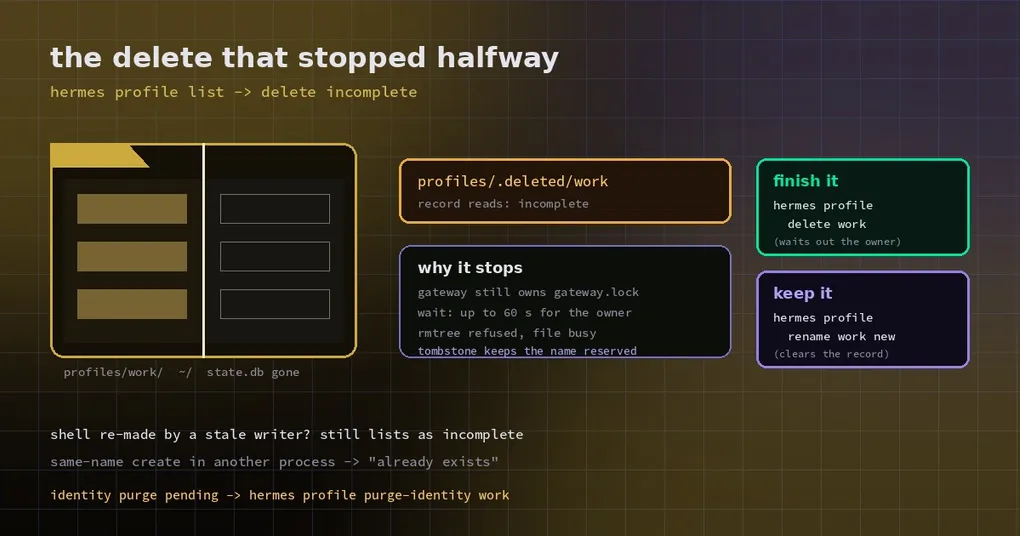
You want a few gigabytes back, so you retire a staging profile. hermes profile delete staging runs for a while, prints a few lines, exits. The next morning hermes profile list has no staging in it — and du -sh ~/.hermes/profiles/staging tells you it is still there, all four gigabytes of it.
That is not a stale cache or a listing that needs a refresh. The delete failed partway, and the old behaviour was to say nothing: the profile disappeared from the list because it was tombstoned, while its files stayed because nothing had removed them. You could neither see it nor delete it, since the commands no longer considered it a profile.
Two things changed on that path: a record that does not lie, and a sentence that tells you what to do.
What a delete actually has to get past
hermes profile delete is not a single rm -rf. Three realities get in the way:
- A gateway may be using it. If the profile’s gateway is running, or a multiplexing process holds its
gateway.lock, the files are live. The delete waits for the owner to let go, up to 60 seconds. - The filesystem may refuse. A
state.dbmid-write, logs someone else has open — either can makermtreefail halfway. - Another process may be working on it. You delete in one terminal while a second process does something to a profile of the same name.
So the delete has to leave a trace before it touches files. That trace is a tombstone: a record file under profiles/.deleted/, named after the profile.
~/.hermes/profiles/.deleted/staging <- two possible lines: incomplete or deletedThe sequence is precise: write incomplete first, rewrite as deleted only after rmtree succeeds. Only a directory whose record reads deleted may be treated as an empty shell a same-name create can replace. Everything else means “a delete is under way, or died partway”.
What you see now
hermes profile list appends unfinished deletes after the table, with delete incomplete in the Gateway column, then the full explanation:
Deletion of profile 'staging' did not finish: /root/.hermes/profiles/staging still holds its files.
Finish it with `hermes profile delete staging`, or keep it with `hermes profile rename staging <new-name>`.
That sentence is the whole diagnosis, and both actions work:
- To finish: run
hermes profile delete stagingagain. This time it waits out the owner before removing. - To keep:
hermes profile rename staging archive-2026. The record is cleared and the profile is back.
It will ask for confirmation again unless you pass --yes. After one failed attempt, one more question is not unreasonable.
Why not just rm -rf
Deleting the directory by hand looks fastest and leaves the harder mess. The record at profiles/.deleted/staging is not something you removed — only a successful delete rewrites it to deleted. A leftover incomplete record with no directory behind it makes the next same-name create behave like an unfinished delete, and you get a stranger puzzle than the one you started with.
So: clearing files by hand is fine if you are only reclaiming space (a big cache subdirectory, say), but finish with a real hermes profile delete so the record settles. The reverse is worse — remove the record without removing the files and the profile reappears in the list with a crippled directory.
There is a third leftover: a directory under profiles/ that carries identity files (config.yaml, .env, SOUL.md, state.db) but no tombstone. That ghost shell is deliberately never listed, served, ticked or seeded with the default install’s credentials. Give it a name again or delete it — do not expect it to heal into a profile on its own.
The identity settlement you still owe
A profile is more than a directory. It also owns session routing keys (agent:<name>:*), heartbeat rows, and Telegram topic bindings. Those live in state.db and do not always go away with the directory, especially when a gateway is alive during the delete.
In that case the delete reports that the profile is gone but its identity settlement is pending, and points at:
hermes profile purge-identity stagingThe purge keys off the name, so it runs even with no directory present — but a profile that is live again under that name is refused. Identity is settled by name, so purging it would take the new profile’s routing with it.
Details worth knowing: routing keys, heartbeat rows and Telegram topic bindings are deleted; pending delivery rows are marked abandoned rather than dropped, so unsent state is not silently lost; session history is not part of the purge — that is decided by the delete itself, which removes profiles/<name>/state.db with the directory. The command is idempotent, exits non-zero for a live name, a refusing gateway or a database error.
The batch is really one fix
The changes that landed together all point the same way: turn “unstateable” into “stated”.
- An unfinished delete now says so instead of hiding the profile;
- two processes creating the same profile, one loses cleanly with
already existsinstead of leaving a half-made directory; - seven plugin write sites refuse a deleted or renamed profile home instead of rebuilding a tree in the old place;
- tearing down a profile the gateway no longer serves does not leave its bot token behind for another profile;
- a memory plugin’s profile hook loads its provider in its own plugin host rather than the shared one.
The common thread: long-lived processes, multiple writers, and on-disk state. The bug that bites there is rarely a crash — it is “looked like it worked”.
The one-line version
When a profile delete goes wrong, do not reach for rm -rf. Read the last lines of hermes profile list first; they name the missing step. Finish it with another delete, keep it with a rename, settle identity with purge-identity.
We covered the rename and identity migration machinery in the profile rename guide; if you run several profiles, the layout in the multi-profile walkthrough helps you decide which directory should survive. Command-level flags are in the hermes profile reference.