Why 90GB of your disk went missing: the dependency state left behind by deleted worktrees
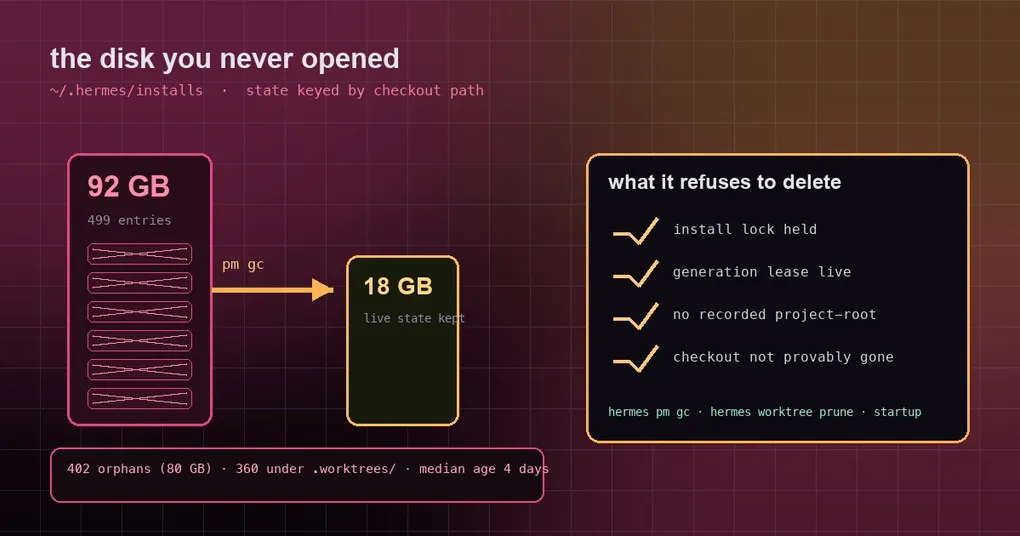
Your laptop says the disk is almost full. You clear the downloads folder, prune a few Docker images, restart, and two weeks later it says the same thing. The actual culprit is a directory you have probably never opened: ~/.hermes/installs. It never shows up as a big process and never appears in du -sh ~/Downloads — it just grows quietly.
The reason is simple and it is not a bug. Every time you boot the agent in a hermes -w worktree, a review tree, or a scratch clone, Hermes prepares a dedicated dependency environment for that checkout — a Python environment, a test environment, the PM runtime, roughly 200MB per tree. When the tree goes away, that environment does not. PR #133808, merged on October 7, 2026, closes that gap.
The state is keyed by path
First, what the thing actually is. Dependency state lives under <hermes home>/installs/<install_key>/, where install_key is not a project name but a hash of the path:
# pm/environments.py
def install_key(project_root: Path) -> str:
    canonical = str(Path(project_root).resolve())
    return hashlib.sha256(canonical.encode("utf-8")).hexdigest()[:16]
So two worktrees of the same repository get different keys and different environments, because their paths differ. That is deliberate: the whole point of a worktree is isolation, and sharing one dependency environment across trees would consume it.
The cost is that the isolation has a lifespan. git worktree remove, the startup pruner, hermes worktree prune, and even a manual rm -rf on the tree all leave installs/<key>/ untouched. The dependency state exists per checkout path; the checkout is gone, the state is not, and nothing references it any more.
The numbers in the PR make the scale concrete. On one developer host after a fortnight of worktree campaigns, ~/.hermes/installs held 499 entries totalling 92GB, of which 402 entries (80GB) recorded a checkout that no longer exists — 360 of them under .worktrees/ — with a median age of four days. Only 76 entries belonged to live checkouts. More than four fifths of the space was ghost state.
The fix: one record decides what is an orphan
The new pm/install_states.py does something deliberately plain. Every state directory that has synced successfully contains inputs/.project-root, written by record_activation_inputs, naming the checkout it belongs to. The check is simply whether that path is still there.
The subtle part is that “not there” does not mean “deleted”. A data root shared with a container (-v ~/.hermes:/opt/data) or an unmounted volume will also record paths the current process cannot see. So the verdict is narrowed to provably deleted: the checkout must have sat somewhere this process can observe — under the data root that owns installs/, or directly inside a .worktrees/ directory that still exists. State directories with no record at all are never touched.
Reclaim is equally conservative. Anything still held is kept:
- the
.install.lockcannot be taken (a process is using it); - any generation under
environments/still has a live lease (something is reading it); - a lock that cannot even be opened counts as held.
That bias is correct. Deleting a dependency environment that is in use breaks the running session; keeping one that should have gone costs only disk.
How to reclaim it now
There is no migration to perform. Two paths do the work automatically:
hermes pm gc          # the output gains a trailing entry: N install state dir(s) of deleted checkouts
hermes worktree prune # reclaims state after the branch pass, for trees that are gone
The pruner that runs at every Hermes startup does it too, so in normal use a deleted worktree’s state disappears on the next hermes launch or the next pm gc. Startup reclaim is fail-soft — a failure logs at debug level and never blocks the launch.
To see what you are carrying first:
du -sh ~/.hermes/installs           # total
ls ~/.hermes/installs | wc -l       # number of entries
hermes worktree list                # age, size, verdict and reason for every tree in .worktrees/
hermes worktree list is the safe pre-flight: it prints a verdict and the reason for each tree before you prune. It never deletes uncommitted tracked changes, unique unpushed commits, or in-use trees, and untracked-only scratch trees are archived to ~/.hermes/archive/worktree-prune/ before removal.
How this differs from the other disk stories
We have covered a few disk-related problems here, and the mechanisms are different enough to keep apart:
- an update blowing up the disk is about temporary artifacts during
hermes update; - the dirty-worktree data loss is about a pruner that deleted trees it should have kept;
- this one is the opposite direction: something that should have been deleted was not. Cleanup reached the tree but not the dependency state the tree left behind.
The first two are guardrail bugs; this one is a coverage gap. Together they form the picture on the dependency side, and cutting storage to 78% of its former size covers the data side — sessions and caches — if you want both halves.
The short version
~/.hermes/installs/stores dependency state keyed by the hash of the checkout path, one ~200MB environment per worktree or scratch clone;- deleting the tree never deleted that state — not
pm gc, not worktree prune, notrm -rf; - now
hermes pm gc,hermes worktree prune, and the startup pruner all reclaim state whose checkout is provably deleted, and leave anything behind a held lock or lease alone; - measured on one host: 499 entries at 92GB, 402 of them orphans (80GB), 92GB down to 18GB after reclaim.
If you open worktrees or spin up throwaway clones regularly, run one du -sh ~/.hermes/installs today. If the number is bigger than you expected, hermes pm gc is the whole answer.