Exiting a session deleted code you never committed
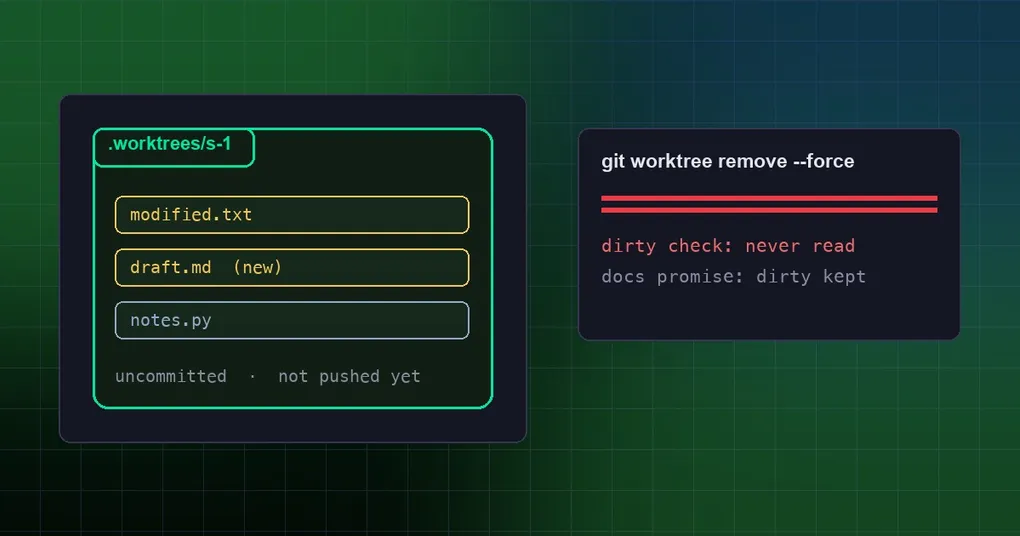
You run three sessions in parallel. One of them is halfway through editing a file — no commit yet, you will finish it tomorrow. You exit the session and close the terminal. Next morning the directory under .worktrees/ is gone, and so is the branch.
You did not misremember where it was. The exit cleanup for worktree: true is missing one check: it looks at commits, never at files.
What worktree mode is doing
Starting a session with hermes -w (or setting worktree: true in config) gives each CLI session its own worktree under .worktrees/, on its own branch:
worktree: false        # default: only when -w is passed
worktree_sync: true    # default: branch from the freshly-fetched remote tip; false uses local HEAD
That is how several agents edit, commit, push and open PRs without stepping on each other. Branching from the fresh remote tip is deliberate too — the PR ends up scoped to your change instead of inheriting whatever the local clone was behind by.
The problem lives in the exit step.
What the docs promise vs. what the code does
The configuration docs, in the git worktree isolation section, are explicit:
Clean worktrees are removed on exit; dirty ones are kept for manual recovery.
Meanwhile _cleanup_worktree in cli.py states its own criterion in the docstring:
def _cleanup_worktree(info: Dict[str, str] = None) -> None:
    """Remove a worktree and its branch on exit; kept only when it has unpushed commits."""
Only unpushed commits are kept. The helper that decides, _worktree_has_unpushed_commits(), runs:
git log --oneline HEAD --not --remotesIn other words, it asks which commits on HEAD no remote has. The working tree status is never read. So:
| What the worktree holds at exit | Actual result |
|---|---|
| A new untracked file, never committed | worktree DELETED |
| A tracked file modified, not committed | worktree DELETED |
| A commit not yet pushed | worktree kept |
The final step is git worktree remove <path> --force plus git branch -D <branch>. --force means exactly what it sounds like: ignore uncommitted changes in the working tree.
Why there are two different criteria
Hermes actually has two paths that manage worktrees, and they disagree.
One is the exit cleanup in cli.py, described above — commits only.
The other is the startup pruner in hermes_cli/worktree_ops.py, and it understands “dirty”: _worktree_is_dirty() runs git status --porcelain (untracked files included), fails safe toward True, and its verdict is recorded as dirty, which is a member of _PRESERVE_REASONS. The comment above it is unusually blunt:
Guards at every tier and age: dirty trees are never removed.
So this is not “Hermes cannot tell dirty from clean”. It is two paths with two different criteria: the background pruner protects dirty files, the exit cleanup protects commits. Users hit the exit path.
How to protect yourself
Until that criterion is aligned, here is what works today.
- Commit before you exit, even as WIP. An unpushed commit makes the tree survive:
git add -A && git commit -m "wip: still working" - Or stash, including untracked files. The
-uingit stash -uis the important part — without it, new files still exist only inside the worktree. - Do not treat “the session is still open” as file safety. Uncommitted work is safe only while the session lives; the moment you exit, it is in range of
--force. - Glance at the status when running parallel sessions.
git -C .worktrees/<name> status --porcelain; non-empty output means this tree will be deleted at exit. - Have the session commit and push. Worktree sessions are designed to let the agent commit, push and open PRs; once pushed, the “unpushed commits” criterion keeps the tree, and you gain a second safety net.
- Audit periodically. It is worth knowing what the worktree check-up introduced in v0.20.5 does and does not cover.
If it already happened: start with git worktree list and git branch to see whether the branch survived. If there was even one commit before exit, that content is still in the object store and recoverable from the branch or the reflog. But uncommitted, untracked files removed with --force have no git-level recovery path — whether you get them back depends on editor buffers, system snapshots or backups, not on git. Better to be blunt about that than to imply a rescue that does not exist.
Where this stands
Issue #129482 was filed on 2026-09-30, labelled P1, against code at 41755854, and it was still open when this was written. The natural fix is to have the exit cleanup call _worktree_is_dirty() too, so both paths share one criterion. Until then, do steps 1 and 2 above.
This is not the first of these “looks clean, quietly lost something” bugs either. The nested-repo rollback guard covers rollbacks touching directories that were never captured, and session boundaries explains what sessions actually share. Both are worth folding into your habits.
The takeaway
The lesson is not “do not use worktrees”. It is that a delete operation should use the most conservative criterion available: when deciding whether a tree can be removed, what is in the working directory matters far more than what is in the commit graph. One uncommitted half-finished file is usually worth more than ten pushed commits.
Until the code agrees, self-defence is one sentence: commit or stash before you exit.