Switching Agents Costs You the Rules You Already Wrote, Not the Install
You have a CLAUDE.md you have been editing for a year — half real conventions, half apologies to your past self. You have a wall of Bash(...) allow rules you no longer remember adding, four MCP servers wired into a side project, and a dozen skills that each encode one expensive lesson. You have read enough about Hermes to want to try it. Then you do the arithmetic on retyping all of it, remember you will forget the one rule that keeps the agent from asking permission forty times a day, and close the tab.
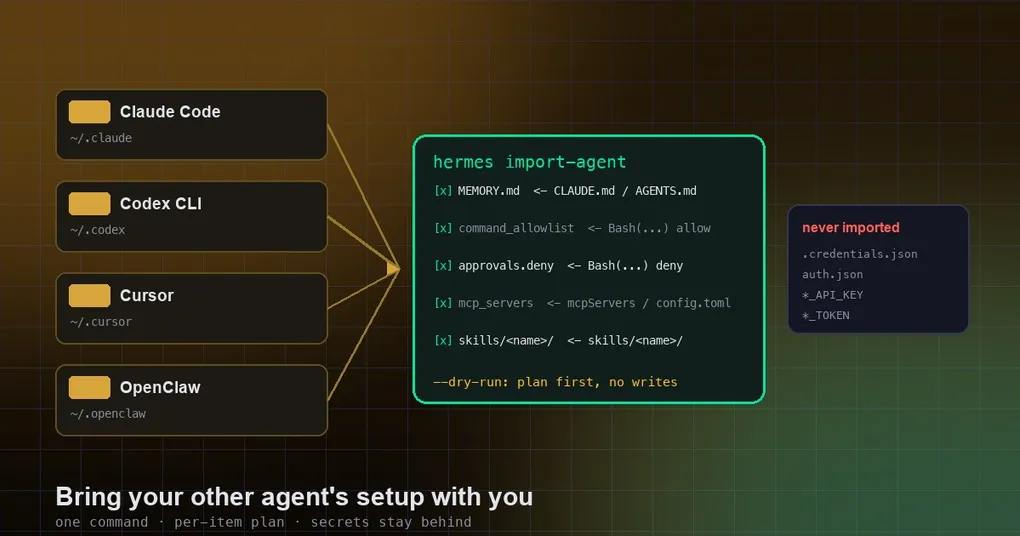
That afternoon is what hermes import-agent is for. It reads another agent’s config directory, works out what it can carry over, and shows you the plan item by item before it writes a single byte.
Three terms recur below. An MCP server is a tool server the agent may call — a database, a browser, an issue tracker — described by a small config block. An allowlist is the set of shell commands the agent may run without stopping to ask. A skill is one directory holding a SKILL.md file that teaches one procedure.
The install is a minute; the config is the actual asset
Nobody hesitates because installing Hermes is hard; they hesitate because the value is the accumulated configuration: the instruction file that took months of “no, stop doing that” to get right, the approval rules that encode your risk tolerance, the MCP servers that cost an evening of debugging headers. Every one lives in a different format per agent, and none are portable by default.
Rewriting by hand drops the config you forgot you had, because you cannot retype from memory something you never consciously wrote — and a tool that copies mechanically does not get bored at item nine.
hermes import-agent supports four sources: OpenClaw (~/.openclaw, including the older ~/.clawdbot and ~/.moltbot names), Claude Code (~/.claude), OpenAI Codex CLI (~/.codex), and Cursor (~/.cursor).
Install the importer once, then ask for the plan
The importer ships as an official plugin, agent-importers, maintained by Nous Research in the agent-importers directory of the hermes-official-plugins repository. Install it once per profile — plugins are per profile, so a second profile needs the same command:
hermes plugins install agent-importersThe plugin moved recently: v0.22.4 (2026-10-21) took it out of core into the catalog and added Cursor as a source, and v0.22.5 (2026-10-23) mentions hermes import-agent plus setup offering an importer when it spots another agent.
With no argument, the command probes all four directories. With one, it goes straight to that source:
hermes import-agent                    # probe ~/.openclaw, ~/.claude, ~/.codex, ~/.cursor
hermes import-agent openclaw           # from ~/.openclaw
hermes import-agent claude-code        # from ~/.claude
hermes import-agent codex              # from ~/.codex
hermes import-agent cursor             # from ~/.cursor
hermes import-agent claude-code --dry-run           # plan only
hermes import-agent codex --source /path/to/.codex  # non-standard location
hermes import-agent claude-code --overwrite --yes   # resolve conflicts, skip prompts
What the first form does not do is merge four agents into one pile and hope. It reports per source, per item: found, will write, skipped and why. --dry-run gives the same report and touches nothing on disk. --overwrite settles conflicts in favour of the import; --yes skips confirmation, fine in a scripted bootstrap and risky once you have hand-edited the destination.
hermes setup on a fresh install runs the same probe first. When it finds something it asks “Import your setup from Claude Code?” and says what it found; when it finds several, you get a checklist with everything ticked. Say yes and, if the profile lacks agent-importers, setup installs it from the catalog and runs the same plan-preview-confirm flow. Decline, or find nothing, and nothing gets installed.
OpenClaw gets one refinement there: setup passes --migrate-secrets automatically, reusing the older built-in OpenClaw migration step, so API keys and bot tokens come across and the provider and messaging-platform sections are already filled in. Pick Quick Setup afterwards and, if the import brought a model and its key, setup asks whether to keep that model (the default) or switch to Nous Portal.
What each source actually hands over
Every source is read for the same four categories — instructions, approvals, MCP servers, skills — but the layouts differ enough to be worth reading first.
| Source | What it reads | Where it lands |
|---|---|---|
| Claude Code | CLAUDE.md global instructions |
memory entries in ~/.hermes/memories/MEMORY.md |
| Claude Code | permissions.allow in settings.json |
command_allowlist in config.yaml |
| Claude Code | permissions.deny in settings.json |
approvals.deny in config.yaml |
| Claude Code | mcpServers, from ~/.claude.json and settings.json |
mcp_servers in config.yaml |
| Claude Code | skills/ directories containing a SKILL.md |
~/.hermes/skills/claude-code-imports/ |
| Claude Code | commands/*.md slash commands |
skipped, with a suggestion to rewrite as a skill |
| Codex CLI | AGENTS.md global instructions |
memory entries |
| Codex CLI | config.toml [mcp_servers.*] |
mcp_servers |
| Codex CLI | memories/*.md |
memory entries |
| Codex CLI | skills/ directories |
~/.hermes/skills/codex-imports/ |
| Cursor | AGENTS.md |
memory entries |
| Cursor | rules/*.md and rules/*.mdc (User Rules) |
memory entries |
| Cursor | mcpServers in mcp.json |
mcp_servers |
| Cursor | skills/**/ skill directories |
~/.hermes/skills/cursor-imports/ |
| OpenClaw | ~/.openclaw (plus ~/.clawdbot, ~/.moltbot) |
broader mapping, described below |
Cursor’s .mdc files carry frontmatter — description, globs, alwaysApply — which is routing information for Cursor’s rule engine. It is stripped and only the body becomes memory: those keys mean nothing to Hermes, and carrying them would create rules that look active but never fire. Cursor skills may sit in category folders, so skills/shipping/land-it/ imports as cursor-imports/land-it/ — the leaf directory is the skill, because a skill is the directory holding a SKILL.md. Two skills sharing a name in different folders are reported as a conflict.
Claude Code’s slash commands are the other honest refusal. commands/*.md is skipped with a message rather than converted, and the suggestion is to rewrite it as a skill — because a slash command and a skill are invoked differently, and a mechanical conversion would only look like it worked.
Allow rules do not translate shape for shape
The mapping is mechanical but not symmetrical, and it is the part of the plan worth reading closely.
A Claude Bash(...) prefix rule becomes a glob: Bash(npm run test:*) arrives as npm run test*. The intent survives — “this family of commands, no questions asked” — but the notation does not. If you want to tighten what came over, the approval model is covered in smart approvals setup.
Non-Bash rules take the other path. Read(...), WebFetch and their relatives govern tools that exist in Claude Code and not in Hermes, so they are reported as unmapped rather than force-imported into something that resembles them — an “unmapped” line beats a config key that behaves differently from what you meant.
Credentials are never part of the cargo
API keys and credentials are never imported, which is what makes this safe on a work laptop. The credential files — ~/.claude/.credentials.json, ~/.codex/auth.json, ~/.cursor/cli-config.json — are not read at all. When an MCP server block carries environment variables or headers whose names look like secrets (*_TOKEN, *_API_KEY, Authorization), those values are stripped and listed in the report, so you can put them back knowing exactly which ones left.
Two routes restore them: hermes setup for provider configuration, or writing the secrets into ~/.hermes/.env. To avoid plaintext keys in a dotfile, the keychain-backed approach in secret encryption is the alternative.
The one exception is OpenClaw, and it is opt-in: only an explicit --migrate-secrets brings the allowlisted API keys and bot tokens across.
Three things you have to finish by hand
The importer moves structure; it cannot finish the job.
Put the secrets back. Every MCP server whose headers were stripped needs its token before it connects, and missing credentials surface as a tool failing on first call rather than an import error. How MCP servers and context variables resolve is covered in MCP config and context variables.
Rewrite the slash commands. A /review or /ship command was skipped. The replacement is a skill, usually twenty minutes per command — worth doing in the order you actually use them.
Re-read the approvals. The imported allowlist and deny list are a first draft made by a tool that never saw your risk tolerance. Check that each glob matches what you think it matches and that nothing important landed in the unmapped report. If more instruction text came over than expected, the AGENTS.md directory chain explains how instruction files stack in Hermes.
Watch these before you press yes
- Plugins are per profile.
agent-importersinstalled for your main profile does nothing for the second one. - Conflicts are reported, not resolved silently. Two same-named Cursor skills, or an existing file at the destination, show up as conflicts.
--overwritesettles them in favour of the import. - OpenClaw has its own guide and its own flags. That guide covers the full mapping — persona, memory, skills, model providers, messaging platforms, agent behaviour, MCP servers — plus
--preset,--migrate-secrets,--workspace-targetand--skill-conflict, a pre-migration backup, andhermes claw cleanupafterwards. The olderhermes claw migratespelling still runs the same import. - Non-standard installs need
--source. If Codex lives outside~/.codex, the probe will not find it.
The transcription half, the importer does without typos — and it hands you a receipt for everything it left to your judgement.