Memory Has a Budget: Why It Eventually Stops Remembering
You have had this moment: last week you told Hermes, in plain words, that this project deploys with process X. This week it asks again. You open its memory file and find it stuffed with three-month-old temporary decisions, conclusions that were later reversed, and a handful of near-identical duplicates. You ask it to remember something, it agrees — and nothing sticks.
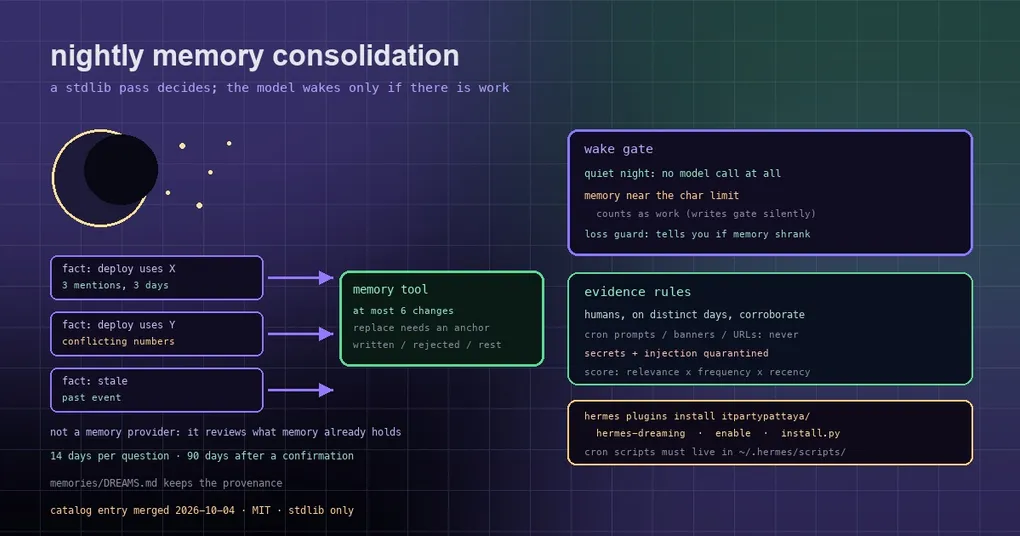
The nastiest part of a full memory is that it does not raise an error. Hermes’ memory has a character limit, and once the budget is spent, new writes are skipped silently. By the time you notice, nobody can say how much was lost. The community plugin hermes-dreaming (added to the official plugin catalog on 2026-10-04) exists for exactly this: a deterministic memory-consolidation pass every night.
The split that makes it cheap
The most instructive design choice is the division of labour. Across the whole nightly run, the script never calls an LLM:
- a pure-stdlib Python script reads the memory you already have (
MEMORY.md/USER.md) plus recent real conversations; - screening, scoring, matching and quarantining all happen offline;
- the agent is woken only when something genuinely needs a decision, and then it applies those few changes through the regular
memorytool.
Most nights that means the pass is free: nothing to compute, nothing to change.
How it decides something is worth remembering
Evidence comes from humans, on separate days. A fact counts only if people mention it on distinct days. Cron prompts, compaction banners, URLs, untrusted chat content and the agent’s own output never corroborate anything — which kills the failure mode where an agent quietly remembers its own hallucinations.
Scoring reuses OpenClaw’s weights: relevance, frequency, diversity, recency, consolidation and richness, behind a corroboration gate.
Every candidate is matched against existing memory: exact matches, explicit alias rules, and stemmed containment in three directions. One distinction here is genuinely smart — a candidate that restates an existing entry but with different numbers is not discarded as a duplicate. It is flagged as a conflict, a possible update, and carries the nearest entry, the file it lives in, and a verbatim anchor for replace.
Screening happens before you see anything: secrets and prompt-injection are quarantined, dated events expire (Russian, English and Thai date formats), and near-identical facts in the store surface once.
Two safety rails: a wake gate and a loss guard
- A wake gate. On a quiet night the job signals that the agent is not needed and the model never starts. Notably, a memory file close to its character limit counts as work — because the limit gates writes silently, so nothing else would ever surface it.
- A loss guard. If a large share of memory disappears overnight, the next report says so explicitly.
It also keeps a diary in memories/DREAMS.md with provenance for every candidate, so you can trace where an entry came from.
Installing it
Requirements: Hermes 0.21 or newer, Python 3.9 or newer, standard library only.
# 1. install and enable the plugin
hermes plugins install itpartypattaya/hermes-dreaming
hermes plugins enable hermes-dreaming
Step two is the installer script. You cannot skip it: Hermes only runs cron scripts from ~/.hermes/scripts/ (a symlink is refused), so the installer copies the two pre-check gate scripts there.
python3 ~/.hermes/plugins/hermes-dreaming/skills/dreaming/scripts/install.pyThe installer copies both gates, seeds ~/.hermes/dreaming.json from the example, does a dry run on throw-away copies of the state, and checks the fact source and the core version. It is idempotent, and install.py --check verifies without changing anything — run it after every update, because the copies under scripts/ can drift from the skill.
Step three is the config, and it is the part nobody can do for you:
$EDITOR ~/.hermes/dreaming.jsonYou fill in the timezone, trusted_chat_ids, agent_names and fact_source. Note that trusted_chat_ids is fail-closed: until you list your group chats, no group chat can corroborate anything and the plugin deliberately does nothing. If a trusted chat is a forum, list the threads that are not human talk — the agent’s own alerts, assistant bridges, machine-generated cards — under excluded_threads.
Finally the cron jobs. Creating them goes through Hermes’ Python API (the CLI has no flag for toolsets, and the job file is live scheduler state), so dry-run the plan first:
~/.hermes/hermes-agent/venv/bin/python \
    ~/.hermes/plugins/hermes-dreaming/skills/dreaming/scripts/install_cron.py --deliver local --dry-run
Happy with the plan? Run it again without --dry-run. The jobs bind to the plugin skill’s qualified name, so the plugin has to be enabled first; existing jobs are skipped, and one that loads a different skill is reported — --rebind points it back.
Every candidate reaches an ending
What makes this feel less like a toy and more like an operations tool is that it does not ask you the same question forever:
- a candidate is either written to memory or put on the reject list (a human’s “outdated” closes it for good, matched by text);
- new facts, conflicts and decay questions appear at most once every 14 days;
- an entry that survived a “still relevant?” round — kept, or rewritten in place with a fresh date — rests for 90 days;
- cooldowns start only once the agent actually answered: a night that failed halfway re-shows the same items;
- at most six changes land per night, and
replacerequires the verbatim anchor the script provided.
Caveats
- It is not a memory provider and registers nothing: it reviews what the built-in memory and the holographic store already hold, so it complements existing memory plugins rather than replacing them;
- fact sources can be the holographic store, a SQLite or JSONL export, or none;
- nothing in the package patches Hermes core — what you run is the catalog-pinned code.
For the rest of the memory picture, see the memory provider catalog migration and cron memory continuity; the command surface is in the hermes memory reference and the plugin catalog guide.