Should a missed cron run catch up? grace_minutes answers per job
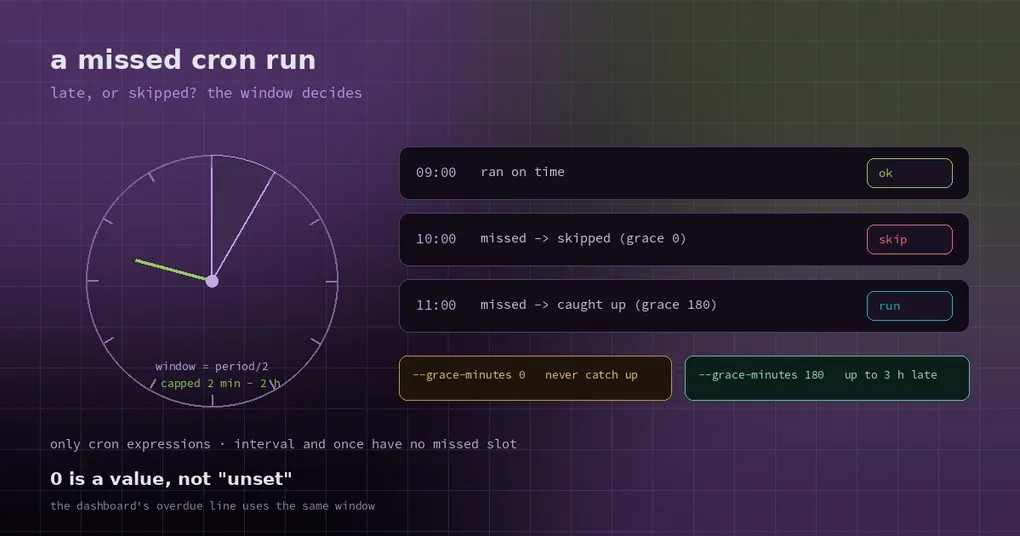
You shut the laptop for a two-hour meeting. When you open it again there are two identical daily reports waiting — the 15:00 job missed its slot while the machine slept, caught up on wake, and then fired again at 16:00. You delete the duplicate and think “next time, just skip it”.
Except catching up exists for a reason. If the 03:00 data sync missed because the box rebooted, you want it to run soon after boot, not tomorrow. The question was never whether catching up is good; it is how long a given job should be willing to wait. Hermes used to apply one rule to every job. Now each job can set its own.
What the default actually does
The scheduler finds a due time in the past and has two options: run it now, or skip it and re-anchor to the next occurrence. The decision uses a catch-up window:
- half the job’s period,
- clamped to 2 minutes – 2 hours.
So a job that runs every minute has a 2-minute window: anything later is stale, and it jumps to the next minute instead of firing a burst of catch-up runs. A daily job gets 12 hours, so reopening the laptop mid-morning still counts as “late but valid”. An hourly job gets 30 minutes.
| Period | Default catch-up window |
|---|---|
| Every minute | 2 minutes (floor) |
| Every 15 minutes | 7.5 minutes |
| Hourly | 30 minutes |
| Daily | 12 hours |
| Weekly | 2 hours (ceiling) |
One-shot jobs are separate: they get a 120-second grace and then expire.
The rule is sensible — long periods tolerate more lateness, short ones fast-forward — but it fits badly in two common cases:
- Daily or weekly reports that must run at most once a day. A 12-hour window means it fires on wake even though you already handled the numbers on your phone, so you get duplicate notifications.
- Time-sensitive jobs. Pulling market data 30 minutes before the open is pointless at 11:00. Better to skip.
Overriding the window per job
The override is in minutes:
# never catch up: a missed occurrence is skipped
hermes cron edit market-open --grace-minutes 0

# willing to run up to three hours late
hermes cron edit nightly-sync --grace-minutes 180
You can set it at creation time too:
hermes cron create "30 9 * * 1-5" "Pull the pre-open quotes and write the briefing" \
  --name market-open \
  --grace-minutes 5
The range is 0 to 1440 minutes (a full day). 0 is a real value meaning “never catch up”. To go back to the computed window, pass an empty string:
hermes cron edit nightly-sync --grace-minutes ""It only applies to cron expressions. once and interval schedules have no missed wall-clock slot — interval counts from the last run, once is an absolute time — so setting it there does nothing, and the CLI tells you so rather than silently accepting it.
Three typical settings
Daily and weekly reports: 0. You care whether it ran today, not whether yesterday’s copy eventually appears. With 0 the missed occurrence is skipped, the skip is logged, and the next slot runs normally. Duplicate notifications stop.
Nightly jobs on a machine that sleeps: set it large. Laptop users are the classic case: a 23:00 sync, a machine that boots at 08:00. The default window covers a daily job, but a weekly one is capped at 2 hours, so set --grace-minutes 600 and it still catches up in the morning.
Time-sensitive jobs: keep it small. Pre-open, pre-launch, pre-reconciliation jobs are worthless late. Give them 5 or 10 minutes and let them skip. A stale report that succeeds is more dangerous than a job that did not run, because nobody notices.
Turning catch-up off globally
If you want no catch-up anywhere:
hermes config set cron.catch_up_missed falseA recurring job past its window is then re-anchored to its next future occurrence instead of firing, and the skip is logged. Jobs still inside the window, plus manual triggers, behave normally. In relation to the per-job knob: the global switch is an off switch, the per-job value relaxes or tightens one job’s window — once catch-up is off globally, a generous per-job window has nothing to act on.
On hosted deployments with a managed cron provider there is a further layer: cron.misfire_grace_minutes (default 10) is how long the gateway waits for the provider’s own retry before catching up locally, so a failed hand-off costs minutes instead of the whole day.
Four traps
0is a value, not “unset”. The code comments call this out explicitly:0 == False, so any “empty means clear it” test silently drops0and restores the default window. The CLI and config parsing treat an explicit0as set — if you editjobs.jsonby script, be as careful.- Cron expressions only.
intervalandonceschedules ignore it; it will not control how a “every 5 minutes” job catches up. - Profile distribution drops unknown fields. If you export and distribute job definitions across profiles,
grace_minutesmust stay in the allowed field list, or the receiving side falls back to the default window. - Health checks move with it. The dashboard’s “this job is overdue” line uses the same window as the scheduler. Changing grace changes the alarm threshold too — which is correct (otherwise the dashboard would flag jobs the scheduler considers on time), but your alert timing will shift.
Confirming it took effect
hermes cron list                 # the Grace row appears only when an override is set
hermes cron doctor               # flags an unusable value, or one set on a non-cron schedule
In hermes cron list, each job’s detail block gains a Grace row showing something like 180 min. Jobs without an override have no such row. hermes cron doctor checks two failure modes: an unusable value, and a value set on a schedule that cannot use it. To confirm a skip actually happened, look for the Skipping missed occurrence log line — it names the cause (grace_minutes or the global cron.catch_up_missed=false) and the next run time.
For a full health-check walkthrough, see the cron doctor guide; for misfires caused by time zones, the timezone and DST write-up; for building jobs from scratch, the cron automation guide.
Status
grace_minutes landed on main on 2026-10-28 and shipped in v0.22.6 (2026-11-02), so a normal upgrade gives you a per-job catch-up window. On anything older, the fallback is the global cron.catch_up_missed switch: one-size-fits-all, but enough to stop duplicate catch-up runs.