hermes chat -c: Continue Your Own Session per Terminal, or Create It on the Fly
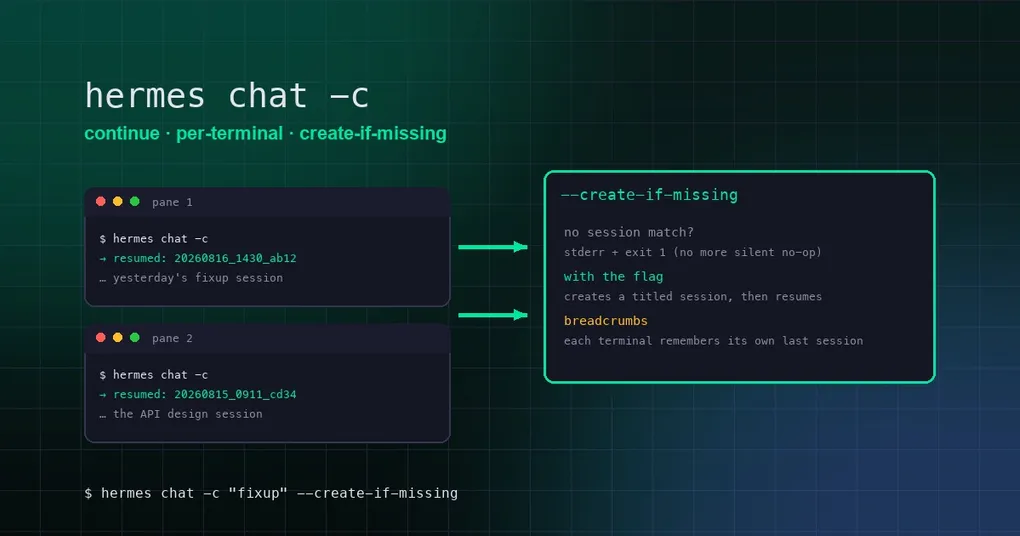
You keep two tmux panes open: the left one debugging a Redis incident in production, the right one sketching a new API design. You step away mid-flow, come back, and type hermes chat -c to pick up where you left off — except both panes get dragged into the same conversation: Redis errors on one side, interface signatures on the other. Total chaos.
That was the pre-v0.20.2 behavior of -c: it always resumed the globally most recent session, with no idea which terminal you were actually in. That just changed — Hermes now keeps a little ledger for every terminal.
Terminal breadcrumbs: every pane has its own session memory
v0.20.2 introduces terminal breadcrumbs (PR #87346): the CLI records “which session did I last chat in, in THIS terminal” per terminal — real tty, tmux pane, kitty window, wezterm pane, Zellij pane, or Windows Terminal session.
Breadcrumbs live in $HERMES_HOME/terminal-sessions/, one JSON file per terminal holding the session ID, working directory, and timestamp. Writes are atomic (temp file + os.replace), best-effort, never raise; records older than 30 days are ignored on read and pruned opportunistically on write. Terminal identity is derived in priority order: real tty path → ZELLIJ_PANE_ID → TMUX_PANE → KITTY_WINDOW_ID → WEZTERM_PANE → TERM_SESSION_ID → WT_SESSION — and if none is available, breadcrumbs are skipped entirely.
So now:
# in pane 1
hermes chat -c        # resumes pane 1's own last session (the Redis one)

# in pane 2
hermes chat -c        # resumes pane 2's own last session (the API one)
Each pane goes home to its own conversation. To resume by name, just name it:
hermes chat -c "redis debug"Name lookup fails loudly now
With a name, -c matches by title or session ID. Before v0.20.2, a miss was a silent no-op — in a script it looked like a successful resume, but you were actually in a fresh conversation with none of your context.
Now (PR #87706) a failed match prints an error to stderr immediately and exits with code 1, plus a pointer:
No session found matching 'redis debug'.
Use 'hermes sessions list' to see available sessions, or pass
--create-if-missing to start a new session with that title.
For script authors this is huge: silent failure becomes detectable failure. CI jobs and cron tasks finally get explicit feedback when the target session doesn’t exist.
–create-if-missing: make it if it’s missing
With the new --create-if-missing flag, “resume by name” upgrades to “resume by name, creating it if needed”:
hermes chat -c "redis debug" --create-if-missingWhen nothing matches, the CLI creates a brand-new session titled “redis debug” and drops you in. The session ID uses the standard timestamp_UUID-short shape, and the title is recorded with user provenance — the auto-titler won’t overwrite your manually-chosen name.
This combo is especially valuable for programmatic callers: a plugin or script that wants “send to this named thread, making it if needed” finally has a one-line, deterministic primitive. Note that --create-if-missing only makes sense with a named -c; a bare -c has nothing to create, and the CLI tells you to provide a name.
From the desktop too
The v0.20.2 desktop app’s session menu can also “resume in your own terminal” — pick any session and bring it back into a real terminal (#86338, merged 8/14). Combined with hermes sessions list, the workflow is smooth:
hermes sessions list           # find the target session
hermes chat -c "target title"  # resume it
hermes chat -c "new title" --create-if-missing   # or just create one
Summary
- Breadcrumbs: each terminal remembers its own last session;
-cno longer mixes panes into one conversation; - Loud failure: named lookups that miss print to stderr and exit 1 — script-detectable;
- Auto-create:
--create-if-missingmakes “send to a named thread, making it if needed” a one-liner; - Pair it up: the desktop can hand a session back to your terminal, and
hermes sessions listis the entry point for finding one.
To get more out of your sessions, see the /save session export guide and multi-profile multi-instance; the full -c flag table is in the hermes chat command reference. All of this is available by default after hermes update to v0.20.2.