A Rate-Limited Cloud Browser No Longer Kills browser_exec
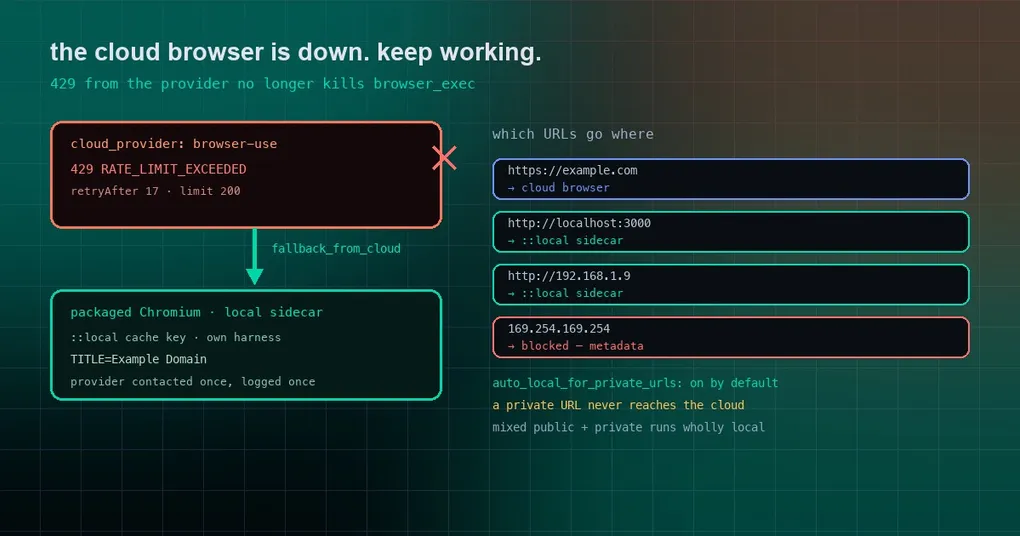
You wired up a cloud browser so Hermes can screenshot your dashboard every morning and drop it in a channel. It worked all week, then one morning you get an error instead of a chart: returned no CDP endpoint, so Browser Use mode cannot drive it. The page is fine. Your script is fine. The cloud browser service was rate-limiting you for a moment — and the whole browser task died with it.
What makes it stranger: Hermes’ built-in browser_* tools kept working under exactly the same conditions. Only browser_exec fell over.
Two ways the browser used to wedge
Both symptoms come from the same thing. Once a cloud browser is configured (browser.cloud_provider, chosen from browserbase, browser-use, camofox, nous, or local), there should still be a local path available on the machine — but browser_exec could not reach it.
One: session creation fails, the call fails
When the cloud provider failed at session creation, browser_exec failed outright:
Cloud browser provider BrowserUseBrowserProvider returned no CDP endpoint,
so Browser Use mode cannot drive it. Switch to the built-in browser tools
for this provider.
The failure seen live was a rate limit: the gateway answered 429 RATE_LIMIT_EXCEEDED with retryAfter 17 and limit 200.
The root cause is that browser_exec and the built-in tools did not take the same path. The built-in browser tools already fall back to the packaged local Chromium when a local session cannot be created, marking the session fallback_from_cloud. browser_exec read only cdp_url from that session — and a local session has no cdp_url until its Chromium launches. So it raised the error above and blamed the provider.
There is an amplifier too: the failed session stays cached. Later calls with the same session key kept hitting the same broken session until the inactivity reaper removed it. One 429 could take out the next several minutes of browser work.
The fix is deliberately small. In tools/browser_use_cli.py::_resolve_backend_cdp, when the provider session comes back as fallback_from_cloud, resolve the packaged Chromium’s CDP endpoint the same way the no-provider path does, and log the provider failure once. A provider that returns a session with no CDP URL and no fallback still fails with the same message — nothing pretends to work.
Two: the cloud browser cannot reach your localhost
The second symptom is more common: you have a dev server on this machine, you ask for http://localhost:3000, and you get:
Blocked: URL targets a private or internal addressbrowser_exec pre-scans the URLs in your code for safety, but it called that check without the hybrid routing verdict. With cloud_provider set, the backend counts as non-local, so every private address was rejected.
browser_navigate never had this problem — it routes private URLs to a local sidecar. Two paths through one browser subsystem, two different behaviours; this change lines them up.
Which URLs go where
| Address you hit | Who opens it |
|---|---|
https://example.com |
the configured cloud browser |
http://localhost:3000 |
local Chromium sidecar under the ::local cache key |
http://192.168.1.9 (LAN) |
local Chromium sidecar |
169.254.169.254 (cloud metadata) |
blocked unconditionally, no backend |
| one call mixing public and private URLs | the whole call runs locally |
A few implementation details matter because they are load-bearing for safety:
- The route predicate
_hybrid_routes_locally(url)is now shared bybrowser_navigateandbrowser_exec, so the two cannot drift apart; - Each URL in the code is evaluated once, and that single verdict decides both the safety check and the route. A host that resolves private and then rebinds to a public IP cannot relax the private-address check and then still be sent to the cloud;
- A call mixing public and private URLs runs wholly local — the private part never leaks upward;
- The sidecar uses the
::localcache key and runs under its own harness daemon (BU_NAME=_local_<name>). The daemon reads its CDP environment once at spawn, so sharing the cloud route’s daemon would relay the private URL to the cloud browser. Separate daemons, not a shared one; - A follow-up call with no URL literal stays on the route the previous call took.
The safety floor did not move
Fallbacks are an easy place to introduce a hole, so every existing invariant stayed:
- Cloud metadata addresses stay blocked unconditionally:
169.254.169.254still answers “URL targets a cloud metadata endpoint”, regardless of provider; browser.auto_local_for_private_urlsis on by default; setting it tofalsestill rejects private URLs, unless you also setbrowser.allow_private_urls, which lets the cloud provider attempt them — usually a lost cause, since Browserbase and friends cannot reach your LAN;- A CDP override is not treated as local: if you set
browser.cdp_urlor used/browser connect, hybrid routing returns false and behaviour is unchanged; - A public-to-private redirect is refused, not leaked;
- The post-execution landed-URL recheck is untouched.
The local fallback needs the local sidecar — the same agent-browser CLI that pure local mode uses. hermes setup tools → Browser Automation installs it for you.
Status and upgrade
Both fixes (PRs #136447 and #136442) merged to main on 2026-10-11. The current tag, v0.21.6 from October 8, does not include them; the next release will. To use them today, update from main.
After upgrading, you can confirm the fallback engaged by looking for that single provider-failure line in the log — it appears once, then the browser call continues on local Chromium.
Wrapping up
A cloud browser is fast and convenient, but it is an external service: it rate-limits and it goes down. The configuration that actually holds up is cloud first, local as the floor, and sensitive addresses that never leave the machine. That floor is what these changes restore: a provider outage no longer ends your task, dev servers and LAN pages open as before, and neither internal addresses nor cloud metadata endpoints went anywhere near the cloud.
Related reading: how the built-in browser tools became the default explains provider selection, the browser snapshot budget tackles a different kind of “the browser is slow”, and free-tier browser challenges covers the trade-offs of running a cloud browser on a budget.