Hermes Now Defaults to Browser Use Mode: Your Browser Tools Just Changed
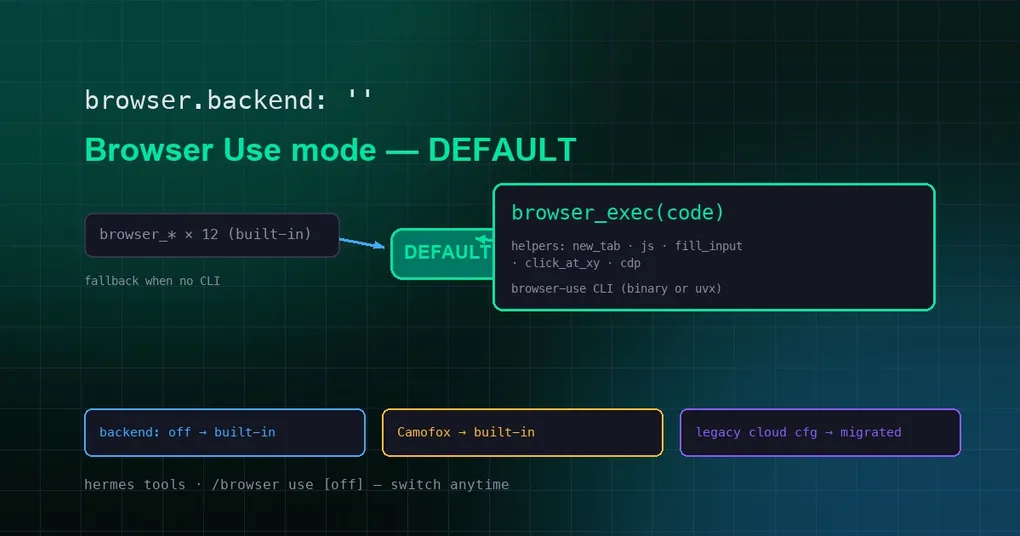
You update Hermes on a quiet evening, and the next day your agent starts doing web tasks differently. Instead of the familiar rhythm — screenshot, look, click, screenshot again — it hands you a single browser_exec(code) call and finishes the whole job in one shot. Nothing is broken and you did not misconfigure anything: as of PR #83402, merged on August 10, 2026, Browser Use mode is now Hermes’ default browser backend. Here is what the switch actually changes, how your machine will behave, and how to go back to the old 12-tool stack if you prefer it.
From “opt-in mode” to “default backend”
Last month we covered Browser Use CLI 3.0 mode (PR #81958): set browser.backend to browser-use in config.yaml and the model no longer sees browser_navigate, browser_click, browser_type and friends — instead it gets a single browser_exec tool that runs Python code directly in a real browser. In official benchmarks, total token consumption on multi-step web tasks dropped by 48% to 66% at equal accuracy. Back then it was a mode you opted into; PR #83402 makes it the default.
The new default rule: use it when you can, fall back when you can’t
With browser.backend unset (the default empty value), Hermes now decides like this (the logic lives in is_browser_use_cli_mode() in tools/browser_use_cli.py):
- The browser-use CLI can run on this machine (an installed
browser-usebinary, oruvxavailable to pull it on demand) → Browser Use mode is on, and the model sees only the onebrowser_exectool; - It can’t run (not installed, broken install) → automatic fallback to the built-in 12
browser_*tools; browsing never silently breaks; - Explicit configuration always wins:
backend: browser-useforces the mode on,backend: offforces the built-in tools; - Camofox setups are unaffected — Camofox uses Firefox’s custom HTTP API with no CDP surface, so it always keeps the built-in tools;
- Legacy cloud configs still work: old Browser Use cloud setups configured via
BROWSER_USE_API_KEYare migrated automatically and behave as before.
One YAML gotcha worth knowing: a bare backend: off is parsed as boolean false under YAML 1.1. The source normalizes this on purpose — false means “explicitly off”, not “unset” — so hand-editing the config file won’t trip you up.
Which mode are you on right now?
Run hermes tools: the Browser Use row highlights the effective mode — default-on, explicitly off, or excluded by Camofox. Inside a session you can type /browser to inspect, /browser use to switch to Browser Use mode, and /browser use off to revert to the built-in tools.
Want the old 12-tool stack back?
Add one line to config.yaml:
browser:
  backend: off   # force the built-in browser_navigate / browser_click / ...
Or, without touching the config file, type /browser use off in the session. Conversely, if you updated and find yourself still on the old tools but want the default mode, remove backend (leave it "") — as long as the browser-use CLI or uvx is installed.
What browser_exec brings
In default mode, browser_exec is a “code as action” tool: you describe the goal, the model generates a snippet of Python, and it executes in a real browser over CDP. Built-in helpers include new_tab, js, fill_input, click_at_xy, cdp, and more; backends range from local Chrome to cloud browsers like Browserbase, Nous Portal, and Firecrawl. The more steps a task has, the more tokens you save — which is exactly why the maintainers promoted it to default. For the full usage guide, helper list, and benchmark numbers, see our earlier deep-dive.
The takeaway
For most people this is a transparent upgrade: the CLI runs, so you automatically get the token-saving mode; it doesn’t, so you silently fall back. The only thing to watch: if your workflows explicitly depend on the names of those 12 browser_* tools (for example, when inspecting agent behavior logs), confirm which mode you’re on after upgrading, or pin backend: off to keep the old behavior. For more on installing and configuring browser backends, see the install guide and the command reference.