Hermes3D
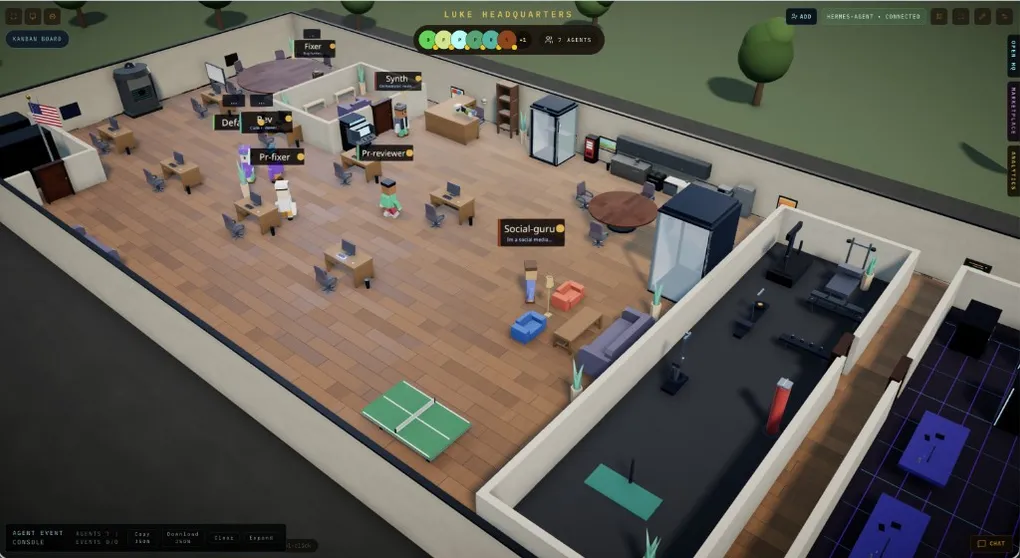
An open-source 3D virtual-office frontend that turns Hermes agents into little characters walking around an office — running tasks, holding standups, checking kanban boards, and reviewing PRs, all visualized. Connects via a JSON-RPC gateway directly or through a gateway adapter. MIT licensed.
What Is It
Hermes3D is an open-source 3D virtual-office frontend (MIT, 113★, by iamlukethedev). It brands itself as “an office for your AI team”: every connected Hermes agent becomes a little character in the office — who’s at their desk writing code, who’s in the meeting room for standup, who’s moving cards on the board, scannable at a glance instead of guessing “what step is it on” from logs.
Note that it does not run any agents itself: Hermes3D is purely a visualization layer; the agent backend is still your Hermes instance. The project was created on August 17, 2026 and is actively maintained; it ships a built-in demo gateway so you can stroll through the office without any agent framework installed.
Hermes Integration
- Direct JSON-RPC gateway: connect via Hermes’
hermes serveJSON-RPC gateway — ideal when the backend runs on the same machine; - Gateway adapter:
npm run hermes-adapterstarts an adapter that speaks Hermes3D’s gateway WebSocket protocol on one side and calls Hermes’ HTTP API (defaulthttp://localhost:8642) on the other — for backends elsewhere or HTTP-API-only setups; - Built-in demo gateway: pure browsing experience, no real agent framework required.
Install
git clone https://github.com/iamlukethedev/Hermes3D && cd Hermes3D
# Follow the README to install dependencies and start (incl. one-command Docker deploy)
For the full Tailscale two-machine deployment walkthrough and the security boundary, see our blog post Hermes3D: Move Your Agent Team Into a 3D Office.
Usage Tips
- Cross-machine setup: run the backend on your homelab (Tailscale mesh) and the 3D frontend on your desktop, connected through the gateway adapter;
- Security boundary: the office is only the visualization layer — operation permissions still live with the agent backend; make sure the gateway listens on trusted networks only;
- Showcase: when demoing agent collaboration to a team or client, a 3D office is far more intuitive than a dashboard.
Who It’s For
Developers who want to see their agent teams at work, self-hosting enthusiasts, and anyone who likes a bit of ceremony around their AI workflows.
← Back to Ecosystem