Hermes3D: Move Your Agent Team Into a 3D Office and Watch Them Work
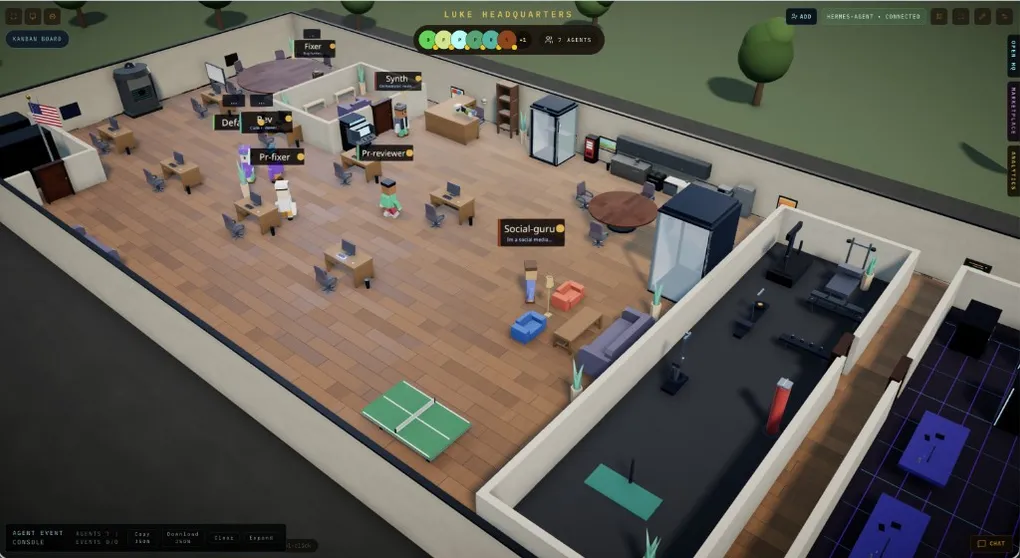
You have three Hermes sessions working in parallel: one watching CI, one triaging issues, one drafting the weekly report. You stare at the terminal and the dashboard, judging “what step is it on” from the logs — you can see the output, but you can’t see it. Now imagine those agents as a few little people in an office: who’s at their desk writing code, who’s in the meeting room for standup, who’s moving cards on the board — scannable at a glance instead of wading through logs. That’s the pitch.
That’s what Hermes3D does: an open-source 3D virtual-office frontend (MIT, 105 stars, by LukeTheDev) that turns your Hermes agents into characters walking around a shared office. It’s a community project (the README is explicit that it’s not affiliated with the agent-backend teams), it doesn’t run any agents itself — it’s purely the visualization layer, connecting through Hermes’ JSON-RPC gateway directly or via a gateway adapter. It suits developers who want to see their agent team working. The project was actively updated on August 20.
What it actually looks like
The core is a /office retro-office environment: every connected agent is a character moving through a shared 3D world. It’s not just a screensaver though:
- Watch agents work in real time — who’s running what task, progress at a glance;
- Run standups — agents connected to GitHub and Jira hold meetings in a conference room;
- Review PRs — walk through pull requests from inside the office;
- Kanban desk — a built-in board that displays the backend’s
hermes kanbandata directly: dragging a card toward Working queues the task asready, only the dispatcher can mark itrunning, and the status writes back to Hermes; - Train skills in the gym, and a janitor system for resetting sessions and cleaning context.
In plain terms: the dashboard is the control console; Hermes3D is the observation deck where you walk into your agent team. Want a look first? The repo ships a built-in demo gateway, so you can stroll around the office without installing any agent framework.
Two ways to connect
Hermes3D supports three runtimes; two matter for Hermes:
- Hermes Agent (direct) — recommended: Studio speaks Hermes’ JSON-RPC gateway itself, no adapter process. Requires a loopback
hermes serveon the Hermes host (Machine A). - Hermes HTTP API + gateway adapter:
npm run hermes-adapterstarts an adapter that speaks the Hermes3D gateway WebSocket protocol on one side and calls the Hermes HTTP API (defaulthttp://localhost:8642) on the other. Good when the backend isn’t local or you want the HTTP-API path.
Two-machine deployment: the Tailscale direct tutorial (most common shape)
The official tutorial’s canonical shape is two machines: Machine A runs the Hermes backend, Machine B runs Hermes3D, and Tailscale connects them securely. The chain:
Browser <-> Studio server (Machine B) <-> Tailscale <-> hermes serve (Machine A)Machine A — the Hermes host:
Step one, pin a session token — the shared secret between the two machines, stored under a dedicated name. Don’t touch HERMES_DASHBOARD_SESSION_TOKEN itself: Hermes loads ~/.hermes/.env with override=True, so pinning it would override the fresh token the desktop app mints for its own backend on every launch, and the app dies at boot:
echo "HERMES3D_OFFICE_TOKEN=$(openssl rand -hex 32)" >> ~/.hermes/.envStep two, start the backend on loopback (--host 127.0.0.1 is not optional: binding to the tailnet address flips on the login gate and breaks token auth):
HERMES_DASHBOARD_SESSION_TOKEN="$(grep '^HERMES3D_OFFICE_TOKEN=' ~/.hermes/.env | cut -d= -f2)" \
  hermes serve --host 127.0.0.1 --port 9120 --skip-build
Step three, publish on the tailnet (the --https port must actually be free — if 443 is taken, use 10000/8443):
tailscale serve --yes --bg --https=10000 http://127.0.0.1:9120Verify the tunnel end to end before touching Machine B: curl -s -H "Host: localhost" https://<machine-a>.<tailnet>.ts.net:10000/api/status should return JSON.
Step four, keep it running: macOS uses a launchd plist, Linux a systemd user unit, both reading the token out of .env at launch — the secret stays out of service definitions and out of ps. Tailscale Serve persists across reboots once set with --bg.
Machine B — the Hermes3D host:
git clone https://github.com/iamlukethedev/Hermes3D.git hermes3d
cd hermes3d && npm install && cp .env.example .env && npm run dev
Open http://localhost:3000 and fill in the connect screen: Backend = Hermes Agent (direct), Gateway URL = wss://<machine-a>.<tailnet>.ts.net:10000 (give the server root, not /api/ws — Studio appends the path), Token = the one from step one. You land in the office with one character per hermes-agent profile.
The security boundary (the author is refreshingly honest)
- The session token is a bearer credential for your whole agent — treat it like an API key: never commit it, rotate it by restarting with a new value;
- Nothing is exposed to the public internet:
hermes servebinds to loopback, and Tailscale Serve publishes only inside your tailnet; - Anyone on your tailnet who learns the token can reach the backend — use Tailscale ACLs on multi-member tailnets.
The troubleshooting table is pre-drawn too: wrong version number/EPROTO = wss:// against a plaintext port (use the --https port); 403 = token mismatch (worked until a restart usually means the token was never pinned); 401 = you hit the gated hermes dashboard rather than the loopback hermes serve; 400 Invalid Host header = old build, update Studio.
Worth a try?
If you regularly run several Hermes sessions and your sense of “what the agent is doing” lives at the level of scrolling logs, Hermes3D offers a genuinely different perspective — and its kanban desk reuses your existing hermes kanban data with zero extra configuration. It’s a 105-star young project, but the README, architecture docs, and tutorial are written with unusual care. Still, it’s a community frontend: the JSON-RPC gateway carries the connection, and the agent’s own behavior, permissions, and approval flows don’t change at all — your existing multi-profile setup and subagent live orchestration keep working exactly as before; you just gain eyes. For more ecosystem projects, browse our ecosystem page.