Hermes Desktop (Hermes One)
A community-maintained Electron desktop app for installing, configuring, and chatting with Hermes Agent — guided first-run setup, streaming chat UI with token tracking, profiles, memory, skills, cron schedules, and 16 messaging gateways. Local or remote backend, 14k★, MIT.
What Is It
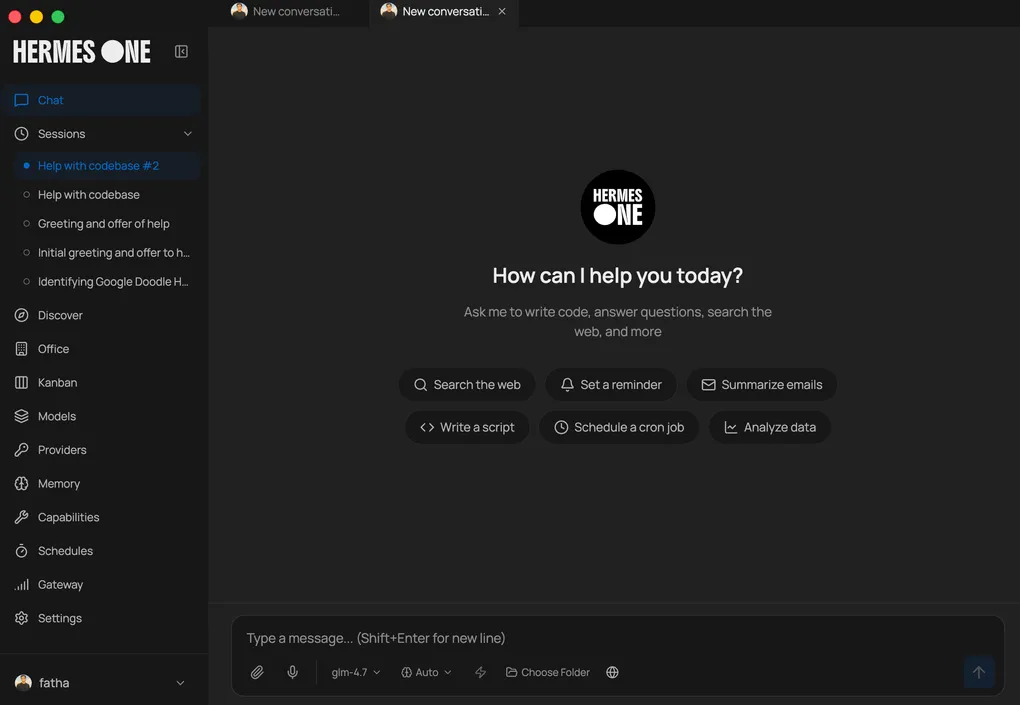
Hermes Desktop — branded Hermes One — is a community-maintained native desktop app for installing, configuring, and chatting with Hermes Agent. Built with Electron (14k★, MIT license, latest release v0.7.6), it replaces hand-managing the CLI: the app walks you through install, provider setup, and day-to-day usage in one place. It uses the official Hermes install script, stores everything under ~/.hermes, and provides a GUI for chat, sessions, profiles, memory, skills, tools, scheduling, and messaging gateways.
The project is in active development and is not affiliated with Nous Research — it’s a community project, with contributions welcome.
Key Features
| Feature | What it does |
|---|---|
| Guided first-run install | Runs the official Hermes install script with progress tracking and dependency resolution (Git, uv, Python 3.11+) |
| Local or remote backend | Run Hermes locally on 127.0.0.1:8642, or connect to a remote Hermes API server with URL + API key |
| Streaming chat UI | SSE streaming with tool-progress indicators, markdown rendering, and syntax highlighting |
| Token usage tracking | Live prompt/completion token counts and cost in the chat footer, plus a /usage command |
| 22 slash commands | /new, /fast, /web, /image, /browse, /code, /shell, /memory, /persona, /undo, /retry, and more |
| Session management | Full-text search (SQLite FTS5), date-grouped history, resume and search across conversations |
| Profile switching | Create, delete, and switch between separate Hermes environments with isolated config |
| Memory system | View/edit memory entries and user profile, capacity tracking, and discoverable memory providers (Honcho, Mem0, Supermemory, …) |
| Persona editor | Edit and reset your agent’s SOUL.md personality |
| Scheduled tasks | Cron builder (minutes, hourly, daily, weekly, custom) with 15 delivery targets |
| 16 messaging gateways | Telegram, Discord, Slack, WhatsApp, Signal, Matrix, Email, iMessage, DingTalk, Feishu/Lark, WeCom, Webhooks, Home Assistant, and more |
| Hermes Office (Claw3d) | Visual 3D interface with dev server and adapter management |
| Backup & debug | Full data backup/restore, log viewer, and system diagnostics from Settings |
| Auto-updater | Install updates via electron-updater; i18n-ready for community translations |
Supported providers: OpenRouter, Anthropic, OpenAI, Google (Gemini), xAI (Grok), Nous Portal, Qwen, MiniMax, Hugging Face, Groq — plus local OpenAI-compatible endpoints with presets for LM Studio, Ollama, vLLM, and llama.cpp.
How It Works
On first launch, the app asks whether you want to run Hermes locally or connect to a remote Hermes API server:
- Local mode — checks whether Hermes is already installed in
~/.hermes; if not, runs the official installer with dependency resolution. - Remote mode — prompts for the remote API URL and API key, validates the connection, and skips local install.
- Prompts for an API provider or local model endpoint, saves the config through Hermes config files, and launches the workspace.
In local mode, chat requests go through http://127.0.0.1:8642 with SSE streaming; remote mode uses the same streaming protocol against your own server. The app parses the stream in real time, rendering tool progress, markdown, and token usage as it arrives.
Getting Started
Download the installer from hermesone.org or GitHub Releases:
- Windows — the installer is not code-signed; SmartScreen will warn on first launch (click “More info” → “Run anyway”).
- Fedora — the
.rpmis not GPG-signed; append--nogpgcheckif your system enforces signature checks, and note auto-update isn’t supported for RPM builds.
After install, pick a setup path in the UI: OpenRouter, Anthropic, OpenAI, or a local LLM via an OpenAI-compatible base URL.
Who It’s For
Anyone who wants a real desktop GUI for Hermes Agent — especially users who prefer managing profiles, memory, skills, cron jobs, and messaging gateways with clicks instead of config files. Compared to browser-based options like Hermes WebUI, Hermes Desktop is a native app with an integrated installer, token-cost tracking, and a rich chat workspace; it’s the most-starred community desktop client in the ecosystem.
Links
- Repository: github.com/fathah/hermes-desktop
- Website: hermesone.org