Your alert went to the group chat — now a follow-up question there actually works
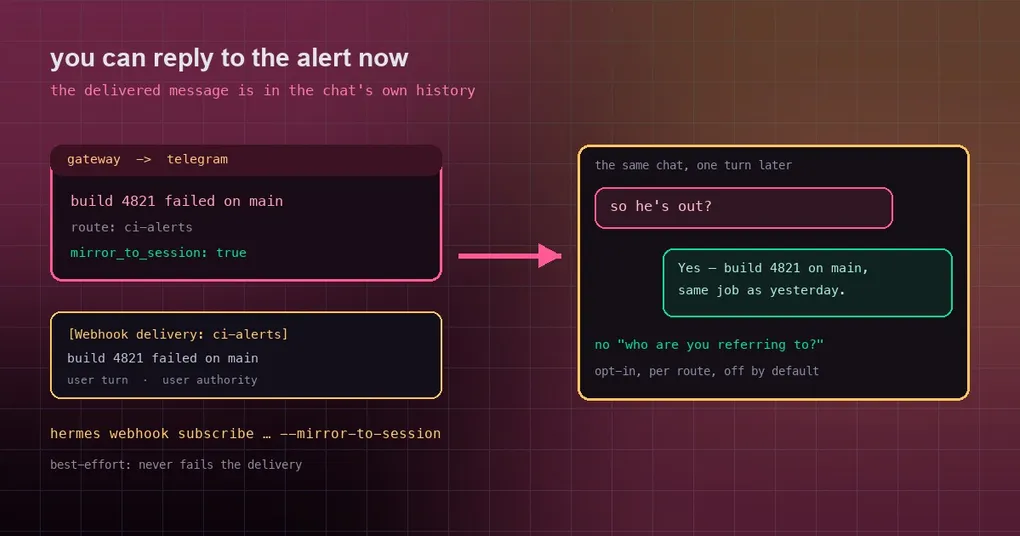
It is 2am, the deploy pipeline goes red, and the webhook pushes the alert into your Telegram. You see it the next morning, reply “is this the same failure as yesterday?” — and get back “who are you referring to?” You did just tell it. It has no idea. That is not the model being slow; it is how webhook deliveries are designed: every event runs to completion in its own session, and the message that got delivered does not exist in the target chat’s transcript at all. This post is about the switch added in v0.21.5, and about what it does and does not fix.
Where the gap comes from
A webhook route works like this: an external service POSTs an event, the payload renders into a prompt through your template, one agent run happens, and the result is delivered to a chat. Throughout that, the webhook:<route>:<delivery_id> session is ephemeral — it exists for the run and is gone after.
When you talk to the agent in that Telegram chat, it loads that chat’s session. The two transcripts never intersect, so:
- it does not know it just sent you an alert;
- “yesterday’s failure” points at nothing in its history;
- your only option is to restate the alert, or give up on the follow-up.
Turning the switch on
A route can now opt in to mirroring. Add one flag where you create or update the subscription:
hermes webhook subscribe ci-alerts \
  --prompt "build {route} failed: {payload}" \
  --deliver telegram \
  --mirror-to-session
The subscribe output gains a line:
  Created webhook subscription: ci-alerts
  URL:    https://…/webhooks/ci-alerts
  Profile: default
  Events: (all)
  Deliver: telegram
  Replies: each delivery is mirrored into the target chat's session
Existing routes can be changed in config instead:
platforms:
  webhook:
    extra:
      routes:
        ci-alerts:
          prompt: "build {route} failed: {payload}"
          deliver: telegram
          mirror_to_session: true
The value check here is deliberately strict: only a real boolean true opts in. The string "true" will not do it — the mirror writes into your conversation history, so the route author has to ask for it explicitly.
What actually gets mirrored
Not the raw HTTP request. The delivered message itself, with a label:
[Webhook delivery: ci-alerts]
build 4821 failed on main
It is appended to the target chat’s session as a user turn with user authority, through the same code path and role convention as continuable cron briefs. Why user and not assistant? Because that text is not the target session’s agent speaking — it is you having been told something. Stored as an assistant turn it would produce assistant → assistant in the history, which breaks strict-alternation providers outright; stored as user, two consecutive user turns merge safely and the conversation shape survives.
The payoff: reply “is this the same failure as yesterday?” and the agent can see the label and the delivered text in its own history, so it can actually answer.
Three boundaries to know before you enable it
1. It is opt-in, off by default
Routes without mirror_to_session behave exactly as before. Same thinking as cron’s mirror_delivery: nothing gets written into a session unless asked for.
2. It is profile-scoped
The mirror runs inside _profile_scope(profile), so it writes into the state.db of the profile that owns the route. That detail is not cosmetic: a Telegram DM chat_id is the same person’s user id on every bot, so an unscoped mirror would land in another profile’s DM with that same person. Worth keeping in mind especially on /p/<profile>/ routes.
3. It is best-effort
A mirror failure never fails a delivery — the implementation never raises — and the mirror is skipped when the target chat has no gateway session yet (nobody has talked to the agent there). In other words: enabling the switch does not guarantee you can follow up. If the group has never had a conversation with the agent, there is no session to write into.
When not to enable it
Be careful with deliver_only routes. Those skip the agent entirely — the rendered template is the literal message body, at zero token cost — and the mirrored text is therefore the raw rendered payload.
So anything that can influence that text lands in your conversation history as a user turn:
- a public issue tracker’s webhook: whatever a stranger can write in an issue title can appear in your conversation history;
- raw alert bodies from a monitoring system: true if they carry user-controlled fields (error messages, request paths, user-agent strings).
The rule is simple: only mirror sources whose content you trust — your own services, your own pipelines. For anything a third party can write into, think twice before flipping it.
Confirming it took effect
hermes webhook listThe list shows each route’s details, and creating or updating a subscription prints the Replies: each delivery is mirrored into the target chat's session line.
To check the real behavior, the cheapest test is a hermes webhook test event to the route, followed by asking in the target chat “what did you just send me?” — if it answers instead of asking what you mean, the mirror is working.
How it fits with the rest
This and the duplicate-reply delivery ledger are two sides of the same gateway-level problem: that one stops a reply being delivered twice, this one stops a delivery being invisible to the conversation afterwards.
If you already run periodic checks through cron, cron briefs have had the equivalent mirror_delivery flag for a while. Webhook deliveries now match it, and both paths use the same convention (a label plus a user turn), so following up feels identical in either case.
The short version
- Default behavior is unchanged: webhook deliveries are fire-and-forget and the target chat knows nothing.
- With
mirror_to_session: true(or--mirror-to-session), the delivered content is written into the target chat’s session as[Webhook delivery: <route>]plus a user turn. - Three boundaries: off by default, profile-scoped, best-effort (skipped when there is no session).
- On
deliver_onlyroutes the mirrored text is the raw payload — only enable it for sources you trust.
This shipped in v0.21.5 (tag v2026.9.24), part of that patch window with no release notes — for the other things already usable from it, see the v0.21.5 window self-check guide and our v0.21.5 release page. The full flag table lives in the command reference.