The Field That Wasn't There: Why Hermes Vault Login Fill Now Types the Identifier, Reads Every Field Back, and Won't Move Off Its Verified Channel
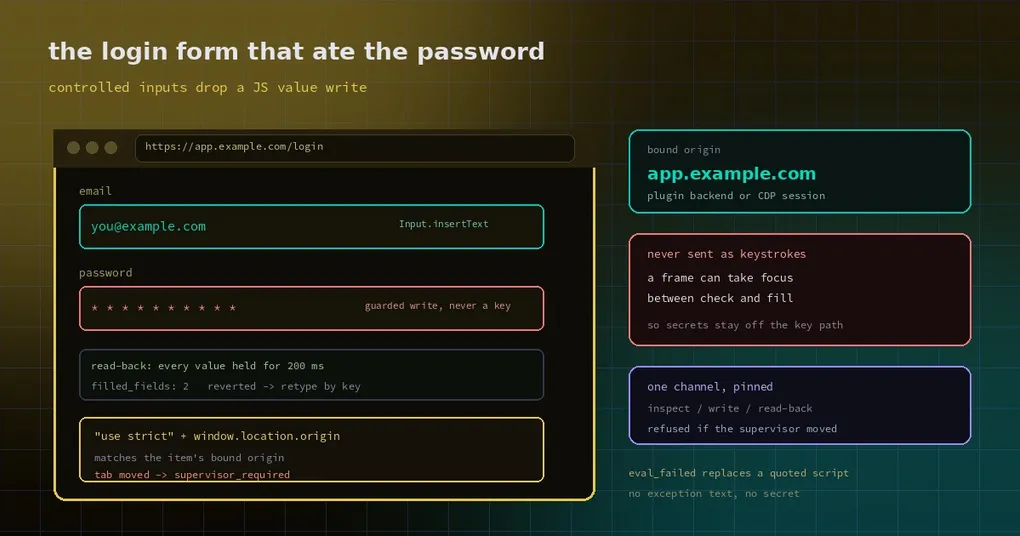
You ask the agent to log in to a dashboard and it answers, cheerfully, that the credentials were filled in. You look at the browser and the email box is empty. Nothing errored, nothing retried, the run simply continues as if the form were ready — and then fails at submit time with a validation message about a required field. Worse, in some page layouts the password ends up in whichever input happened to be first in the DOM, and the agent types your password into a search box on a page that has already logged in, or into a field that is not a password field at all. Both failures come from the same place: the fill believed its own write instead of checking what the page actually held.
That is what #157803 and its follow-up #158002 change. Both merged on 2026-11-19 at 22:23 and 22:50 UTC — after the v0.23.3 tag was cut at 20:51 UTC, so it is not in v0.23.3 and will ship in the next release. Track main to use it now.
Update (2026-11-25): these changes shipped in v0.23.4 (November 24) —
hermes updatebrings them in. The “not in v0.23.3 / onmainonly” wording above is a snapshot from publication time.
Three words this article leans on
CDP is the Chrome DevTools Protocol, the browser’s own debugging interface. It can do things a page cannot do for itself, and one of those things matters here: Input.insertText delivers text as if a person had typed it into whatever the browser considers focused, going through the input pipeline rather than assigning a value from JavaScript.
A controlled input is a text field whose value is owned by a framework — React, Vue, MUI — rather than by the DOM. The component renders from its state on every change, so a value written straight into the DOM is discarded the next time the component re-renders or the framework runs its own update. The page never knew about your write, so it puts back what it thinks the value should be.
An origin is the page’s identity as the browser sees it: scheme plus host plus port, so https://app.example.com and https://evil.example.com are different origins even though both are HTTPS. Vault entries are bound to the origin they were saved for, and that binding is what decides whether a secret is allowed to appear on the page at all.
Why a JavaScript-written value evaporates
The old path was the obvious one: find the field, set its value, dispatch an input event so the page notices. On a plain HTML form that works. On a controlled input it does not, and the failure is silent — the assignment succeeds, the DOM briefly shows your text, and the framework’s next render wipes it. There is no exception to catch, because from JavaScript’s point of view nothing went wrong.
Two consequences followed from that, and both showed up in real runs:
- The agent reported success because it had written successfully, not because the page held anything. Login then failed downstream with a message that looked unrelated.
- On multi-step pages where the password field mounts later than the identifier field, the write could land on the wrong element entirely — including a field the page had auto-focused for something else.
The fix separates the two kinds of value, because they have genuinely different threat models.
Typed identifiers, guarded writes for secrets
Identifiers — email, username — now go in through CDP Input.insertText. That is a real keystroke-path insertion, so a framework’s change handlers fire the way they do for a human, state updates, and the value survives the next render.
Secrets do not go through that path, and the reason is not squeamishness about typing. Input.insertText inserts into whatever element has focus at the moment it lands. Between the moment the agent verifies it is looking at the right field and the moment the text arrives, a frame on the page can take focus. If that happens to a password, the password goes wherever focus went — which is exactly the “password in the wrong box” failure. So passwords, card numbers and the like are written by JavaScript directly onto the specific control that was validated, inside a guarded write that only runs on the bound origin. The page already holds that value; the write is not a keystroke race.
Identifier readback that comes out wrong is not accepted either: the field is cleared and the text is retyped key by key, asserting focus before each keypress. Only the first key is allowed to re-focus the field — every later key has to find focus already where it belongs, or the attempt stops.
The rest of the surface is unchanged on purpose. Addresses, selects, checkboxes and radios, pages with frames, and plugin page backends still use the JS path, because for those the value is not a secret or the write target is not a keystroke surface.
Reading every field back before saying “filled”
Every field is now read back after it is written, and the read is not a single glance. It polls every 10 ms and requires the value to hold steady for 200 ms, with a 0.5 s ceiling on the whole wait. Only then does the field count as filled.
The comparison is mostly exact, with a short list of tolerated rewrites, all of them things a page may legitimately do to a value it accepted:
| Value | Accepted readback |
|---|---|
| Card number, postal code | Same digits, regrouped with different separators |
| Phone number | Leading + preserved, one ( allowed in front |
| Expiry date | Reordered, same month and same year |
| Anything else | Exact match, or the field is not counted |
On the bound origin the page already has the value in hand, so the comparison is plaintext — there is nothing extra to decrypt and no need to encrypt anything just to check it.
The visible effect of all this is a number you may already watch: filled_fields on a login fill goes from 1 to 2, because the identifier is now filled as well. Automations that used to rely on “only the password gets filled” will now find the account field populated too. That is the intended behavior change, not a side effect.
Pinned to the channel that passed the origin check
The security half of #157803 is about where a fill is allowed to happen, and it is enforced in three layers.
First, every script that carries a vault value — or that decides where a value goes — begins with "use strict" and checks window.location.origin against the origin the entry is bound to before it references any value. Strict mode is not decoration here: in sloppy mode a script’s source can be reached through the caller chain by arbitrary page functions, which is a way to hand the secret out without ever reading the DOM.
Second, an operation is pinned to the one channel where it performed that origin check — either the plugin page backend, or a specific CDP page session: the one focus_page attached to, or the one that read the origin. Checks, writes, keypresses, readbacks and cleanup all happen there. If the supervisor moves, reconnects or disappears, if the plugin backend comes and goes, or if CDP cannot read a session, the operation is refused with supervisor_required and nothing is sent at all. enter_code waits for the user inside that pinned state, so switching tabs while the code prompt is up is covered too.
Third, when a script carrying secrets throws inside the transport layer, the caller sees a fixed eval_failed and nothing else — the exception text could quote the script, and the script contains the secret.
The vault itself is documented in the secrets command reference if you want the surrounding picture, and the keychain encryption guide covers what happens to these values at rest. The plugin attack-path writeup is the longer version of why the origin and supervisor rules exist.
What you see when it fails
Failures are now loud and specific rather than a cheerful “filled” over an empty box:
- A field that never stabilizes is not reported as filled, and the run surfaces the readback mismatch instead of proceeding.
- A refused operation returns
supervisor_required. Nothing was typed, nothing was written, and the page state is untouched. - A keystroke refused because the pinned channel went away says so in as many words: nothing further was typed. That wording is there because the password had already been written — the message tells you the fill stopped mid-operation rather than never starting. Refusals in the pre-write phase keep their original wording.
The follow-up PR also fixed two smaller things worth knowing about. Page inspection now reads the autocomplete attribute rather than the property, because Chromium reports an empty string for a mixed token list like off one-time-code — with the property, a one-time-code field looked like an ordinary text input, and the identifier got typed into it. And save_login now recognizes phone numbers that arrive with spaces, hyphens, dots or parentheses — seven digits or more, no letters, an optional leading + that may be followed by a single ( — storing them as phone and reading them back as a tel field.
If you have an automation sitting on top of this, the card and 2FA walkthrough covers the multi-step pages where these changes are most visible: two fields instead of one, and a code prompt that no longer loses its place when you switch tabs.