Update once and your local patch is gone: how hermes update treats your work
Last week you changed two lines in the Hermes source to work around a bug upstream has not fixed yet. The patch was small — you even called it temporary in the commit message. Then on Monday morning you ran an update, saw Update complete! at the bottom, and went for coffee.
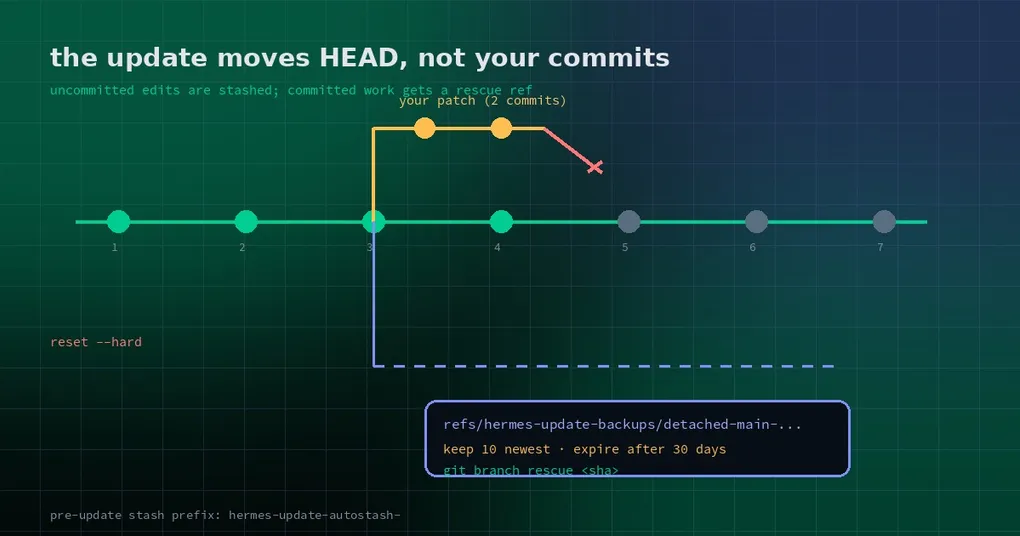
On Monday afternoon the bug was back. Scrolling up, there is one warning line in the middle of the log: some commit “is on no branch — backed up to refs/hermes-update-backups/…”. That is not a bug. Updating moves your checkout, and how your work is preserved depends on which state it was in.
Three states, three outcomes
Your local work falls into one of three buckets, and the updater treats each differently:
| What you have | What the update does | Risk |
|---|---|---|
| Uncommitted edits | Stashes them, restores after the update | Low (a failed restore leaves the stash named with instructions) |
| Local commits on the target branch | reset --hard after backing up HEAD to a rescue ref |
Medium: the backup expires in 30 days |
| Commits on a detached HEAD | Backs up to a rescue ref, then moves HEAD | Same, and easier to miss |
That table is the key to everything below.
Uncommitted edits: autostash, then restore
If the working tree is dirty, the update stashes it first under a timestamped name with the hermes-update-autostash- prefix (UTC), and restores it afterwards.
A few details show this path is taken seriously:
- Intent-to-add entries (
git add -N) left by editors makegit stash pushfail outright, so the updater promotes them to real staged adds first — lossless, and the closest thing to what the editor was showing. - Unmerged index entries from an interrupted merge or rebase are cleared at the index level (the working tree is untouched), because otherwise the stash fails with “needs merge”.
- If the update fails, the stash is not restored. It stays in place with the recovery command printed, because the tree state is unknown and an automatic restore would be more dangerous.
- With
--keep-stash, the changes are parked rather than re-applied. The desktop updater uses exactly this so local source edits never silently ride along onto the new code. - An autostash nobody dealt with for more than seven days gets called out on a later run.
So “I tweaked a file quickly” is safe. The next bucket is not.
Committed work: a rescue ref, not a replay
Once you commit, the rules change. The updater does not replay your commit onto the new code. There is no such step anywhere in it.
What happens instead depends on where you are:
- On a custom branch: the update merges upstream in (
merging origin/<branch> instead of resetting so local commits survive). Your commits survive, at the cost of a merge commit. - On the update target branch with local commits: when a fast-forward is impossible, it resets. Before moving HEAD it writes the current HEAD to
refs/hermes-update-backups/diverged-<branch>-<timestamp>-<sha>. - On a detached HEAD whose commits no branch, tag or remote contains: it writes
refs/hermes-update-backups/detached-<branch>-<timestamp>-<sha12>and prints one ⚠ line saying those commits are on no branch, backed up, and that the backup expires in 30 days.
Those refs have a cleanup rule: ten newest per kind, and anything older than 30 days is deleted. The reason is practical — a rescue ref pins every reachable object against git gc, and if it happens to contain a multi-gigabyte autostash snapshot, .git grows forever. A rescue ref is a recovery window, not a backup.
One clarification: commits on your own other branches are unaffected. The update checks out a detached HEAD; it does not delete your branches.
Getting the work back
List the rescue refs first:
git -C ~/.hermes/hermes-agent for-each-ref refs/hermes-update-backups/See what a ref contains — this is the command the warning suggests:
git -C ~/.hermes/hermes-agent log refs/hermes-update-backups/detached-main-20261117-061214-23088b65f29a \
  --not --branches --tags --remotes
Give it a branch so it stops depending on that ref:
git -C ~/.hermes/hermes-agent branch my-local-fix <sha>Then check for leftover stashes:
git -C ~/.hermes/hermes-agent stash list
git -C ~/.hermes/hermes-agent stash show -p stash@{0}
Read it before you git stash apply — never pop. The updated code has changed underneath, and if it conflicts you want the stash still there.
Keeping a patch long-term
If a patch has to survive repeated updates, there are only three dependable options:
- Commit it to your own branch and point the update at that branch with
--branch <name>, so it takes the merge path and keeps your commits. - Fork the repository and keep the change on a branch in the fork, updating against your own remote — the updater supports the fork/upstream sync path.
- Send it upstream. Even a small fix stops being a local patch the moment it has a PR.
The fragile option is exactly the one people reach for: commit on the default branch and update. A rescue ref saves you once, expires quietly, and does not warn you a second time.
Look before you update
If you are not sure what a run will touch, start with the read-only plan:
hermes update --planIt reports the install kind (git, docker or nix), every running Hermes service across profiles with its supervisor, and how each will be restarted — without changing anything, so it is safe on a machine that is currently working.
Where this stands today
Everything above describes v0.23.2 behaviour. Issue #157230 proposes an improvement: the update should record “this run dropped N local commits, backup ref X” in the update receipt, instead of one ⚠ line in the middle of the log. It is still open.
Until then, keep the rule in mind: the updater protects uncommitted work, and gives committed work a 30-day rescue window. It is not a version control system, and it will not decide for you whether a patch deserves to survive.
For the mechanics of the update itself, read the graceful upgrade guide; for repairing a .git directory an update damaged, see the git repair guide; for the “it said success but did nothing” class, read this one; all flags are in the hermes update reference.