The folder was deleted, so every command after it failed — with a permission hint
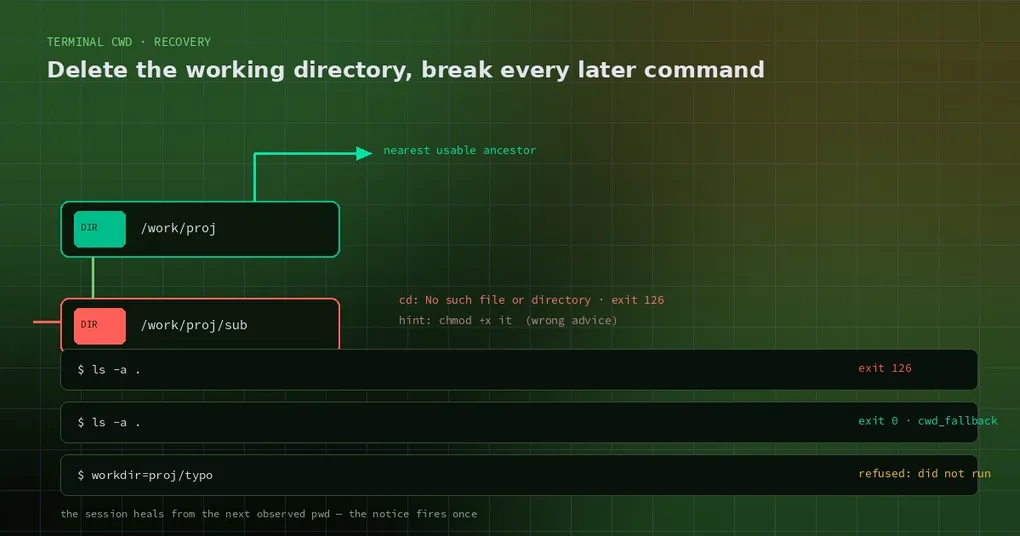
You are deep in a branch worktree, the agent is running commands happily, and then a cleanup job — or a sibling subagent, or your own rmdir — removes the directory the session was sitting in. From that moment every single command fails the same way:
bash: line 4: cd: /work/proj/sub: No such file or directory
[exit 126]
Hint: the file may not be executable — try chmod +x it
The hint is nonsense. There is no file. Your command never ran at all: the wrapper that Hermes builds for each call starts with cd <session cwd>, and that cd now points at a path that no longer exists. Even a command that begins with its own cd ~ never gets a chance, because the wrapper’s cd fails first.
Once you are in that state, no command can fix it, because no command can run. The session is wedged.
How often this actually happens
This is not a rare edge case in agent work. On one maintainer’s install, 131 terminal calls across 79 sessions failed exactly this way in a week. Sixty-seven of those sessions were subagents whose scratch worktree had been removed by a sibling or by the pruner — which is exactly what scratch worktrees are for, so the failure was structural rather than accidental.
And every one of those 131 calls also received the “not executable, try chmod +x” hint, which sends the model down a permissions rabbit hole instead of telling it the truth: the directory is gone.
The root cause was an argument, not a state
Hermes resolves the start directory for a command in two places, and the bug lived in the gap between them.
The environment object has its own cwd. But the terminal tool also passes an explicit cwd argument, taken from the session record — the directory the session believes it is in. The wrapper script is built with that explicit argument. Recovery logic existed, but it ran on the environment’s variable, and it ran after the wrapper had already embedded the dead path. So the recovery was correct and useless: it fixed a value nobody was about to use.
That is a useful general lesson about state bugs: when two copies of a fact exist, patching the one that is not consumed looks like a fix and behaves like nothing.
What the fix does
PR #138827 moves the resolution to before the wrapper is built, and applies it to whichever path is actually going to be used:
execute(command, cwd)
  -> _usable_cwd(cwd or self.cwd)      # before _wrap_command
  -> effective_cwd, cwd_fallback
  -> build the wrapper with effective_cwd
BaseEnvironment._usable_cwd() is the hook. The default implementation returns the directory unchanged — sandboxes resolve their own paths and were deliberately left alone. LocalEnvironment overrides it: if the directory is missing or cannot be entered, it substitutes the nearest usable ancestor that does exist.
That choice matters. The LobeHub fix this was ported from falls back to a fresh empty temp directory. Hermes instead walks up to the closest surviving folder, so the files you were actually working on are still there — you land in proj/ instead of a blank /tmp/tmpXXXX.
When the substitution happens, it is returned with that command’s result as cwd_fallback, carrying the requested and used paths. It is deliberately not stored on the shared environment object, because concurrent commands share one environment and would otherwise swap notices with each other. The notice is rendered for the model on normal results, on results yielded to the background, and on background spawns. The session record then heals from the next observed pwd, so the notice fires once instead of on every call.
A typo no longer runs one directory up
The second half of the fix is the one with teeth. If the model names a workdir that does not exist, the command is now refused before it runs:
workdir /work/proj/typo does not exist or is not accessible; the command did not run. [exit 126]Before, that path went into the wrapper too, and the failure mode depended on what the shell did next. With a command like rm -f ./*, “the command ran somewhere else” is not an acceptable outcome. Now it does not run at all, and the message says so explicitly.
Remote backends (SSH, Docker) are not covered by the ancestor walk in this change. What they do get is a better hint: if the wrapper’s cd still fails, the message names the directory that could not be entered instead of suggesting chmod +x on a file that was never the problem.
Before and after, on a real session
The PR’s live test does the smallest possible reproduction: make a subdirectory, enter it, delete it, then run an ordinary command.
| Step | Before | After |
|---|---|---|
cd proj/sub and pwd |
exit 0 | exit 0 |
rmdir proj/sub |
exit 0 | exit 0 |
ls -a . |
exit 126, cd: .../proj/sub: No such file or directory, plus the chmod hint |
exit 0, ran in .../proj, lists keep.txt, with a cwd_fallback notice |
touch marker with workdir=proj/typo |
exit 126, same misleading chmod hint | exit 126, “does not exist … the command did not run” |
Did proj/marker get created? |
no | no |
The last row is the point of the second fix: the refusal must be a refusal, not an accident of which directory the shell happened to inherit.
Why the session heals instead of staying broken
You might expect the fix to be “recover once, then keep going in the new directory”. That is what happens, but the mechanism is worth knowing because it explains a behaviour you will see: after the fallback, the agent’s next command may include its own cd back to a path it thinks exists. The environment does not fight it. It re-resolves on every call, and the session record updates from the pwd observed in each result.
So the sequence you get is: one command lands in the ancestor with a notice, the model is told where it actually is, and from then on the session’s own bookkeeping matches reality. No flag to reset, no “restart the session” step.
This is also why the notice is per-command rather than stored on the environment: two subagents sharing one environment object must not read each other’s relocation notices. If you run parallel subagents in scratch worktrees — see subagent live orchestration — that distinction is the difference between a clear message and a confusing one.
What to do when you hit this on a stable release
The fix is on main only (merged November 15, 2026) and is not in v0.23.1. If you are on a release and see the cd: No such file or directory plus chmod hint pattern, the fastest recovery is to start a fresh session — the wedged one cannot run the command that would fix it. Then avoid the setup that caused it:
Update (2026-11-17): these changes shipped in v0.23.2 (November 16) —
hermes updatebrings them in. The “not in v0.23.1” wording above is a snapshot from publication time.
- Do not let a pruner delete a directory a live session is sitting in. Scratch worktrees should be removed after their owner session ends, not on a timer that can fire mid-run.
- Prefer absolute paths, or re-
cdexplicitly at the start of each command when working in worktrees that other processes may clean up. - If a subagent’s worktree is disposable, say so in its prompt and keep its commands inside that directory — so when it disappears, the parent’s session is not the one that gets wedged.
Background: this is a port of lobehub/lobehub#20735, where a local shell hit the same wedge, plus an earlier diagnosis (#131554) and a hint fix from another contributor. The 909 related tests pass, including two invariants that fail on main and pass here — one for the recovery, one for the explicit-workdir refusal.
The smaller lesson
A dead working directory is a boring bug with a spectacular failure mode: it converts “this one command failed” into “this session can never do anything again”, and it lies about the cause while doing it. The fix is a five-line idea — resolve the path you are actually going to use, before you use it — but it only works because it was applied at the point of consumption rather than to a copy of the state.
If you maintain anything that builds a shell command around a directory, that is the check worth copying: resolve once, at the boundary, and report the substitution to whoever asked. And for more on how Hermes handles the terminal environment itself, see terminal temp directories and terminal backend plugins.