Session Temp Files No Longer Blow Up Your RAM Disk: terminal.temp_dir and 72-Hour Auto-Cleanup
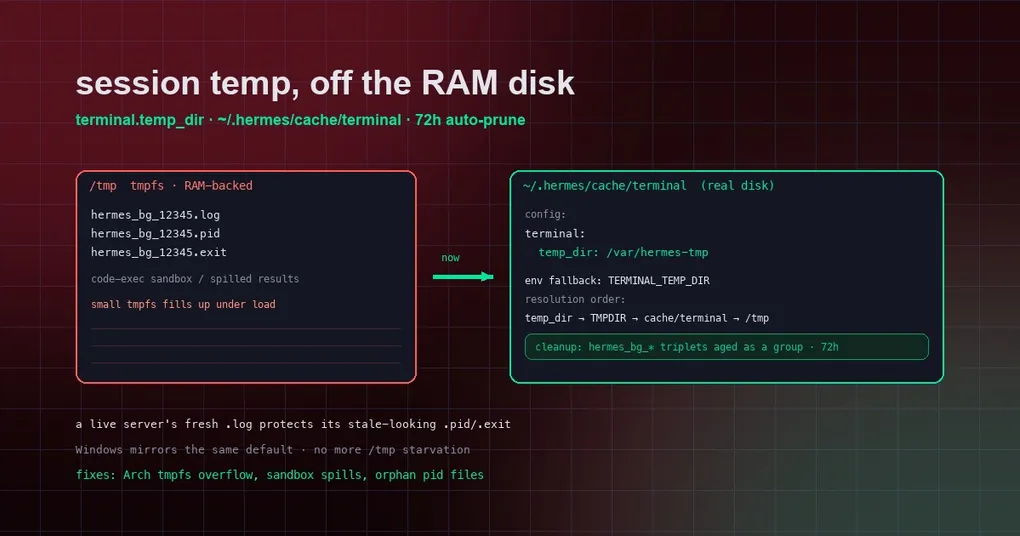
It’s Saturday night and you’ve let Hermes run a batch job: background processes writing logs, a code-execution sandbox spilling intermediate results, several tool calls temporarily writing output to disk. You wake up at 3am to a “disk full” alert — and the culprit isn’t your project directory, it’s /tmp, the directory you never think about. This isn’t an edge case: many distros (Arch-based setups especially) mount /tmp as a tmpfs RAM disk whose capacity is only a fraction of your physical memory. Once Hermes spawns a few background processes, that RAM disk fills up — followed by mysterious write failures, crashed processes, and aborted tasks. The fix merged on August 28 (PR #97205) addresses this in one go: session temp files now default to real disk, and you get a config key to relocate them whenever you want.
Root cause: temp files on a tmpfs
Hermes produces a batch of “session temp artifacts” while working: background-process log/pid/exit files (the hermes_bg_* triplet), code-execution sandboxes, and tool results spilled to disk. Before this change, those files defaulted to /tmp.
On many Linux distros, /tmp isn’t a real disk directory — it’s a tmpfs: data lives in RAM, reads and writes are fast, but capacity is small (typically half of physical memory or less) and everything vanishes on reboot. When Hermes runs hot, background processes pile up and the RAM disk runs dry in minutes. Worse, write failures rarely fail fast — they surface mid-task in confusing ways.
The maintainer’s description is blunt: “many distros (Arch-based setups, and our own machines) mount /tmp as a small RAM-backed tmpfs, and Hermes fills it under load.” Even the official team’s own machines hit this.
The fix: temp files default to real storage
The resolution order after the change is:
terminal.temp_dirconfig key (explicit, highest priority)TMPDIR/TMP/TEMPenvironment variables~/.hermes/cache/terminal(new default)/tmp(last-resort fallback)
So unless you configure anything, session temp files now land in Hermes’ own cache directory — real storage, capacity no longer an issue. The Windows branch mirrors the same default, so behavior is consistent across platforms.
72-hour auto-cleanup
The change also ships a cleanup_terminal_temp_cache() pruner: temp files older than 72 hours are deleted automatically. It has a thoughtful detail — the hermes_bg_* triplet (log / pid / exit) ages as a group: a live background service’s fresh .log file “protects” its stale-looking .pid and .exit files from being deleted. That way a still-running service never loses its pid file and becomes untraceable.
Want a different location? Two ways
If you’d rather keep session temp files elsewhere (a dedicated SSD, a large data volume), pick either option.
Option 1: the terminal.temp_dir config key
# config.yaml
terminal:
  temp_dir: /var/hermes-tmp
Option 2: the TERMINAL_TEMP_DIR environment variable
export TERMINAL_TEMP_DIR=/var/hermes-tmpThe config key outranks the env var, and both outrank the default. One caveat: if you explicitly point temp files somewhere, that directory is yours to manage — auto-cleanup only applies to the managed default ~/.hermes/cache/terminal, never to your custom location (the source comment is explicit: “User-pointed terminal.temp_dir locations are the user’s to manage”).
What this means for you
- Arch / other tmpfs users: you benefit immediately after upgrading — the default already moves to real disk, no config needed;
- People who want fine-grained control: a config key and an env var now exist, so you decide where temp files live;
- People worried about disk accumulation: 72-hour auto-cleanup with group-based aging means files never pile up.
The change also quietly fixes a long-standing pain: when /tmp used to fill up, sandboxes running inside a session would fail silently — those “mysterious write failures” are now far less common. If your Hermes is still on an older version, hermes update to the latest build containing this change.
Further reading
- Curious about the other knobs on Hermes’ terminal backends? See our command reference;
- Interested in background processes and sandbox management? Read the terminal backend plugins guide;
- Want a systematic view of Hermes configuration? Check the long-task tuning guide.