Telegram DMs piling into one thread? Give every new message its own topic
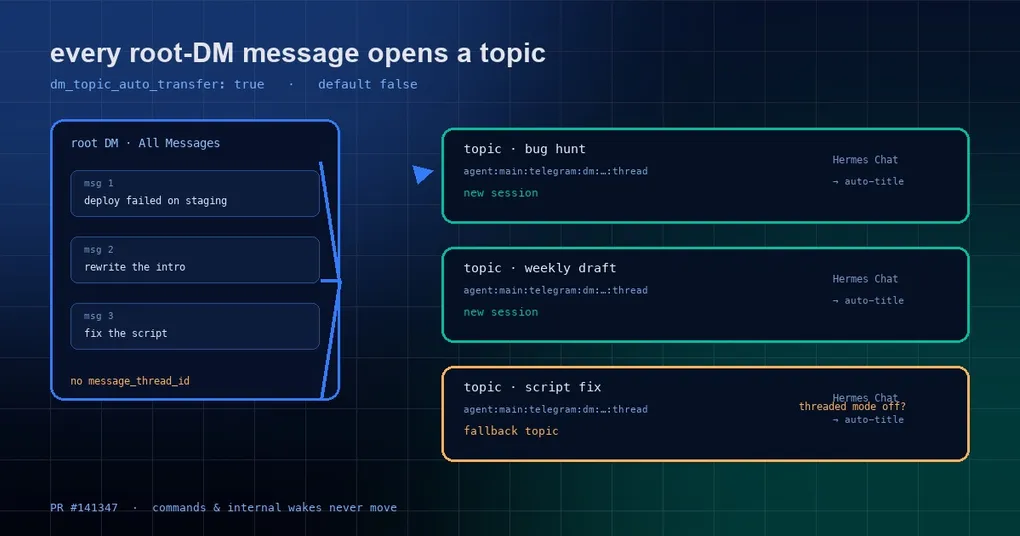
You run three things at once in Telegram: chasing a production bug, drafting a weekly report, and patching a script for a friend. So you turn on /topic mode and give each one its own thread. Perfect setup — until your thumb slips and you type a line straight into the main chat window instead of a topic.
That message does not start a new thread. It lands in whichever topic you used most recently. Now your weekly report has a debugging conclusion sitting in it, and the model cheerfully starts blending the two. You scroll back for a while before you find the moment it went wrong.
Topic mode is not broken; it makes a conservative choice — a message in the root chat means “continue the last conversation”. If you would rather have every root message start from scratch, Hermes merged a switch for exactly that on October 19: dm_topic_auto_transfer.
How topic mode behaves today
Send /topic in a DM and Hermes checks whether the bot may create topics (Threaded Mode must be on in BotFather), enables multi-session topic mode for that chat, creates a pinned System topic for status and commands, and offers to restore earlier sessions that were never bound to a topic.
From then on the root chat is a lobby: normal prompts are rejected with guidance pointing at All Messages, while system commands such as /status, /sessions, /usage and /help still work there.
Each topic is a standalone session — its own history, model state, tool execution and session id. The isolation key is agent:main:telegram:dm:{chat_id}:{thread_id}, so two topics in the same DM are two different conversations as far as Hermes is concerned.
The wrinkle is the conservative choice above: some clients deliver a message typed in the root chat without a message_thread_id. Hermes treats those as a continuation and answers in your most recently active topic — what the docs call lobby recovery. The reminder it sends to nudge you back into a topic is rate-limited to one message per 30 seconds per (profile, chat), so forgetting and typing ten prompts in a row does not produce ten replies.
The switch: one config key
Add a line to your profile’s config.yaml:
gateway:
  platforms:
    telegram:
      extra:
        dm_topic_auto_transfer: true   # default: false
The top-level telegram.extra.dm_topic_auto_transfer key works too (that is the one shown in Desktop Settings). It is strictly opt-in: leave it out and nothing changes, including the fallback to your most recent topic.
With it on, a plain message in the root DM does this:
- Hermes creates a new topic immediately (named “Hermes Chat” until the auto-title pipeline renames it);
- A new session starts inside that topic;
- Your reply is posted in that topic.
In other words the root chat stops being a lobby and becomes a doorway: one stray message, one brand-new room.
What never gets moved
This switch handles exactly one case — a human typing a plain message in the root DM. Everything else is left alone by design:
- Slash commands are not moved.
/statustyped in the root stays a lobby command and never creates a topic. - Internal wakes and routed events are not moved. Cron firings, events routed in from other platforms and background tasks never get pushed into a fresh topic.
- Non-DM traffic is untouched. Groups and channels have nothing to do with topic mode.
- Unauthorized senders are not moved. The authorization check happens at the lobby stage.
- A failed topic creation falls back. If Threaded Mode was switched off in BotFather, creation fails and Hermes reverts to the default: answer in your most recently active topic rather than dropping the message.
One implementation detail is worth knowing: the transfer runs at the adapter ingress, before session keying (it lives in telegram_topic_transfer.py inside the Telegram plugin). So the turn, its session and the reply all use the new topic — you never get a session in one thread and a reply in another.
Two small traps
First, the opening reply in a new topic has no reply anchor. Your original message lives outside the topic and Telegram will not let a reply cross into it, so Hermes sends by message_thread_id alone, with no reply anchor. It looks like the answer did not attach to your message; the content is in the new topic, and that is expected.
Second, in multi-bot setups the key is read per bot. If one gateway serves several Telegram bots (a personal assistant, a team bot), the switch is read from the bot that received the message, not from the launch bot. Worth remembering when you run multiple profiles behind one gateway and assume a change to the default profile covers everything.
A related nicety: topic auto-rename. Once Hermes generates a session title, it best-effort renames the Telegram topic to match — “New Topic” becomes “Database migration plan”. Failures only log; the session is unaffected. If you name topics by hand and want them left alone, the docs cover turning that off.
When it is worth turning on, and when it is not
Worth it if Telegram is your multi-thread workbench: one topic per thread, and you often enter the chat from the app’s home screen. Every message becoming its own topic enforces “new thread, new context”, which is usually what you wanted.
Not worth it if you mostly have a single running conversation and only occasionally use topics. Then every root message adds another thread, and until auto-titling catches up you will see a wall of “Hermes Chat”.
If what you actually care about is the boundary between a topic, a session and a context, the site’s session boundaries guide maps that out. The Telegram inline picker post covers picking models and sessions from inside the chat, and peer bot to bot DMs is the other half of the Telegram story. Starting from zero? The install guide has the platform configuration baseline.
The short version
dm_topic_auto_transfer is a tiny switch that answers a very concrete question: “which conversation did this stray message belong to?” The old answer was “the last one”; the new answer is “a new one”. Keeping the old behaviour as the default is right — most people do not want a new topic per message — but for anyone treating Telegram as a workbench, turning it on removes a whole class of cross-contaminated context.