Stop Paying for Silence: Cloud STT Silence Trim & Local Whisper Idle Unload in Hermes Agent
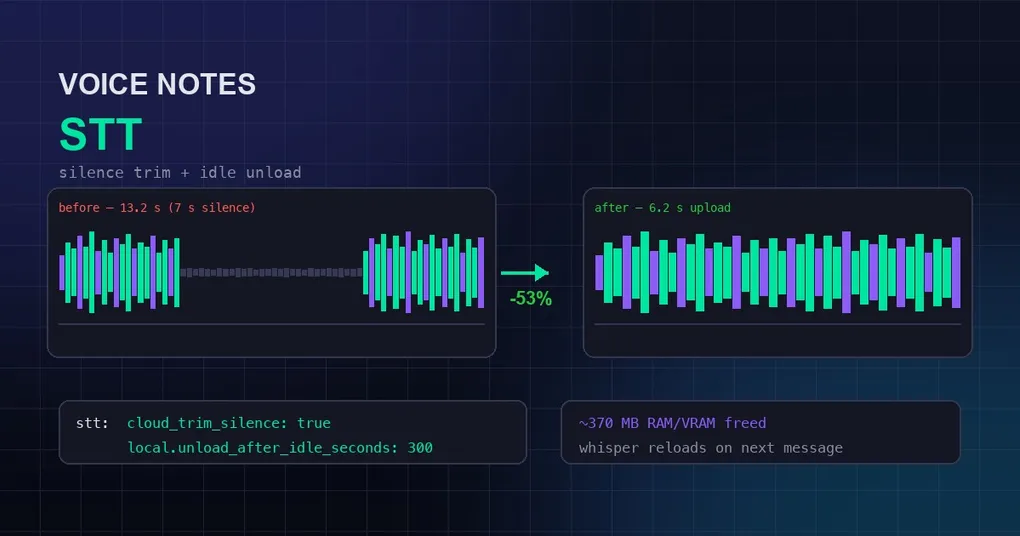
Voice messages are the most natural input on Hermes Agent’s messaging platforms — hold the button, speak, and the transcript goes to the agent. But if you use a cloud speech-to-text (STT) provider, every voice note quietly costs you twice: once for the silence.
A 13-second voice note may contain only 6 seconds of actual speech — the other 7 seconds are you thinking. Cloud Whisper bills by the audio minute, and silence is billed at the same rate as speech (OpenAI charges $0.006/min for it). Worse, Whisper hallucinates words on silent stretches — which is why cloud transcripts occasionally contain sentences that were never spoken.
Two recently merged Hermes Agent PRs fix exactly these two problems, both essentially plug-and-play (one on by default, the other a single config line):
- #77581 — Pre-upload silence trim for cloud STT: collapses long pauses with ffmpeg before upload. Measured result: a 13.2s voice note trimmed to 6.2s (-53%) with a fully equivalent transcript.
- #81027 — Idle unload for the local Whisper model: automatically unloads the local model after 5 idle minutes, freeing ~370MB of RAM/VRAM, and transparently reloads it on the next voice message.
Background: two STT routes, local and cloud
Before the new features, here’s the architecture. STT lives under the stt section of config.yaml; provider picks the route:
stt:
  enabled: true
  provider: local          # local | groq | openai | mistral | xai | elevenlabs | deepinfra
  language: "en"           # global language hint, avoids wrong-language detection on short clips
Local route (local): faster-whisper runs on your own machine — free, private, but the model stays resident in memory. Earlier hardening already added Silero VAD (voice activity detection), so silence never reaches the model.
Cloud route (groq/openai/mistral/xai/elevenlabs/deepinfra): audio is uploaded raw to a third-party API and billed per audio minute. The problem: the cloud route never had VAD-equivalent protection — raw audio, pauses included, went up untouched.
The two PRs close exactly those gaps: silence trim for the cloud route, idle unload for the local route.
Part 1 — Cloud silence trim: collapse the pauses before upload
Enabling it
It’s on by default — three settings:
stt:
  cloud_trim_silence: true      # false = always upload the original audio
  cloud_trim_threshold_db: -40  # audio quieter than this counts as silence
  cloud_trim_keep_ms: 300       # keep 300ms of each pause, preserving word boundaries and pacing
The flow: before uploading, any clip longer than 12 seconds has its long pauses collapsed into 300ms gaps via ffmpeg’s silenceremove filter (audio below -40dB counts as silence), then the trimmed version is uploaded. ffmpeg was already a dependency of this exact code path (CAF transcoding), so no new dependency.
Measured numbers (real run by the PR author)
original: 13.15 s   (speech 3s + pause 7s + speech 3s)
INFO Trimmed silence from voicenote.wav before cloud STT upload (13.2s -> 6.2s, -53%)
trimmed:  6.24 s
The trimmed audio was verified with faster-whisper: both utterances transcribe identically to the original — pauses gone, speech intact.
The 12-second gate: why short clips skip the trim
Everything above says “clips longer than 12s”. That gate is deliberate cost control: short clips get one ~50ms ffprobe and skip the encode. The reasoning is concrete — on a sub-12s clip the maximum possible saving is ~10%, about 1 second of audio, and several providers bill a per-request minimum anyway (Groq bills a 10s minimum). The encode can never pay for itself on short clips; only clips long enough to plausibly benefit pay the encoding cost.
Strictly best-effort: trimming can never break transcription
This is the design core: the trim is best-effort — every failure mode uploads the original untouched, and transcription never fails because of the trim:
| Condition | Behavior |
|---|---|
cloud_trim_silence: false |
Original uploads |
| ffmpeg/ffprobe missing | Original uploads |
| Clip shorter than 12s | Original uploads (one probe, no encode) |
| Trim command fails / times out | Original uploads |
| Trimmed result ~empty (mostly-silence clip) | Original uploads — the provider, not a client-side dB heuristic, decides whether it contains speech |
| Trim saves <10% | Original uploads |
The last two rows deserve a second look: whether an almost-silent recording “contains speech” is left to the provider (which has its own voice detection), and re-encoding for a <10% saving is pure waste — so the trim just gives up.
When to turn it off
The -40dB threshold treats quiet environments as silence. If your voice messages are often music, ambient sound, or white noise rather than speech (e.g. asking the agent to identify a song or a field recording), set cloud_trim_silence: false to restore raw uploads — the same philosophy as vad: false on the local route.
Part 2 — Local Whisper idle unload: the 370MB leak you didn’t notice
The problem: load once, hold forever
The local faster-whisper model is a singleton: it loads on the first voice message and never releases — for the entire lifetime of the process. The base model holds roughly 370MB, even if no voice message arrives for hours or days.
That’s especially wasteful on long-running Hermes gateway processes — particularly machines where Whisper competes with a local LLM for the same GPU: the VRAM Whisper pins is VRAM your local model can’t use.
Enabling it
stt:
  local:
    model: "base"           # tiny | base | small | medium | large-v3
    unload_after_idle_seconds: 300   # 0 = never unload (default); 300 = unload after 5 idle minutes
The default 0 means never unload — zero behavior change for existing users. Set it to 300 (recommended for gateway setups) and:
- A watcher thread checks every 30 seconds; once idle time exceeds the threshold, the model reference is dropped for GC
- The next voice message transparently reloads it via the existing lazy-load path — no user-visible difference except one model-load delay
- The config is re-read every cycle: edit the value in
config.yamland it takes effect within one check interval — no process restart; setting it back to 0 mid-idle even cancels the pending unload
The honest memory numbers: GPU vs CPU
The PR author measured both honestly, and it’s worth quoting:
- CUDA/GPU: once the model object is GC’d, VRAM is returned to the device — the big win for GPU-sharing setups.
- CPU (measured on macOS): Python references are dropped and the memory becomes reusable, but ctranslate2’s C++ allocator does not return pages to the OS, so RSS barely moves (measured: 388MB before and after). On Linux, glibc’s
malloc_trimbehavior may return some.
In plain terms: on GPU it’s a real release; on CPU it mainly makes the memory reusable — the model no longer pins hundreds of MB of live objects, and a differently-sized model configured later loads into reclaimed space instead of growing the process further. Either way, it’s no longer “load once, hold forever”.
Part 3 — Recommended configs per use case
| Scenario | Recommendation |
|---|---|
| Long-running gateway, local LLM on the same GPU | local.unload_after_idle_seconds: 300 (strongly recommended — VRAM is truly freed) |
| Desktop/CLI, occasional voice, tight RAM | local.unload_after_idle_seconds: 600 — unload after 10 idle minutes |
| Frequent voice messages, latency-sensitive | Keep 0 — avoid the model-load wait on the first message |
| Cloud STT (groq/openai, etc.) | Keep cloud_trim_silence: true (default) — costs drop immediately |
| Voice messages are often music/ambient | cloud_trim_silence: false |
After editing, open the file with hermes config edit, or verify current values with hermes config get stt.local.unload_after_idle_seconds.
Four practical tips
- Cloud STT + short voice commands is the best combo: the 12s gate means ordinary commands (“check tomorrow’s weather”) never trigger the trim or pay the encode cost — trimming only kicks in for long voice notes.
- Don’t skip the language hint: a global
stt.language: "en"applies to cloud providers too (per-provider config wins), and short voice commands frequently break because Whisper auto-detection guesses the wrong language. - Check before you change:
hermes config get stt.cloud_trim_silenceshows the effective value directly; runhermes config checkafter edits to validate syntax. - Local and cloud are swappable per need: change the
providerfield any time. Want zero cost?local(free but memory-resident — pair it with idle unload). Want high-accuracy multilingual? Cloud route — and the silence trim keeps the bill in check.
Summary
Together, the two PRs tidy up both STT routes: the cloud route no longer pays for pauses or gets its transcripts polluted by silence hallucinations; the local route no longer pins 370MB of RAM/VRAM spinning idle. Small configs, zero new dependencies, purely incremental wins — voice-heavy users (especially gateway-resident + cloud STT setups) should switch these on today.
To go deeper on Hermes Agent’s voice capabilities and related configuration, check out our v0.19.1 Voice Patch release notes, the installation guide, and the v0.20.0 Herald release notes.