You Edited SOUL.md — Why Your Running Session Still Follows the Old Rules
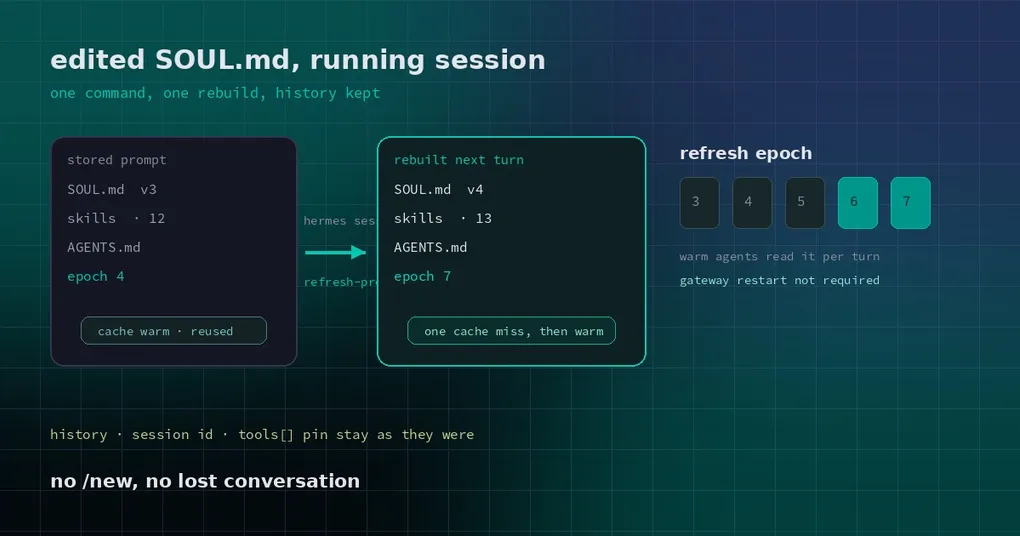
You spend half an hour rewriting SOUL.md. You add two new rules to a skill. You restart the gateway, switch back to the session that has been running since yesterday, and ask it to redo the task it just did. It answers in the old voice, follows the old steps, and avoids the old things you just told it to stop avoiding. You open the config file three times to be sure the edit really landed. Eventually you do the only thing left: /new — and watch forty turns of context disappear.
The config was fine. Hermes was deliberately ignoring it, to save you money. There is now a command that refreshes the instructions without touching the conversation.
Why a running session cannot see your edit
Model providers have a cost-saving trick: when the beginning of every request is byte-for-byte identical, the provider can reuse its cached computation instead of recomputing it. That prefix is the system prompt — the block holding your SOUL.md persona, the skill index, the project rules from AGENTS.md, memory and USER.md.
To keep that prefix stable, Hermes builds a session’s system prompt once, then stores it and replays exactly those bytes on every later turn. After a gateway restart it restores the stored copy from the session row; an agent kept warm in memory never re-reads the files at all.
So only a brand-new session reads the files. Old conversations keep replaying the prompt they were born with — which is exactly what you were looking at.
The command: hermes sessions refresh-prompts
# every session in this profile
hermes sessions refresh-prompts

# one session only (id or unique prefix)
hermes sessions refresh-prompts --session a1b2c3

# another profile
hermes sessions refresh-prompts -p work

# machine-readable, handy inside an update script
hermes sessions refresh-prompts --json
What it does is deliberately small: it records a refresh request in the profile’s state.db and prints how many sessions hold a stored prompt. The actual work happens at the start of each session’s next turn.
The output looks like this:
Requested a system prompt refresh for every session in this profile (12 session(s) with a stored prompt).
Each rebuilds its prompt from the current SOUL.md, skills and context files on its next turn (one prompt-cache miss per session); conversation history is kept.
With --session there is one edge case handled for you: a compacted conversation continues on its tip, so the request is keyed to that continuation rather than to the long-finished root it was compressed from.
What actually gets rebuilt
- Rebuilt: the whole system prompt goes through the normal builder, so the new SOUL.md, added or removed skills, AGENTS.md and context files all take effect on that turn. The memory and USER.md blocks are re-read from disk as well.
- Untouched: conversation history, the session id, and the session’s pinned tool list. The
on_session_starthook does not fire, so none of its side effects run again. - Cost: one prefix-cache miss per refreshed session, on the turn that rebuilds. Later turns are cached again.
- Persistence: the new prompt and its version stamp are written back to
state.db, and every later turn replays them verbatim. This is a one-time rebuild, not a per-turn expense.
No gateway restart is required, and a restart does not cancel it: the request lives in the database, so an agent that comes back from a restart still reads it. An update script can call the command either before or after replacing the gateway.
How it knows a refresh is due
Hermes keeps an incrementing epoch in the profile’s state_meta — think of it as a revision number for your instructions. Each session records, in its model_config, which revision its stored prompt already satisfies. At the start of a turn the agent does one point read: if the stored epoch is older, it rebuilds once; otherwise it does nothing.
With no request recorded, the only added work is that single read. Nothing watches files in the background, and nothing swaps the instructions midway through a turn.
When to use it — and when not to
| What you just changed | Run refresh-prompts? |
|---|---|
| SOUL.md, skills, AGENTS.md, USER.md | Yes — this is the case it was built for |
| The model or sampling settings only | Not needed |
| Tool definitions or tool permissions | New sessions pick them up; an existing session’s tool pin stays as it was |
| You want a clean slate on a new topic | Use /new; this command does not clear history |
| The session row itself is damaged | Use hermes sessions repair-prompts, a different command |
Two caveats. First, refreshing does not replay history or repair a broken conversation — it only replaces the instruction prefix. Second, when you run many long sessions and pay per token, prefer --session: every refreshed session pays its own cache miss, and across dozens of conversations that adds up.
If your question is instead “why do instructions go stale after compaction”, that is a separate mechanism — Hermes rebuilds the system prompt while compacting. The details are in how compaction rebuilds the prompt. If you have just moved skills into the repository, read project-local skills and the trust gate first — refreshing is only how a live session catches up with them. And the mechanics of sharing one prefix cache across sessions are covered in cross-profile prompt cache sharing. The full flag reference lives in the hermes sessions command page.
Release status
The command merged into main on 29 October 2026 (PR #143581). The current release, v0.22.5 (23 October 2026), does not include it yet — if hermes sessions --help does not list refresh-prompts, you are on an older build. Install from main to use it now, or wait for the next release.
Edit the files, run one command, and the next turn is on the new instructions — without trading a conversation for it.