"Session unavailable" Was Never a Broken Chat: Hermes Now Names the Setting
Wednesday morning. You open the desktop app to pick up yesterday’s conversation, click it twice, and get the same four words back: “Session unavailable.” Your first instinct is a full disk or a corrupt database. You check both, and both are fine. You have no idea what to fix, because the error gave you exactly one word.
The truth behind this class of incident is usually dull: one setting in the saved session failed validation, and validation folded every possible failure into the same sentence.
A session isn’t just messages — it carries a receipt
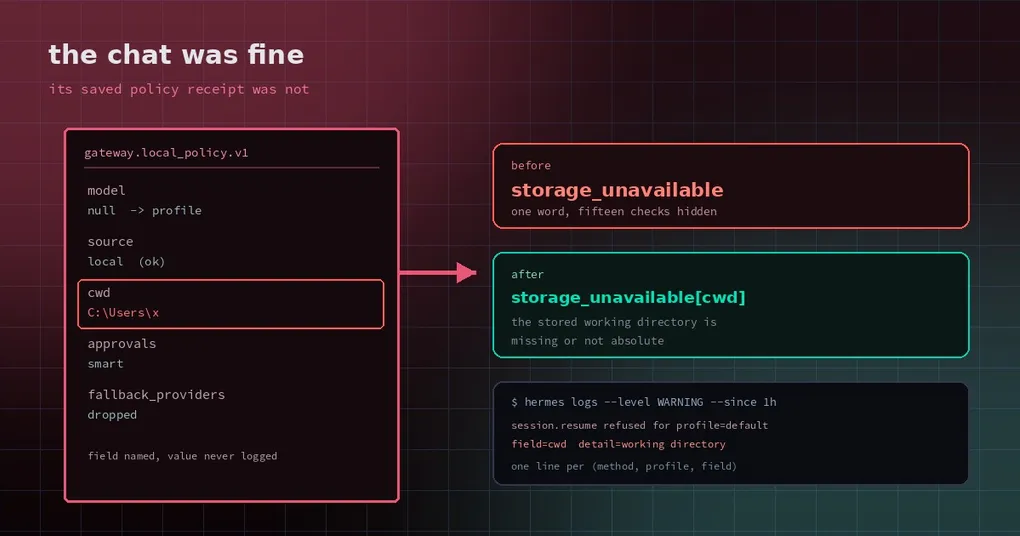
When Hermes stores a conversation, it stores a little more than the transcript: which model to use, which working directory, which platform it came from, how approvals should behave. The gateway — desktop, TUI, and the one the CLI starts for itself — calls that small bundle a policy receipt and keeps it in the state store under a key like gateway.local_policy.v1:<session id>.
When you --resume that session, the gateway doesn’t just read messages. It rebuilds the policy from the receipt and runs roughly fifteen checks: is the model valid, is the directory absolute, are the field types right. Any single failure and the session won’t open.
The problem was that all fifteen checks raised the same ValueError('invalid policy'). The log had one sentence, you had no idea whether it was the model, the directory, or something else, and every retry hit the same wall.
Locked out by data Hermes wrote itself
Worse: four of those checks rejected shapes Hermes itself persists.
model: null— what one write path stores when nothing resolves, meaning “use the profile’s model.” Restore treated it as invalid.model: ""— another path’s raw result, same meaning, same outcome.- A
cwdthat is a Windows path while you resume on Linux (or the reverse).C:\Users\xgenuinely doesn’t exist here, but a cross-platform resume shouldn’t be fatal. - A key an older build left in the receipt, such as
fallback_providers. The new build didn’t recognize it, so the whole receipt was judged invalid.
In other words: the data wasn’t corrupt. The reader no longer understood its own dialect.
What restores now, and what still refuses
These shapes open normally today:
- A model of
nullor an empty string → falls back to the profile’s model. source: localon the cli/tui/desktop/acp platforms → restores (ACP keeps its own edit policy).- A
cwdthat is absolute under either operating system → the session restores. A Windows-created chat opened on Linux comes up, and the turn gets a named card: “This chat’s working folder no longer exists (C:\Users\x)” — so you can point it somewhere real. - Keys this build doesn’t define → dropped, with a warning once per key set. The values are never written to the log.
These are still refused, now with the field named:
- A whitespace or non-string model.
localon any other platform.- A relative
cwd, or a drive-relative one. - A wrong-typed field, a missing field, or malformed JSON.
The refusal reaches the terminal with the field attached:
storage_unavailable (cwd: the stored working directory is missing or not absolute)and the gateway log carries the full form:
WARNING gateway.session_controls: session.resume refused for profile=default:
storage_unavailable field=cwd detail=the stored working directory is missing or not absolute
The wire code is still storage_unavailable, so clients don’t change. What changed is that it finally says why.
How to investigate: three commands
For the other ways to reopen a chat, see resuming sessions from the terminal; every flag of hermes logs is in the command reference.
Don’t guess. Read the log; the field name is the answer:
# Warnings from the last hour, including refused sessions
hermes logs --level WARNING --since 1h

# Or just the gateway
hermes logs gateway -n 100

# Easiest: filter by the session id
hermes logs --session <session id>
field=cwd means the working directory. field=model means the model block. malformed JSON is the one case that really is a broken record.
Then confirm the conversation still exists:
hermes sessions listIf it’s listed and simply won’t open, you’re looking at a receipt problem, not lost messages.
When it genuinely can’t be repaired
Two cases stay unrecoverable: a relative cwd in the receipt, and corrupted JSON. Neither is a “flip a flag” situation — forcing them through would mean rewriting history.
The pragmatic move is to start a fresh session and pull the conclusions you need back out with session_search. The transcript was never deleted; what failed was rebuilding the runtime around it.
Why this deserves its own post
Because the failure mode is nasty: a self-healing problem reported as a data-loss problem. “Unavailable” sends people to backups, reinstalls and database forensics, when the real cause might be “this chat was created on Windows.”
The fix isn’t a feature either. It’s unfolding an error that had been folded flat: each check now names its field and reason, each refusal is logged once (repeats drop to debug per method/profile/field/detail), and the reader accepts every legal shape its own history produced.
For anyone who keeps long sessions open in the desktop app or TUI, this may be the least visible, most useful repair of the week. Next time it refuses you, at least it will tell you where to look.