Moving the secret caches to the profile root: the sandbox hole a folder rename could open
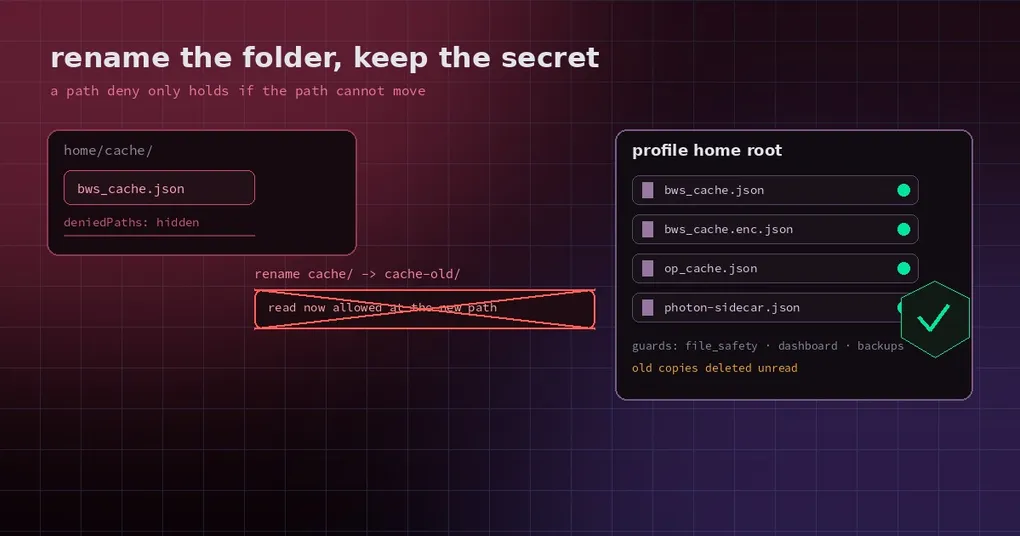
You set Hermes up with Bitwarden so it can fetch the database password itself instead of you pasting it every time. Being careful, you wrapped it in a sandbox and marked cache/bws_cache.json as a denied path — that file is the plaintext, decrypted key cache, after all.
Then it turns out the denial falls over with one push: rename the cache/ folder to cache2/, and the blocked file travels with it. Read it at the new path and the guard no longer recognises it.
That is not one person’s oversight. It is a textbook boundary mismatch: the sandbox denies by path, while the path’s parent folder sits inside the agent’s write scope. On 2026-10-31 Hermes moved the four credential cache files to the top of the profile home, removing the bypass rather than patching around it.
The problem was not “hidden too shallowly” — it was “hidden in a folder that can be renamed”
This is worth understanding properly, because the lesson outlives the bug.
On Windows, the MXC sandbox (the one the OpenShell plugin uses) blocks files through deniedPaths. That mechanism assumes the denied file sits directly in the granted home. If it lives inside a subdirectory, and the agent can create, write and rename that subdirectory, the denial is decorative:
- The sandbox says
home/cache/bws_cache.jsonmust not be read. - The agent has write access to
home/cache/, so it renames the directory tohome/cache-old/. - The file moves with its directory: it is now
home/cache-old/bws_cache.json. - That path is not on the deny list. Read it. Done.
The pull request states it plainly: the bypass holds on MXC 1.0.0 and 1.0.1, as measured. So the earlier promise — “this path is denied” — does not survive the condition “the denied file lives in a writable subdirectory”, and all four credential caches met that condition.
The conclusion is blunt: you cannot fix this with a longer deny list. The files have to stop living in a writable subdirectory.
Where the four files went
| What it holds | Old path (inside a writable subdirectory) | New path (top of the profile home) |
|---|---|---|
| Bitwarden plaintext cache | cache/bws_cache.json |
bws_cache.json |
| Bitwarden encrypted cache | cache/bws_cache.enc.json |
bws_cache.enc.json |
| 1Password cache | cache/op_cache.json |
op_cache.json |
| Photon sidecar record (port, token, pid) | runtime/photon-sidecar.json |
photon-sidecar.json |
The filenames are unchanged; only the directory level changed. You cannot move these by renaming a folder, because they are not files inside a folder — they are direct children of the home itself, and a sandbox that denies them denies that exact path.
One long-standing gap got fixed in the same pass: the 1Password cache was not covered by any guard before this. So the change is not only a move; the four names now live in a single shared list (SECRET_CACHE_FILES in hermes_cli/home_data_layout.py), and every place that needs to know “these files are credentials” reads that one list.
The old copies: deleted unread
The natural question after upgrading is what happens to cache/bws_cache.json.
It is deleted on first use, without being read. The reason is simple: that path is inside a directory the agent can write, so its contents can no longer be trusted. Reading it would be inviting possibly-tampered data back in. The deletion is idempotent, and the next Bitwarden or 1Password use simply fetches again.
The cost is tiny because all four caches are regenerable:
- Bitwarden and 1Password caches: at most one extra fetch after the upgrade.
- The Photon sidecar record: rebuilt the next time the gateway restarts.
There is one honest edge case. A profile that never touches its Bitwarden or 1Password source again keeps the old file in cache/, unread. It is still covered by every guard, because the guard list keeps the legacy paths too. A sandbox plugin can delete those legacy paths before it starts a sandbox — the OpenShell plugin does exactly that.
The guards that moved with them
The move is the easy part. The hard part is every place that assumed the old location. This change updated:
- The credential path list (
PROFILE_CREDENTIAL_PATHS): profile-scoped security checks know the four new names. - The file safety layer (
agent/file_safety): read and write denials, not just read. - The gateway’s media-delivery deny list: so a credential file cannot be handed out through an attachment or media path.
- The dashboard’s Files API: the four names are hidden names, never listed in the file browser.
- Backups: backups skip the four top-level names. This one matters — a credential cache should not ride a backup onto another machine.
- The flat install’s
.gitignore: the four top-level names are ignored, so they cannot be committed by accident.
The design choice here is worth copying: not “add a special case” but “make one list the single source of truth”. Add another credential store later and every guard picks it up automatically, which is considerably more reliable than writing it out in six places.
What you will see after upgrading
~/.hermes/bws_cache.json,~/.hermes/op_cache.jsonand friends appear at the top of the home (or under~/.hermes/profiles/<name>/when you run several profiles).- On the first Bitwarden or 1Password use, the old copies under
cache/disappear and the new cache appears at the new path. - Backups no longer contain these files.
- The dashboard file list does not show them.
- Inside a sandbox, renaming a subdirectory no longer moves them.
If you have a script that reads cache/bws_cache.json directly, it needs the new path. That is a breaking change — but what it breaks is precisely the insecure location.
Can you use it today
The change landed on main on 2026-10-31 (PR #146715, labelled type/security) and shipped in v0.22.6 (2026-11-02) — upgrade via an installer or hermes update and the caches move to the profile root.
Until it ships, if you are running untrusted code through the MXC sandbox — especially on Windows with the OpenShell plugin — do not treat “I added the cache path to deniedPaths” as a security guarantee. The rename trick above defeats it. The robust answer is not to keep high-value credentials and untrusted sandbox code in the same profile.
For the wider context on how Hermes handles credentials, two companion pieces are useful: how keys are encrypted and where the keychain trade-off sits, and how secrets get redacted on the way into logs and messages. Those cover how keys are stored and how they leak; this one covers where the file holding them lives.