Why Your /save Export Was Missing Turns — and the Cap Behind It
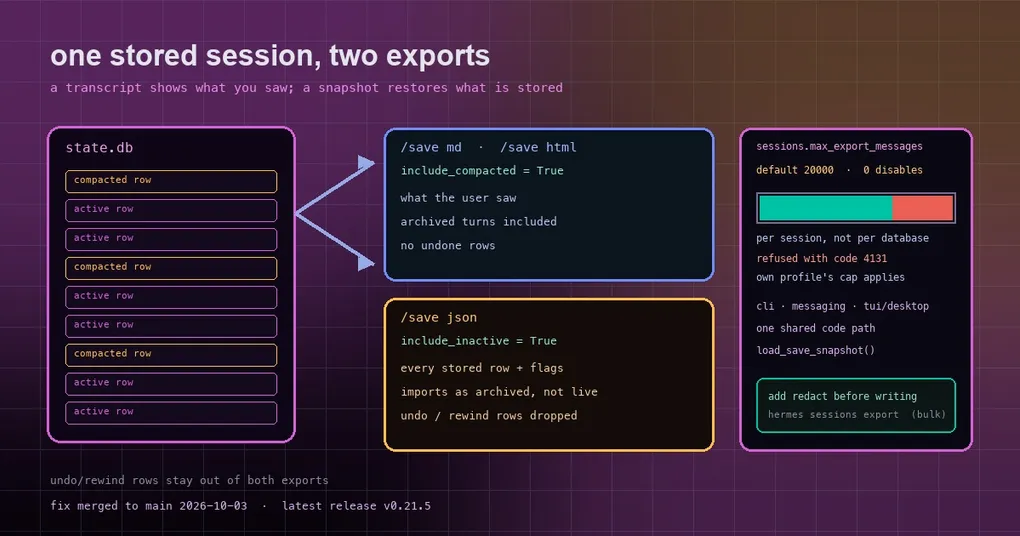
You have a long-running session, compaction has archived several rounds of it, and you want to export it for safekeeping. /save json from the CLI works fine. You do the same thing in the desktop app, import the result later, and notice that chunks are missing — the turns that compaction archived are simply gone. You start wondering whether you misremembered, or whether some /undo deleted them.
Two problems are stacked here: the same /save ran through three different code paths (CLI, messaging platforms, and the desktop/TUI session.save RPC), and the two rules that matter — what to export, and how large is too large — ended up disagreeing between them. The fix converges all of it onto one path.
Three /save surfaces, previously three answers
/save supports json (a full snapshot), md (a readable transcript) and html (a standalone shareable page). The desktop and TUI call the session.save RPC, while the CLI and messaging platforms used a different implementation. The difference showed up in the export projection:
- A transcript (
md/html) is “what the user saw,” so it must include turns that in-place compaction archived; - A JSON snapshot is “what an import restores,” so it carries every stored row with its
active/compactedflags. Exporting only live rows drops every archived stretch of conversation; exporting the flags lets the import restore them as archived rather than replaying them as live context.
The RPC path did not consistently follow that rule, so one session exported differently depending on which surface you used.
The rule now: one path shared by all three
The fix extracts the already-correct CLI logic into a shared load_save_snapshot(db, session_id, fmt) in hermes_cli/session_export.py, and all three surfaces call it. It does three things:
- Picks the projection by format:
include_compacted=Truefor transcripts,include_inactive=Truefor JSON; - For a JSON snapshot, drops undone rows: only rows that are
activeorcompactedsurvive, while rows removed by/undo, rewind or edit stay out — deliberately, since an import should not resurrect what the user undid; - Enforces the export cap (below).
Two smaller things came along for the ride. The JSON snapshot now uses the canonical export shape, matching the CLI, instead of the desktop app’s legacy keys — and when a session has no stored row (or the read fails), the in-memory fallback writes that same shape (id, model, started_at, system_prompt, messages). It also reads the row the live agent is currently writing, so a compression rotation does not export a stale parent.
The export cap: sessions.max_export_messages
Materializing a 100k-row session in memory at once can exhaust the process, so there is a guard:
sessions:
  max_export_messages: 20000   # the default; 0 disables the guard
It is checked per session, so a whole-database backup of many small sessions is unaffected — only one oversized session gets refused. After this fix, the desktop/TUI /save json honours it too, and:
- the refusal arrives as RPC error code 4131 (not the generic 5011) with the same message the CLI prints;
- on turn-isolated (compute-host) sessions, the host forwards the handler’s error code in
control.errorand the parent passes it through, so remotely executed sessions report the real reason; - the message tells you to set
sessions.max_export_messages: 0inconfig.yamlto disable the guard.
The last detail is easy to overlook and matters: the limit is read from the config of the profile that owns the session. The desktop app now reads that profile’s own state.db under that profile’s config, so a secondary profile’s export cap is its own, not your main profile’s.
Choosing by scenario
Once the rules are clear, format selection is simple:
| Your goal | Use | Why |
|---|---|---|
| Archive / move to another machine | /save json |
Full snapshot with archived flags; re-importable as-is |
| Send to a colleague | /save html or /save md |
Readable transcript, compaction-archived turns included |
| Session too large, export refused | hermes sessions export for one session, or raise/disable max_export_messages |
The cap is judged per session |
| Post somewhere public | Any format plus redact |
Scrubs API keys, tokens and credentials before writing |
The takeaway worth keeping: “export” serves two different purposes and the rules deliberately differ. A transcript is for humans, so it stays as close as possible to what you saw — archived turns included. JSON is for machines, so it preserves flags and removes undone rows. If you had assumed the JSON shortfall meant data loss, this rule explains it away.
When you can get it
The fix merged to the main branch on October 3, 2026. The latest release is v0.21.5 (tag v2026.9.24), so it currently lives on main only — though sessions.max_export_messages itself already exists in released versions and works today. Installations tracking main become consistent on the next hermes update.
For the bigger picture, the session save and export guide compares /save with hermes sessions export, and the session boundaries guide explains how sessions are scoped. If the compression mechanism itself is your interest, mid-turn compaction integrity and the single-call compaction write-up go deeper. Command-level details live in the sessions command reference.
The short version
The value here is not a new feature but the removal of ambiguity: previously you could not tell whether a short desktop JSON export was a bug or a setting. Now three surfaces share one rule, the two projections have explicit rationales, and an oversized session returns a specific code with advice you can act on directly. If you export sessions on a schedule, one check is worth doing today: which surface and format your backup pipeline uses — and whether what it produces actually imports back cleanly.