Your Profile Export Was Shipping Your Cloud Credentials
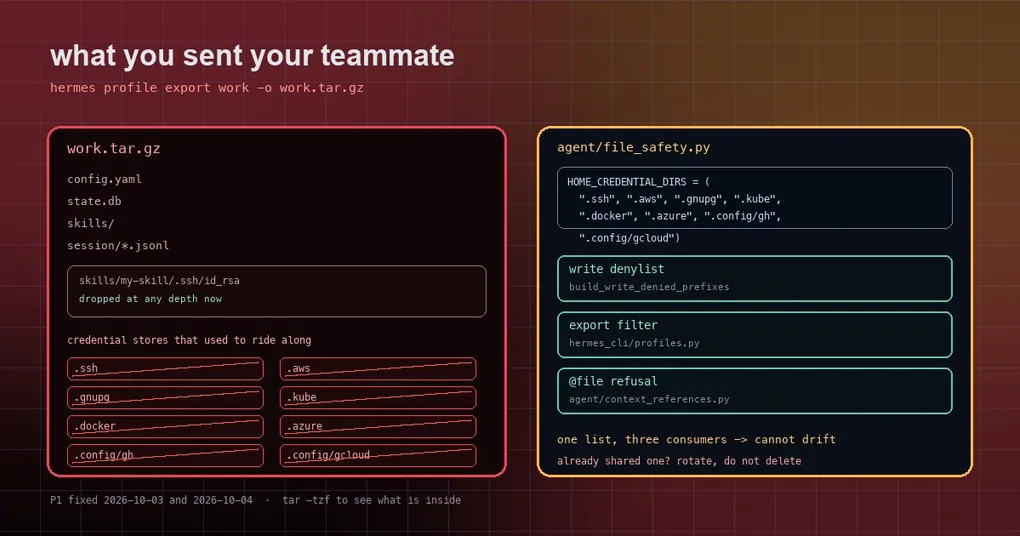
You spend a morning tuning a profile, then hand it to a teammate: hermes profile export work -o work.tar.gz, with a note saying “unpack this and you have my setup”. They unpack it and they do have your setup — plus your private registry credentials. The tar.gz contains skills/, config.yaml, state.db, and a .docker/config.json you never thought about.
That was not a hypothetical hole. hermes profile export excluded some credential files but missed the OS-level credential directories entirely. Two PRs merged on October 3 and October 4 (#132201 and #132654) closed it. Here is what leaked, why, and what you should check today.
Stage one: .ssh, .aws, .gnupg, .kube
An earlier fix (#130525) already kept Hermes’ own secrets — auth.json, .env, OAuth tokens — out of exports. But PROFILE_CREDENTIAL_PATHS only covered the subprocess home/ subtree; the operating-system stores were simply not on the list.
#132201 added the first batch: .ssh, .aws, .gnupg, .kube, and direnv’s .envrc. It also fixed two neighbouring problems:
- Nesting. A skill directory copied from a real home can carry
skills/some-skill/.ssh/id_rsa. The old export filter matched top-level names only, so a nested.sshshipped anyway. After the fix those stores are dropped at any depth. - Distribution installs. When you install a profile distribution, those paths are marked user-owned (
profile_path_is_private), so a package can no longer plant or overwrite them on your machine.
Stage two: .docker, .azure, .config/gh, .config/gcloud
A day later, #132654 noticed four sibling directories were still uncovered — and these were exactly the directories agent/file_safety.py already write-denies. Hermes refused to write them, then happily exported them:
| Directory | What usually lives there |
|---|---|
.docker/config.json |
Registry auth for private images |
.azure/accessTokens.json |
Azure CLI access tokens |
.config/gh/hosts.yml |
Your GitHub CLI token |
.config/gcloud/ |
Google Cloud ADC and credentials.db |
The @file context reference made it worse: writing @file:~/.config/gcloud/application_default_credentials.json in a message expanded the token into context. And the gateway feeds untrusted remote text through @file expansion, so it was the same leak class.
Why it happened: three hand-copied lists
The root cause was not one forgotten directory. The same list had been copied by hand in three places, and the copies had drifted:
- the write denylist in
agent/file_safety.py; - the export filter in
hermes_cli/profiles.py; - the
@filerefusal list inagent/context_references.py.
The fix gives the list a single source. agent/file_safety.py now holds:
HOME_CREDENTIAL_DIRS = (".ssh", ".aws", ".gnupg", ".kube",
                        ".docker", ".azure", ".config/gh", ".config/gcloud")
build_write_denied_prefixes derives from it, and hermes_cli/profiles.py unpacks the same tuple into _OS_CREDENTIAL_STORES, so the export lists (PROFILE_CREDENTIAL_PATHS, _EXPORT_CREDENTIAL_FILES) can no longer drift away from the write denylist. agent/context_references.py imports it too, which is how @file gained .config/gcloud.
The export filter also changed how it matches — on trailing path components rather than top-level names:
def _export_credential_entries(directory: str, contents: list) -> set:
    """Entries of *directory* that are an _EXPORT_CREDENTIAL_FILES store: matched on trailing path
    components, so ``.config/gh`` drops at any depth while the rest of ``.config`` ships."""
So .config/gh and .config/gcloud are dropped wherever they sit, while unrelated content such as .config/other, .config/ghost or .config/gh.bak still exports normally.
Already exported one? Assume it is exposed
This fix only protects exports made after it. If you have shared a profile archive — with a teammate, a file host, or a git repo — the right response is rotation, not deleting the file:
- Look at what is actually inside the archive first (a tar.gz lists without unpacking):
tar -tzf work.tar.gz | grep -E '(^|/)\.(ssh|aws|gnupg|kube|docker|azure|envrc)/|\.config/(gh|gcloud)/'- Anything that matches is burned: replace SSH keys, rotate AWS / Azure / gcloud credentials, revoke and reissue the GitHub token, change the private registry password.
- Export again, confirm it is clean (the same grep returns nothing), then share that.
The short version
hermes profile exportproduces a tar.gz and now excludes Hermes’ own credential files plus eight home-level credential directories;- the gap existed because three hand-copied lists drifted apart; the fix makes one list authoritative and matches on trailing path components;
@fileexpansion and distribution installs share that list, so all three tightened together;- the fix is forward-looking — rotate anything you already shipped.
For the wider isolation picture, see the three outbound lanes for secret redaction and renaming a profile without losing its identity; the full subcommand surface is in the hermes profile reference.