Hermes ships its own package manager: what pm doctor, repair and gc actually fix
One morning hermes will not start: a single ModuleNotFoundError, and all you did yesterday was install a plugin. Or the opposite — the same config works on your laptop and claims a tool does not exist on the desktop. You open pip list to find out why and discover three Python environments, none of which know about each other.
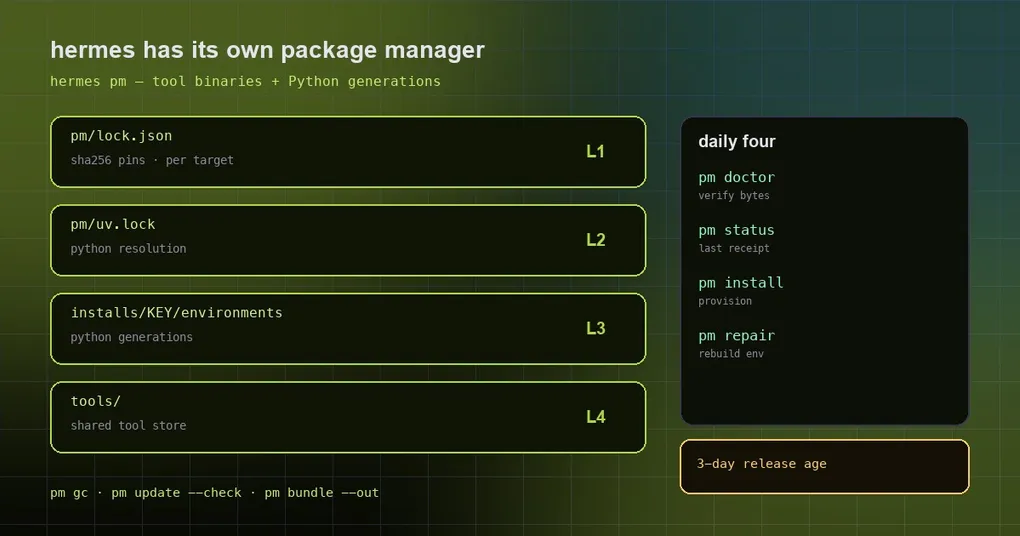
That is why Hermes carries its own package manager. hermes pm does not manage the Hermes application (that is hermes update); it manages the layer underneath: tool binaries and Python dependency environments. Once that line is clear, every subcommand has an obvious place.
What it owns
The docs put it in three jobs: install pinned tool binaries and put them on PATH, prepare managed Python environments for Hermes, and explain the difference between what is declared and what is actually installed.
The files involved each play one role, and confusing them is the most common misreading:
| File | Role |
|---|---|
pm/lock.json |
Exact managed-tool versions, per-target URLs, SHA-256 hashes |
pm/pyproject.toml + pm/uv.lock |
The dependency manager’s own Python requirements and lock |
pyproject.toml + uv.lock |
The main project’s requirements, extras, platform markers |
Tool-store facts.json |
Installed tool entries, identities, environment exports, realized-file digests |
Per-install facts.json |
The selected Python environment, its input stamp, enabled extras |
A lockfile entry does not prove a package is installed. That single sentence explains hermes pm doctor: it compares installed state against the lock and checks the realized bytes.
The four everyday commands
hermes pm status     # the latest sync/update receipt as JSON, or a plain "no receipt"
hermes pm doctor     # do tool identities, files and digests match the lock?
hermes pm install    # required tools + Python, then sync the all extra
hermes pm repair     # rebuild and validate the Python dependency environment
status is the cheapest place to start. It prints the most recent receipt — here is real output from this machine, truncated:
{
  "exit_code": 0,
  "feature_list": null,
  "finished_at": "2026-10-21T16:57:52.054592+00:00",
  "kind": "plugin-check",
  "outcome": "ok",
  "plugin_checks": [],
  "refusal": null,
  "schema": 1,
  "steps": [],
  "update_id": null,
  "venv_rebuild": null,
  "warnings": []
}outcome, refusal, warnings and steps are usually enough to tell success from a partial run or a refusal.
install deserves its own paragraph. A bare pm install installs the required tools plus Python, puts the tools on PATH, syncs the all extra, and also installs the default optional tools — agent-browser with Chromium, and cua-driver. A failed download of those optional tools prints a warning and does not fail the install, because most people only want the CLI, not a browser or desktop control.
If you skipped them at install time with --skip-browser or --skip-computer-use, that choice is recorded: later bare installs and hermes update keep leaving them out. To reverse it, name the package once — hermes pm install agent-browser.
Repairing a broken dependency chain
repair and gc solve different problems; mixing them up wastes time.
pm repair replays the recorded dependency set of the selected generation in a new generation, validates it, and then selects it. Crucially, it does not parse plugin configuration, so the plugin config that broke your dependencies is not read again. It also does not change pins, extras or plugin config. If the record is unreadable or the saved lock is missing, it fails rather than handing you a reduced environment.
On startup, Hermes requests the same repair when it finds incomplete dependencies, but automatic attempts are bounded; running pm repair explicitly is not.
pm gc removes what nothing references: orphaned tool-store entries, eligible download partials, unused lease-managed Python environments, and the installs/INSTALL_KEY/ state of checkouts that no longer exist. It is deliberately conservative — it keeps checkouts this process cannot see (a host install viewed from a container sharing the data root, for example) and any state whose install lock or environment lease is still held.
One-line mnemonic: broken means repair, bloated means gc.
Pins, the three-day rule and mirrors
Every Python package Hermes itself depends on must be at least three days old when Hermes locks it — uv’s exclude-newer, enforced by the CI lock check. The intent is simple: a package published minutes ago, possibly compromised, cannot reach uv.lock.
The practical consequence: hermes pm lock is the step that applies the check, and against a mirror that publishes no upload times it stops with has no publish time. When you see that, point that one step at https://pypi.org/simple; everyday installs can still go through the mirror.
Mirrors are configured with index-url in pip.conf, which Hermes passes to uv, or with UV_INDEX_URL.
Downloads retry, bad hashes do not
The retry policy is worth remembering:
- At most four attempts per probe or transfer, with 1, 2 and 4 second backoff; a
Retry-Afterheader can extend a wait up to 30 seconds. - Retried: 408, 429, 500, 502, 503, 504, plus connection resets, timeouts, temporary DNS failures and interrupted response bodies.
- Ranged downloads keep the bytes already received; servers without range support need a fresh stream.
- Not retried: hash mismatches, certificate failures, local filesystem errors — permanent failures.
So if a download fails three times, read the cause in the log before blaming the network.
Maintainer commands, and the new flag
These are development and packaging tools; most users never need them.
| Command | Effect |
|---|---|
pm lock |
Relock uv.lock from pyproject.toml; writes nothing when the lock is current |
pm lock --bump NAME VERSION |
Resolve and hash target artifacts, then write the tool pin into pm/lock.json |
pm update [names...] |
Query upstream versions, change pins, install changed tools |
pm update --check |
Query without writing; exit 1 may mean updates exist — read the output |
pm update --target TARGET |
Resolve versions for a specified target |
pm update --uv / --npm |
Also refresh the Python or npm resolution |
pm update --termux [--check] |
Repin termux pool archives the rolling pool has retired |
pm bundle --out DIR |
Stage a portable payload (source snapshot, tools, dependencies) — not a signed installer |
The new pm update --skip-target TARGET solves one specific annoyance: when upstream lags, you do not want a particular target’s pins refreshed. Say the termux pool is still catching up and you want an update round to leave linux-arm64-bionic alone — pass the flag (repeatable) and those pins stay, while later runs still report the package as current.
Troubleshooting by symptom
- A tool is missing or the wrong version → read
pm doctor, then explicitlypm installthat package on a writable installation. - Dependency conflict → read
pm status, fix the plugin’s declared requirements, retry. - Damaged Python dependencies →
pm repair, then restart Hermes. - A new environment did not take effect → restart the affected Hermes process. Do not add a second site-packages tree to a live import path.
- Disk eaten by old environments →
pm gc; if the disk is already full, our low-disk auto-prune guide covers the runtime side. - Unknown package or extra →
pm installtakes package names, not Python extra names and not pipname==versionspecs.
The design bias
hermes pm is built to fail loudly instead of quietly handing you a degraded environment. A malformed cost table keeps a server from loading, an unreadable record makes repair fail, a retired termux pool makes an update error out — all so the problem surfaces now rather than as a stranger failure next week.
If all you want is to upgrade Hermes itself, you never need pm; the graceful upgrade guide covers that other path.